We’ve considered a lot of things. Some things still to be improved:
Naming,
Better utilization of the ClosedXML library – because our techniques are quite primitive right now.
Testing (this really should be done first, but no matter).
Further refining the code according to SOLID design principles.
Here is the code thus far:
Ok, that’s certainly a bit better. Still the namining of the classes is quite poor; and we have the dependency inversion issues that we need to fix. Also is there any need to pass in the beams object direction when at the end of the day, we are converting it to a data structure which the printer can understand? Perhaps we should just pass in the printed data structure? We will address these concerns in Part 3 of our refactoring.
Strive to improve the code. Just like this guy is trying to improve his swing. Looks like a fine golfer by the way. probably low single figure handicap, if not scratch.
We will attempt to do something which is seldom done or discussed in Tekla code samples: and that is the very important issue of refactoring code.
1. Start with Tests.
The first thing you need is a good suite of tests. That way you will know whether something has gone wrong or not. It might be tricky doing this since we are developing within the Tekla environment, but I do suppose it’s possible.
Some nice looking steel. The picture has nothing to do with the Tekla API but it’s cool nonetheless.
What is the task at hand?
The user selects some beams.
We then want to collate the following information into various Excel spreadsheets:
Name
Profile
Length and finally Weight
We want two views: the first aggregates the beams by their name and finish, and the second merely lists all the beams selected with the information listed above (length/weight etc).
WARNING: The code is very dirty. There’s a lot of repetition here. And I’ve gone up some cul de sacs incorrectly. But that’s ok. It’s code which works. We can worry about refactoring for another day – in fact, that will make for a very good exercise. Here is a link to where I document the refactoring process.
Clear lines of communication is one of the keys to the success of any organisation.
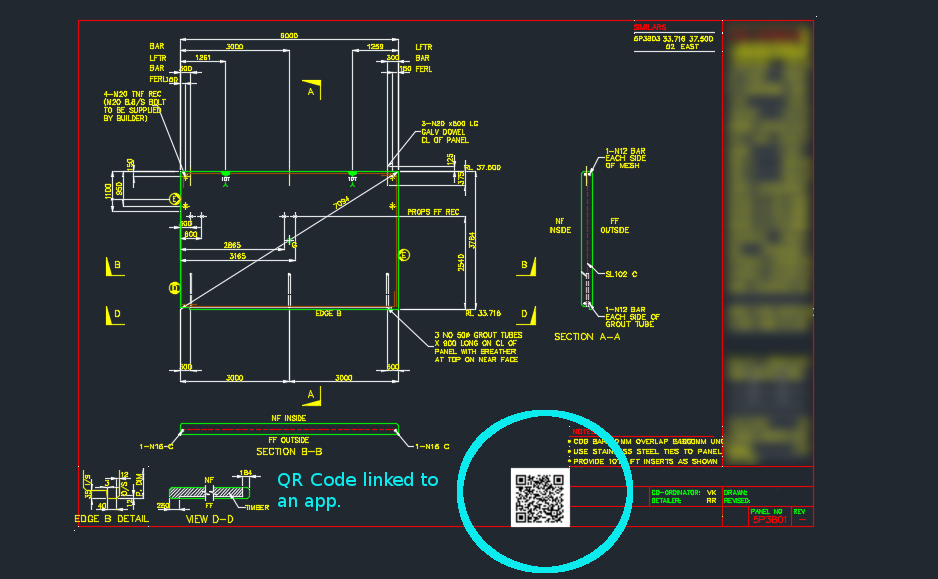
Now you can easily track and record information pertaining to panels with a QR code on each panel drawing.
Here’s how it works:
You scan the QR code, if you’re on the construction site and want to find out specific information about the panel, or if you want to record information about the panel.
Everything is backed by an app on the web.
In this case, we can record things like:
panel status
drafting issues/errors – pertaining to a panel (so the entire drafting process can be improved).
Once the status is recorded, or issues are raised, this is tracked and recorded by the app.
The basic point is that it is very difficult to track and record information pertaining to a panel throughout the entire organisation. Not anymore!
Now you can record and communicate panel specific information to everyone in the organisation.
In the last part we left off having obtained all the bolt distance and placing them in a domain object. In this instalment we will try to export all that data into an Excel Spreadsheet. Please note that the following code is untested – unfortunately there was a lightening storm in Melbourne which short circuited my flux capacitor which means I cannot connect to the TeklaServer – so rather than wait, I thought to get this code out to you.
Which library to write to Excel?
There are many libraries out there: XLS compatible and not:
OpenXML libraries
ClosedXML libraries
NPOI
EPPlus
The consensus is that the worst of the above is still better than using Microsoft’s office interop dll. If you use that approach, you will need to ensure that MS Office is installed in your deployment machine, and secondly, be sure to dispose of all relevant objects. If you forget, then you’ll be leaking memory. This is a very important point.
How to use ClosedXML in your code:
Firstly download closedXML using NuGet Package Manager. That should add the relevant references.
Secondly add the `using ClosedXML.Excel` directives.
Then add the code snippets I’ve provided for you below:
Notes on the code:
* A significant change has been made – we are now filtering the SinglePartDrawings based on: (i) whether they are beams or not and (ii) whether they have the relevant profile – a reader wrote an email asking for this version of the code. I have left the previous version out there as well.
* I’m not an expert with ClosedXML – I just wanted to get the code out there. So it’s a very hackish and non-elegant solution, but I hope it serves to illustrate the point.
Have you ever fallen down a flight of stairs? I hope not! But from experience I can tell you that it’s not a very pleasant one. I slipped as I was walking down – I fell supine, hard, like a hammer on a nail, bang into the corner of the steps. The pain was absolutely numbing – I could walk for about three days, nor could I even roll over in bed for about that same period. Falling down stairs is a dangerous business – and if you’re in the business of designing or fabricating stairs – especially public access stairs, then you absolutely have to get it right. Because if you don’t, then it’s only a matter of time till someone falls. Luckily I was a young man, so I recovered pretty quickly. But if I was an invalid, a fall like that could be potentially life threatening!
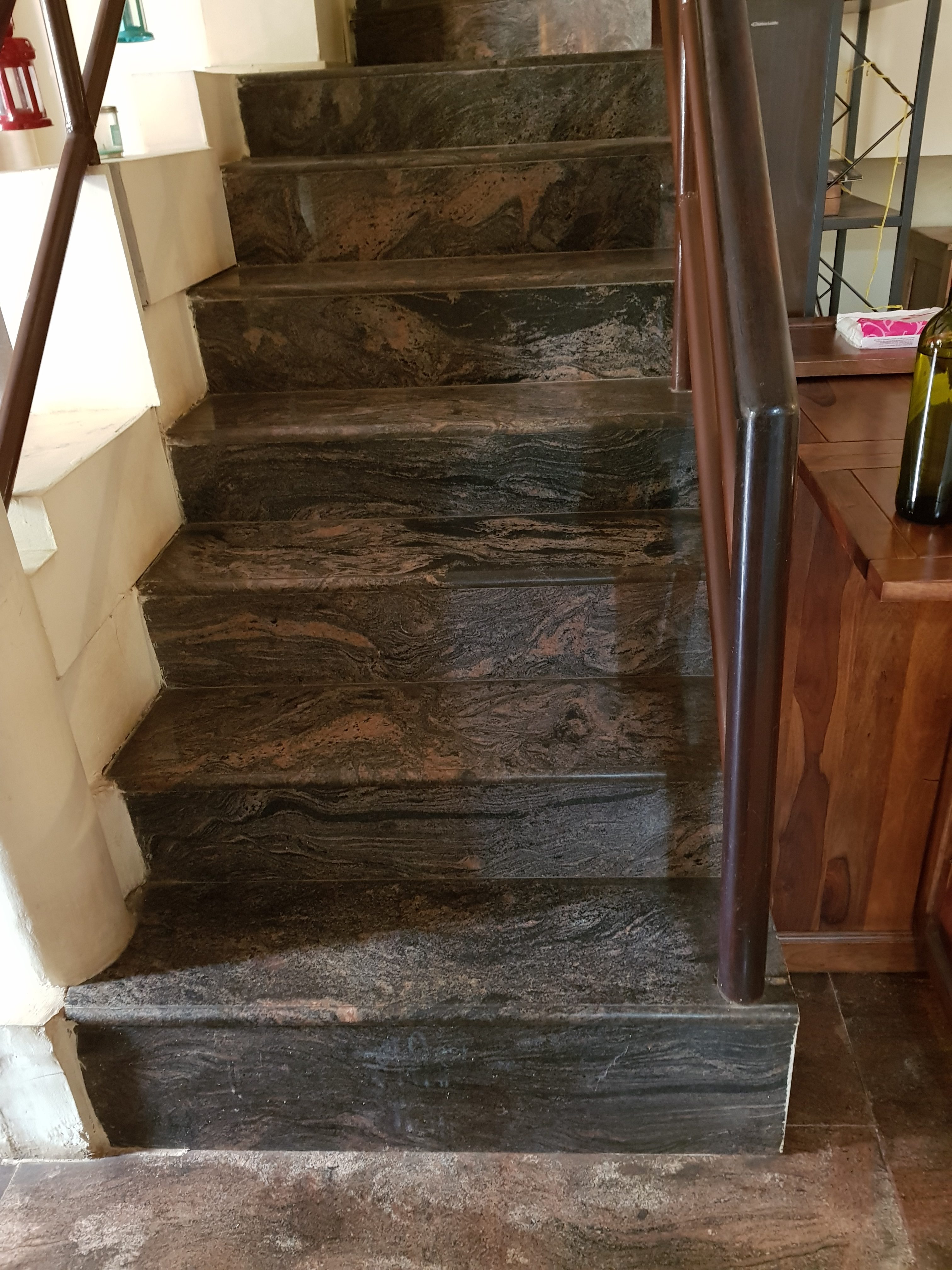
Here is an example of a badly designed stair:
An example of a staircase which was not made according to AS specifications or perhaps any sort of specifications apart from the builder’s convenience I suppose. This type of shoddy workmanship will be the cause of many injuries and accidents. Designing structures according to the specifications mandated is absolutely essential.
The steps are not uniform – they vary in height and length. This is not safe if you are traversing it. It’s easy to misjudge. That’s why when we do the shop drawings for a flight of stairs we check that it’s uniform, that you don’t have too many stairs in a flight, that there’s adequate room, that a child cannot squeeze his/her head in between the treads, etc. I have ascended and descended these steps – and were it not for the handrails, it would be very dangerous. Don’t do steps like this. Here were the measurement from the bottom riser going up:
29 cm
20 cm
20 cm
18 cm
17.5 cm
15.5 cm
The risers vary too much!
Our staff are trained to ensure that their stairs comply with Australian Standards. We’re definitely not the cheapest, but we’ll know if we see a bad design – and knowing that information could save you a bundle.
A pictorial representation of how Entity Framework, in the world of code, would look if it was a corporeal object.
The problem with using a database, when you have another primary source of information, is that the database needs to be updated. Constantly. If someone forgets to update the database, then you will be relying on information that is old/erroneous and not updated. That’s a huge risk. It’s the type of thing that you want to do only if your staff are disciplined, and the gravity of failure is low, should they forget. But if the reverse is true, then you’re sure to eat humble pie, and cause a lot of needless trouble and expense for yourself and all you deal with.
There was a political war over the implementation: I was for using the original database, and the boss was for creating a new one. Accuracy vs speed. Speed won the victory. And I must oblige by constantly updating a database with panel information.
What are these guys doing, you ask? I suspect that they are jigging a line. They are probably doing it this way because they didn’t read the ObjectARX documentation. Well actually, you don’t need to. Just use the poor man’s jig.
I wanted to implement a jig for drawing a Line – but strictly speaking I didn’t want the line itself – I wanted its two points, yet I wanted all the features that come with jigging: snaps, polar tracking, and a nice line leading from the base point to the cursor, which shows you where you were, and where you are going. I was originally going to jig it all myself – and all of this to obtain two coordinates in a manner that would allow the user to see what was actually going on. Jiggig takes a lot of effort. It was only then that I realised I could get the same result, but with a massive short cut:
Here is a poor man’s Line Jig – at the end of it, you’ll have the two points you are after, but without the effort. If required, you can encapsulate all the logic in it’s own class, so that the client doesn’t have to bother too much with the implementation details.