Author: admin
-
c# .Net Autocad plugin – “Hello world” Walk through
There’s not much out there in the way of introductions. You’d have to wade through some manuals and it can be tedious. A simple walk through of how to get started. You would do well to record it at 1.5-x2 playback speed.
Autocad .net c# Plug in – Hello World Example from Tek1 on Vimeo.
-
Checking the type of an Entity? (AutoCAD .net)
Ok, so you’ve got a bunch of entities in a collection. You only want to deal with circles. You need to iterate through the collection and consider only the circles. But how will you identify the circles from the other objects.
- Casting.
You can cast
Entity en = en as Circle
And then you can test whether entity is null.
If (en == null )
{ // throw new Exception etc. etc. }
Or you can try the equivalent:
If (en is Circle)
{ // Perform operation etc. etc.}
What is the catch with this approach?
- The benefits are that it is really quick and dirty.
- ………most important that you gotta watch out for is that it tests for Circles and subsequent sub classes of circles. You may not want that so watch out!
- GetType
I’ve also seen folks on the forums use the Gettype to check for the type of the entity. It goes something like this:
en.GetType() == typeOf(Circle)
The Catch with this approach
- It’s painful to read.
- Two computations involved, just like the first approach. I can’t see the performance being too much better or worse.
Another approach is to use Dxf codes to check for the name. But this is overcomplicated. I don’t see many people using it on the forums and you need the object ID of the relevant entity and all the overhead associated with it.
In my opinion, keep it simple. Casting, after all things considered, is probably the best option, but you have to watch out – all subclasses will return true. So you need to use the most granular class you can if that is at all important.
-
Get SelectionFilter by block Name
It is very common that you will need to create selection filters for different types of blocks. Why repeat yourself?
There is a very simple utility that I wrote that is amazingly handy for solving this very issue. Best part is that it accepts wildcards, so you can search for block references which, for example, start with Fire by passing in “FIRE*” as the argument:
public static SelectionFilter GetSSFilterBlockReferenceByName(string name)
{
TypedValue[] filterlist = new TypedValue[2];
filterlist[0] = new TypedValue(0, “INSERT”);
filterlist[1] = new TypedValue(2, name);
SelectionFilter filter = new SelectionFilter(filterlist);
return filter;
}So simple!
-
Convert ObjectID[] to ObjectIDCollections!
When dealing with selection sets we can obtain the object ids of the objects contained within. The method though, returns an array.
But what if we want an ObjectIDCollection?
We can simply pass the ObjectID[] array into the ObjectIDCollection constructor.
Simple. The last thing you want to do is iterate through the array and add it to a collection individually. A simple yet handy hint which can save you a lot of effort.
-
Tek1 Now Drawing Bubble Deck!
Tek1 – Now has Bubble Deck Capabilities
Bubble Deck
After sending our staff overseas for an intensive Bubble Deck training camp, and after the development and preparation of tools to handle Bubble Deck detailing, Tek1 is pleased to announce that in addition to stand panel detailing, Tek1 has started to draw Bubble Deck slabs.
This has been the culmination of months of hard work.
What is bubble Deck?
- It is basically a concrete slabbed, reinforced, with voids in it. It is perhaps best illustrated with pictures:
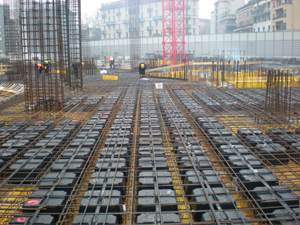
Bubble Deck Slabs 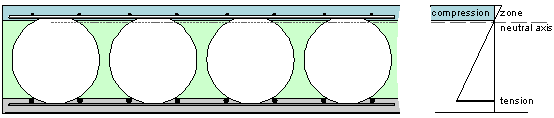
Cross section of bubble deck slab -
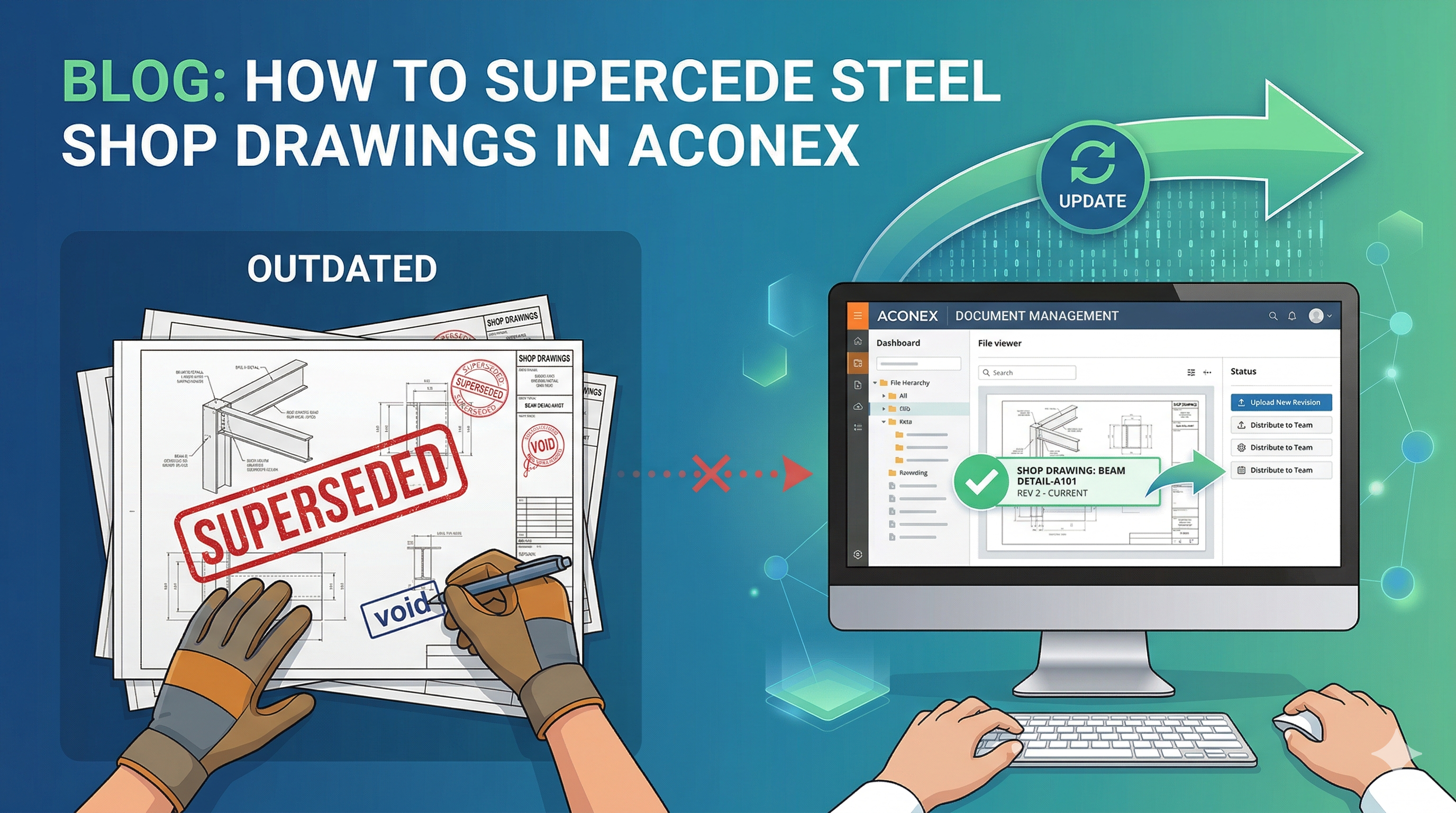
Program to supersede and manage hundreds of drawings received via transmittal
What is the problem?
- Superseding documents is a real pain – a great difficulty. Manually clicking and deleting files: it’s very time consuming and error prone. What if you miss an important drawing? It’s very, very easy when you get 20-30 new drawings every two days to sort through. In 3 months you’ll have a couple of hundred drawings which have to be reviewed. Who’s gonna pay for that?
Why is it a problem?
- Essentially it’s because people want to transfer any risk associated with a project cocking up onto you. So they’ll send you, say, 700 drawings all at once. Multiple revisions of the same document. And they’ll get you to sort it all out.
What is the solution?
- I wrote a program which takes care of everything. Saves you time and a lot of headaches. It’s literally amazing.
What does it do?
I’m using terms you may not be familiar with it, so first please take a moment to understand it: Definitions: (i) current project folder – this is the folder on your computer where you keep only the latest drawings for a particular project. (ii) Downloaded drawings folder – this is the folder where you download any “new” drawings received from a transmittal.
What does the program do?
- Automatically updates your current project directory with the latest revisions which you have downloaded.
- Cleans your downloaded drawings folder, and your current project folder, of any obsolete drawings.
- Identifies which drawings are new and which ones are to be superseded.
So what’s the point of all this?
It allows our guys to focus on what they do best: getting good drawings to you. In other words, you’ll get more value for your dollar with us, because we don’t need to spend a lot of time sifting and updating drawings.
Demo:
Please see below for a demo. Programming this had its challenges. I chose VBA because it allows users to see and tweak what is going on. This might have been more challenging if I used WPF to do the same project.
I hope you enjoy it!
Ben
-
How to avoid Danger in Building and Construction Projects (Part I)
How to avoid Danger in Building and Construction Projects
“The prudent see danger and take refuge, but the simple keep going and pay the penalty.” — Proverbs 22:3
The aphorism holds with building and construction.
- How it works in building and construction
What is the danger in building and construction?
The danger is if you commit yourself to projects which will cost you time and money.
Ideally your goal in building in construction should be this: to (i) produce accurate drawings quickly, or if you are a builder/trade to: (ii) build quality structures and get out as soon as you can.
Why are delayed projects costly?
You do not want a construction site that is delayed by 6 months. Think about it: crane hire: $15,000+ per week. What about site crew? That’s $25 / hour (very, very conservative. More like $100 / hour). How many staff will be working there? What about charge backs? What about the engineers and architects who will put RFI queries to the back of the line in order to focus on jobs that will bring them immediate revenue? Delayed projects straps all interested parties of liquidity, especially the builder, who will try to delay payments to suppliers. And if suppliers/contractors don’t have the liquidity to ride things out they could go belly up, further adding to the monumental costs involved. It’s a vicious cycle. The moment people get wind of a possible insolvency then they’ll pull out of it to focus on jobs that will bring them revenue. In short, delays are damn expensive. And you need to avoid badly managed and designed projects like the plague.
- How do I know whether a project will be a cock-up?
- First and foremost: Look at the capital position of a builder
If the builder cannot stand up when times get a little tough, then their strength is small. Builders need to have a strong capital base and liquidity in order to tide them through projects. As a rule of thumb: you can trust the big names: Lend Lease, Watpac, Leighton– because they have the ability to raise capital from markets if things go bad – but even then, you need to have a good look at their financial statements. You cannot trust the big four auditors. Read that again: only a fool would trust in the audited statements of the big four. You don’t need to be a financial analyst, but you do want to see a healthy cash balance, and the ability of these firms to service any impending debts.
- Second: track record
Make sure the builder has been around for a while. If she’s been around for 10 years she must be doing something right.
- Third: Price and availability
Good builders know their value and won’t work on the cheap. Consequently, they’re hard to hire because they’re always working. If you see a builder who is cheap and available, you need to very carefully investigate her or her quality.
- Fourth: The Designers need to be good
Bad drawings are the bane of this industry, nay bad architects are the bane of building and construction. I see it all too often, and very rarely do I see an architect worth his salt.
If the designs are bad – I mean really bad, then you want to steer clear from that project. Why? Because builders with funds hire the best architects. Builders without funds hire architects who are inexperienced, which means architects which could drag everyone under. This means, as mentioned above: (i) endless changes, (ii) endless RFIs, and (iii) issues getting paid.
Things to watch out for:
Now you can apply the following general aphorisms when accessing the quality of the drawings you see:
General Aphorism applied
Cockroach theory
- If you see one, then there will be a hundred hidden behind the scenes somewhere.
Small mistakes, big mistakes
- If they can’t walk, then they definitely can’t run. This means if you see some elementary mistakes, then you cannot trust them to get the more complicated things right.
What one should specifically watch out for in Construction Drawings:
Bad design:
-
- I sometimes see the most absurd looking panels. What mind, smoking what substance, would concoct such a creature worthy of standing beside David in Florence? If you see one ridiculous looking panel, this is a sure-fire indicator that the architect knows absolutely nothing about what she’s doing. That means it’s gonna be a long and costly project. Stay clear of these things and let your competitors fall into them, while you focus your energies on projects that will generate a timely and handsome return.
- Missing panels.
- Misnumbered panels.
- Panel details that are not workable.
- Too many missing dimensions – another early warning indicator that the architect is careless, or rushed, or lacks resources.
- Missing gridlines. These architects ought to be round up and summarily executed.
- Dimensions made not to gridlines.
- Unnecessary complications in panel design. This is a sure red flag. It just increases the risk that something will cock up.
- Architects who make hundreds of revisions. Watch out: this means that people keep finding mistakes, or the architect is making changes continually. And that will bring more errors and more revisions. This means you gotta download 50 new drawings every day from Aconex. And you have to supersede all your old drawings? What if you miss one? This is a dangerous accident just waiting to happen.
- Too many misnumbered section views. This means that the architect has made a lot of changes. And when there are changes, it’s not a good sign: it means that there are problems hidden in the drawing, it means that they’re drawings are not easily readable, and will cost you money.
Architects who do not release their CAD files. These architects are costly. And as a rule of thumb you do not want to hire these architects. Because if there is a single missing dimension you have to call them to find out.
- Architects that take too long to respond: This means that they’ve taken other projects on, and are focusing on what will pay them money rather than attending to their work. They are too busy to actually be doing work.
- Architects that have their own agenda: they are not interested in delivering a quality structure, or a structure that is a commercial success to the client, as much as building a work of art which they can display to their friends/family and put into their portfolio. They are artists and have fabulous visions of grandiose structures without (much) regard for returns. At the end of the day, if you’re a builder, you goal should be to make money. Making cool buildings can be a part of that vision, but it certainly should not come at the expense of the bottom line.
My friends, if you take in just half of what I have written here, then you can surely avoid yourself from entering into strife. But you ignore my advice, then you will fall headlong straight into it!
-
Technical Note: Lifters minimum 10 tonnes & must use N20 loop bars
What is happening?
Summary: Lifters minimum 10 tonnes & must use N20 loop bars
- Lifters must have a minimum capacity of 10 tonnes from now on.
- N20 loop bars must be used on 10 tonne lifters. This is a slightly thicker diameter than the previously used bars.
Why?
Suppose you have a 9 tonne panel. Then a 10 tonne lifter will suffice, would it not? Wrong! The panel will sometimes actually be more than 9 tonnes due to dynamic loading. What is dynamic loading? It is the additional load that is felt by the lifter, caused by lifting the panel. If the crane drops the panel very quickly, and then stops abruptly, then the panel lifter will face a strain significantly higher than its static weight. To prevent accidents and injuries – not to mention losing a panel and the antecedent costs, all panels henceforth must have 10 tonne lifters as a minimum.
What to do now?
- Please make changes to the code to ensure that it is impossible to place a lifter less than 10 tonnes.
- Please add a check on the audit to ensure that lifter under 10 tonnes are not found.
- Please add an audit check to ensure staff are following procedures.
For the general public, as an aside:
What is a lifter?
If you don’t know what a lifter is, it is basically a hook that allows a crane to lift up a panel. This “hook” is secured to the panel with what is called a loop bar.
What is a loop bar?
It is simply a bar which secures the lifter to the panel. If you have no bar, then the hook will simply snap off the panel. If the hook snaps off the panel while it is being lifted by a crane, you can be sure that it’s gonna kill some unlucky soul who might be walking under it. So it’s very important that every lifter is secured with the correct loop bar. There is no point putting in a loop bar if you put in the wrong one.