Author: admin

  • CAD Engine for Structural Steel

    Open Invitation to participate in developing Structural Steel Cad Engine.


    Almost all reasonable cad systems are priced significantly high to suck out any money detailing companies can generate. Most detailing companies will find pretty soon that the only party benefiting from their effort is the software vendors.

    I am interested in developing a cad system which can take a lot of work from the high end cad systems to an open source system /low priced (under $1000) where significant amount of work can be done and at some point of time the model can be read into any of the commercially available high end cad system.

    The invitation is open to all types of participants

    1. Developers who know a good deal about cad engines, and data structure for structural steel.
    2. Financiers who can chip in.
    3. Any one who has reviewed open source cad systems and has a good grasp of how that works (Linux, Mac, Windows)
    4. Brilliant College students who can contribute.

    What can we provide.

    1.  Some amount of low level funding
    2. Can put together a brilliant team in India recruiting from the top end of the town.
    3. Review and evaluation of design strategy.
    4. A market, which will pay to buy anything useful.

    List of Opensource Cad Systems.

    Contact koshy@tek1.com.au with your ideas and proposals

    Tools for BIM Review

    http://www.bim-review.com/

    lpcorp for wood design

    RISA-3D – Had dwg Underlay options can export to sdnf

    Demo download page for RISA

    https://www.opendesign.com

    History of Cad Systems


    Developing Light Weight Cad System for Structural Steel Modelling Member placement.

    1. Main Cad database must have only the End Point definition and Rotation definition along with Profile offset distance in x, y and z direction of the member.
    2. All profile information must come from a profile database.
    3. Any cut on the main profile is to be defined as a set of points and linear dimension which represents the depth of cut along with direction information in relation to the member on which the cut is applied.
    4. All 2d drawings must have only an index in the main cad database. 2d drawings must exist as a separate database with a foreign key in the main cad database.

    If you are reading this can you get us started in the right direction.

    Parabuild is a steel detailing solution built on top of Autocad. www.parabuild.com
  • What does N12-200 EF mean?

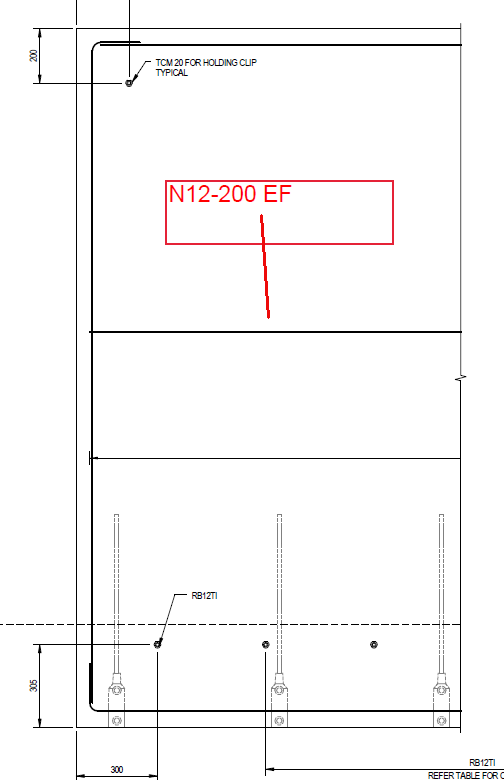
    In this blog post we will explain what N12-200 EF means.

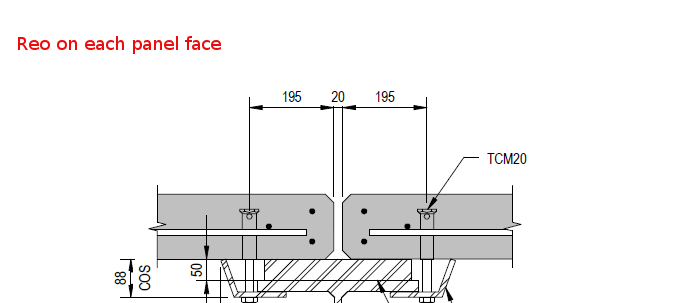
    Please see the below diagram of a precast panel elevation

    Well, what does N12-200 EF it mean?

    Let’s break it down.

    • N12

    This is the diameter of the rod. 12 mm.

    • 200

    The 200 portion means that the rod should be spaced 200 mm apart.

    • EF

    This means that the rod should be on each face. i.e. on both panel faces. This is best served via a diagram.

    I hope you learned something!

  • Batch Processing AutoCAD drawings using AcCoreConsole and Script Pro 2.0

    Batch Processing Using AcCoreConsole is now here.

    What is AcCoreConsole?

    • It is a command line version of AutoCAD without a user interface.
    • It allows us to batch process AutoCAD drawings super fast.

    Example:

    • Let’s say I have 500 drawings. (This is a prime candidate for batch processing).
    • Now let’s say I have to apply a tedious and repetitive change to each of those drawings.
    • This would take a long time to do manually. You would have to employ a CAD monkey to do this. No more! You can automate everything!

    Watch the Video: It is will explain the technical stuff below:


    For Geeks Only:

    • If you have any questions, please feel free to ask!

    Geek-speak: How does it work? (It might not make sense to most of you guys but that’s ok – all you need to know is that you CAN automate things if you want to):

    1. Write a custom .net DLL (or ARX if you prefer).
    2. Write a script file to load this dll and to apply it to a drawing, and to add the parameters your dll requires.
    3. Apply that particular script file to all 500 of your drawings using Scrip Pro 2.0.
    4. Use AcCoreConsole to do the heavy lifting. It is light weight and fast and ideally suited to batch processing.
    5. Make yourself a cup of coffee – and by the time you are done, your files will have been updated.
    6. Check the log files to ensure everything went smoothly.
    7. Important: Ensure you DLL is in a “trusted location”.

    Here is my ScriptFile:

    (Remember when pasting that you have to add the .scr extension)

    My .net DLL:

    • Just a standard DLL which changes the attribute values of a particular block. You’ll have to get rid of the pesky reference to AcMgd but otherwise it is basically the same as the below. Kean says it better than I could ever say it.
    • Of course you will have to change the above script file to suit the DLL command name, and the DLL location, as well as the particular block name and tag and new attribute values that will be particular to your project.
    •  You can access the Document with the following code:

    Document acDoc =  Autodesk.AutoCAD.ApplicationServices.Core.Application.DocumentManager.MdiActiveDocument;

    • Here is Kean’s code.


    If you have any questions: Go ahead and call me!

  • Introducing AcCoreConsole

    AcCoreConsole is AutoDesk’s brand new toy. It is basically a command line version of AutoCAD. It has no “User Interface”. That means that if you are a user, there are no menus to click on. No buttons. Nothing. You have to do everything via text. Via command line, like it was in the very beginning.

    You cannot see lines.

    What is the benefit of this you ask? Well it allows for super fast batch processing.

    Please watch my screencast for a very brief introduction to this new technology. I will provide another video of the batch processing power of this babey.


    https://knowledge.autodesk.com/community/screencast/d6ef5929-4208-443d-8b53-eca0c637328a

    I hope you learn something.


    Ben

  • Lapping – What is it? What does it mean?

    Lapping – what is it?

    It’s got nothing to do with being over taken on the F1 track.  Lapping refers to the “overlapping” of reinforcement with another section of reinforcement.

    Why do we lap?

    • It gives greater structural integrity to the structure you are fabricating. What does this mean? It means that when you lap, your concrete will be stronger, and will be better able to withstand loads/weights. In other words, a lapped structure will be more sturdy that unlapped structures.
    • AS 2870 requires that we lap.

    Lapping Requirements?

    Trench Mesh Laps

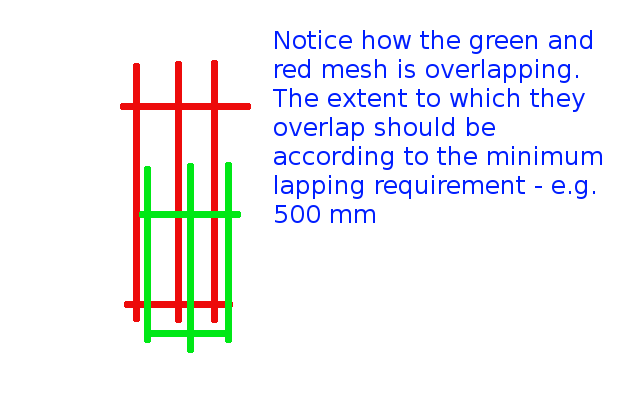
    • If they are overlapping at T or L intersections, then overlap the full width of the mesh.
    • When end to end, they need to be at least 500 mm.

    Please see below:

    Lapping
    Demonstrates the concept of lapping.

    Square mesh lap

    • These need to be lapped by 225 mm minimally.

    Very similar to the above – please refer to that diagram.

    Reinforcing Bar Laps

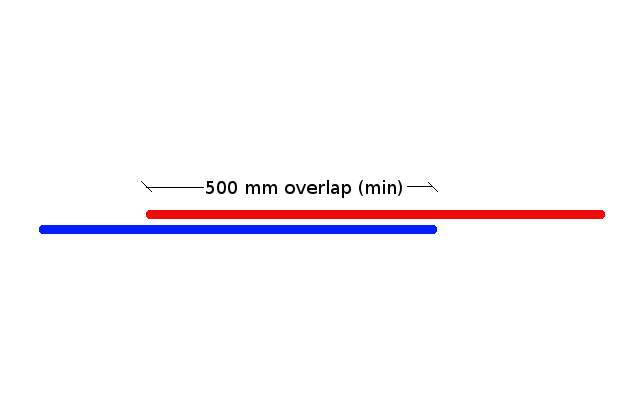
    • Lapping needs to be at minimally: 500 mm.

    Please see below:

    Reinforcement Bar Lapping
    Shows the minimal lapping required for reinforcing bar laps.


    I hope this helps you. Any questions? Feel free to ask. I may even write up another post if the question is good enough.

  • The Signficance of the “Mould” Face in Precast Panel Detailing

    The Mould Face

    This post attempts to explain the following two questions, for those starting to learn the precast trade:

    • A lot of fancy words are thrown around. Near face. Far face. And mould face. What does it all mean?
    • How should shop drawings be marked vis-a-vis the mould face, and why should they be marked as such?

    What is a precast panel?

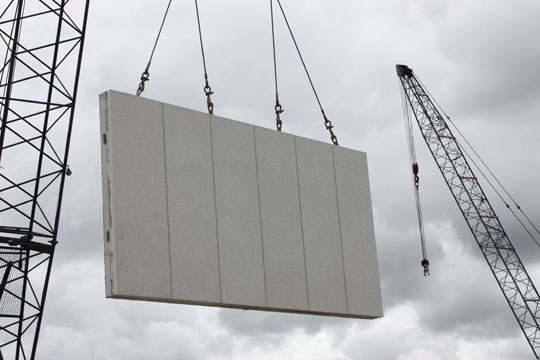
    These my friends are precast panels:


    What panels look like.


    • You can build things quickly and cheaply, if you build with precast panels. Your other option is to fabricate on site. The problem with this is that it: (i) is more expensive, and (ii) the construction is a lot slower.

    What is the mould face?

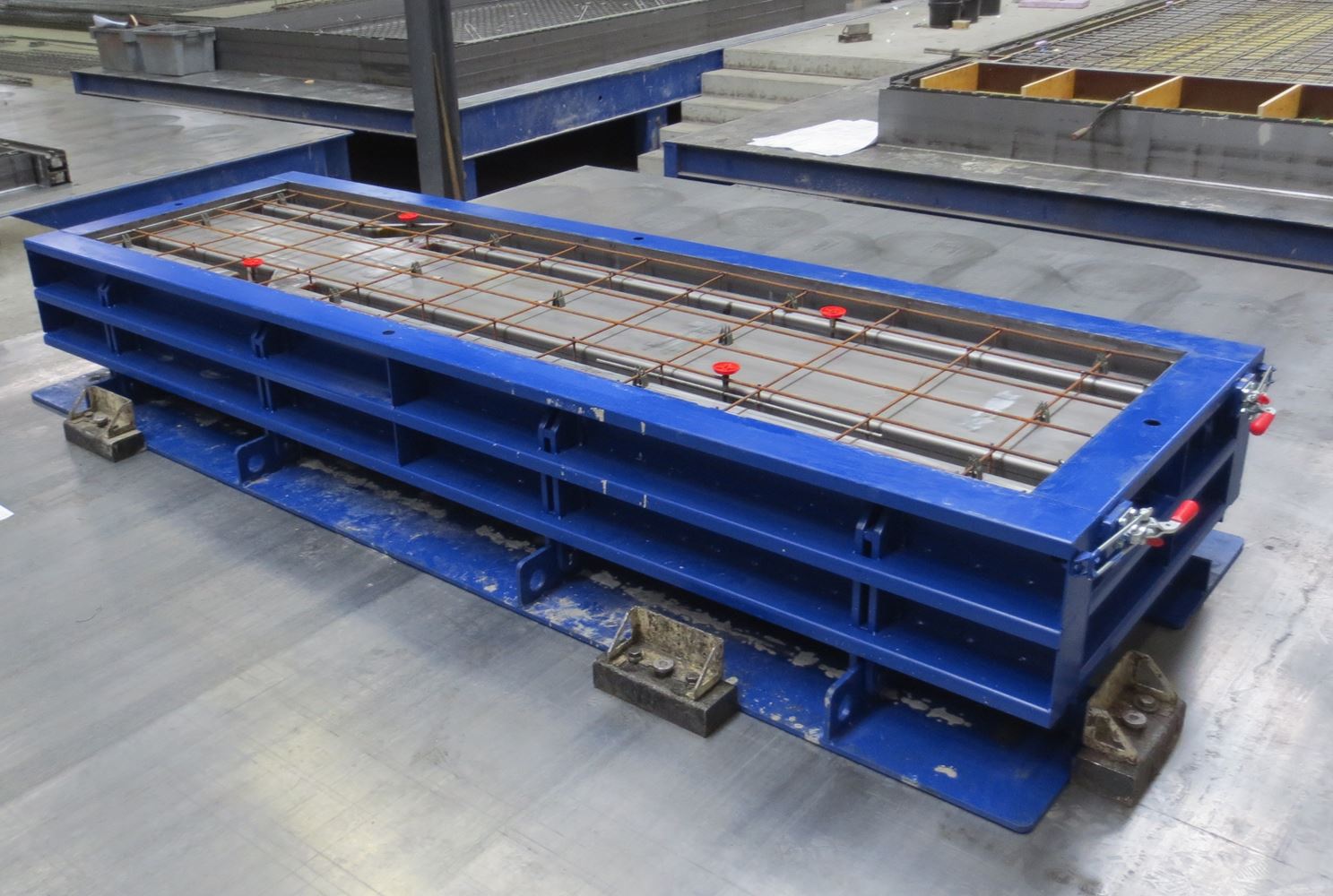
    • First you have to understand how the panels are “fabricated” (i.e. how they are made). Concrete is poured into a mould, on a table. It looks something like this:


    Showing a panel on a table, in its mould.

    So then what is the near face / far face / mould face?

    • The near face is the side of the panel which is exposed to the air. This is the face of the panel which you can see.
    • The far face (or mould face), is the face of the panel which is lying on the table.

    What is the significance of the mould face?

    • The mould face has a smooth finish (or should have one).
    • You do not want a building which has the ugly face of a panel exposed for everyone to see. The architect will be baying for your blood, and moreover it is a very costly remedy. Some precasters, in order to avoid this problem, “trowel” the near face (i.e. the face which is exposed to the air). “Trowelling” is when you smooth the surface of the panel with a tool so that it looks nice.

    When you draw a panel, you want to indicate on your drawings that the mould face is on the building exterior.

    • Why? So that the smooth side is seen by people and the ugly side is hidden from view.
    • “But won’t people on the inside of the building also see the ugly side of the panel?” you ask. Not necessarily. Most of the time, the panel is not visible on the inside of the building because the architect will put up plaster or there will be something hiding the panel from view.

    Standard Shop Drawing Practices

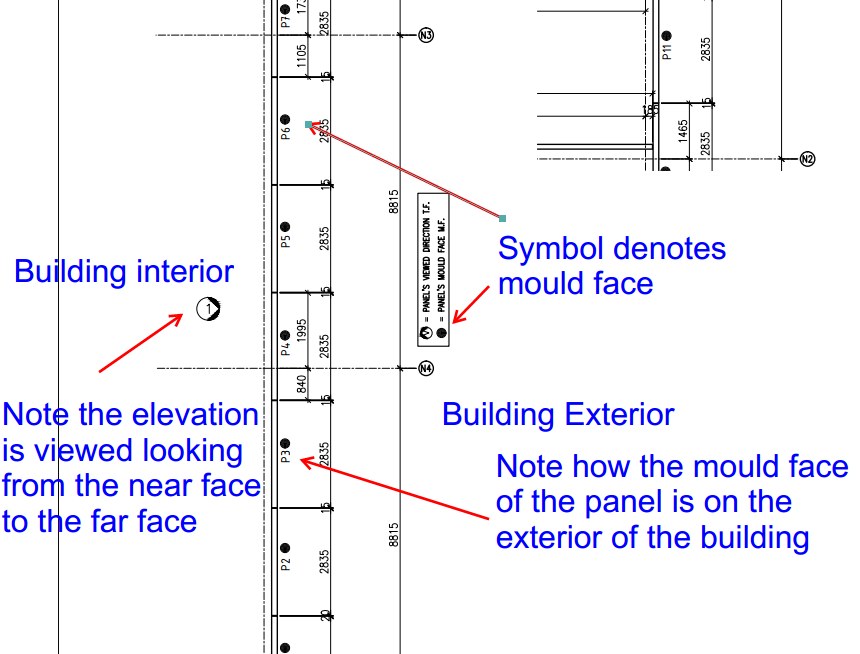
    • People draw elevations assuming they are looking at the near face first, rather than the far face.


    This diagram should certainly clear things up for you:


    Shows the near face and far faces on the marking plan – also notes where the exterior of the building is.


    I hope you learned something. Any questions, please ask.

  • Writing Clear Tests

    A very rudimentary but fundamental tip: When you are testing something, it is absolutely paramount that you have a crystal clear idea in your mind of exactly what you are testing.

    If you want to ensure that there are 4 tyres on your car, before you start out from your garage, you must check for exactly that:

    • are there four tyres on my car?

    If you test for something else:

    • are there tyres on my car?

    Then you may win some of the time, but other times you will get confusing and conflicting results.  What if somebody adds 3 tyres, but omits one tyre? Obviously this car will have a lot of problems going forward (pun intended), and you will wonder why all of a sudden your tests are all passing but the car is failing?

    What is going on? And it will not be immediately obvious what is going on. Because the mind can deceive, and while the eyes see, they may yet be blind. You’ll be spending a loooooooooooot of time trying to debug that one little glitch. Save yourself the headache, especially if you’re looking at the code 6 months later.


    So it is a very simple, but very powerful tip:

    • be very specific and clear in your mind as to exactly what you are testing for.
  • Transportation Issues to be aware of when detailing precast panels

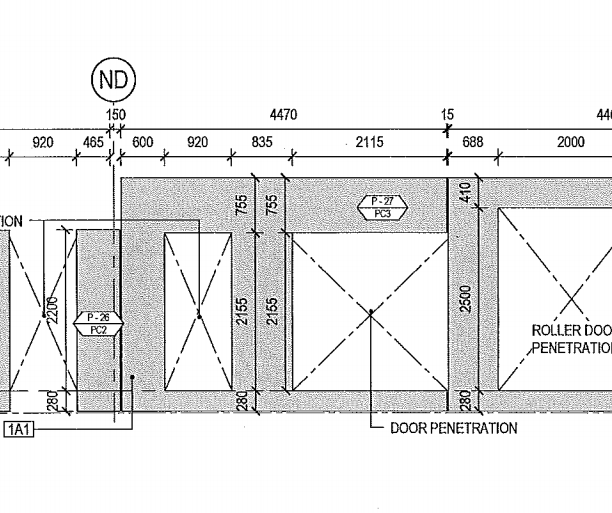
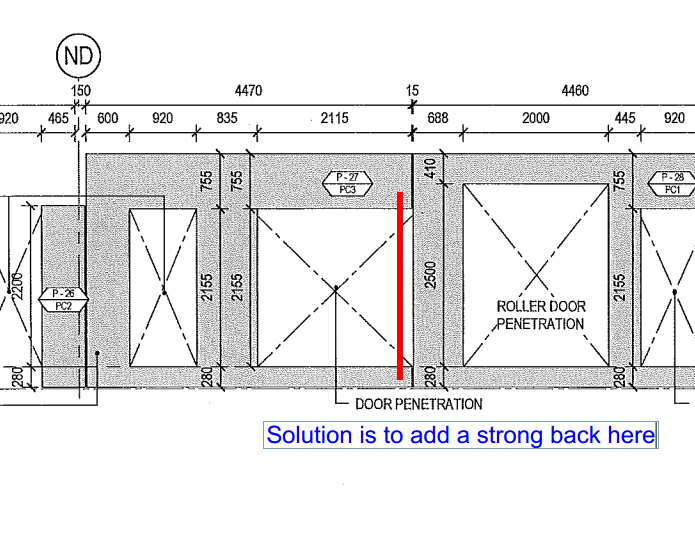
    This is a first in a series of articles I will be writing about the process of precast detailing. Suppose you get a drawing like the one below.

    Any problems you notice here?
    Any problems you notice here?

    Question: Is there anything that strikes you? That might be a potential concern?

    • Take a look at Panel P – 27. And note that it kinda looks like an arch flipped on it’s side. So what’s the problem with that, you ask?
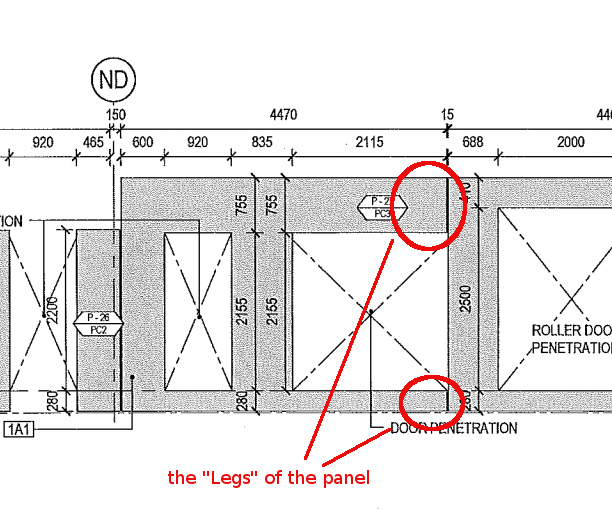
    • There is a potential issue: the panel might break. Why? Because the right hand side of the panel has no real support. If you try and put the lifters on the left hand side of the panel, when you’re trying to lift it off the table, the “legs” of this panel could break, given the size of the panel notwithstanding its reinforcing.
    • If you put the lifters on top of the panel, then the breakage issue remains – even if you do manage to successfully lift the panel without it breaking, what about lowering it into position?
    Legs of a panel. They can break off easily.

    What then is the solution?

    • Simply use a strongback. If you don’t know what a strong back is, it is simply a beam which can be used to add support to the legs. This will give the right hand side of the panel some support and sturdiness so that it will minimise the chance of breakage.
    A strong back is needed
    A strong back is needed

    Hope you learned something!

  • What is a North Elevation? East and West? Elevations Explained

    What is a North Elevation (when outside a Building)? 

    Explanation with Words:

    • Imagine you are standing north of a building, outside the building, but facing the building in a Southerly direction.
    • What direction are you facing? You are facing south.
    • The view of the building that you are seeing is called the “north elevation”. It is basically what you see while looking South, when you are standing North of a particular building. A little tricky hey? It’s simple enough, but it’s extremely important that you get this distinction right. Here is a plan drawing.

    Pop Quiz:

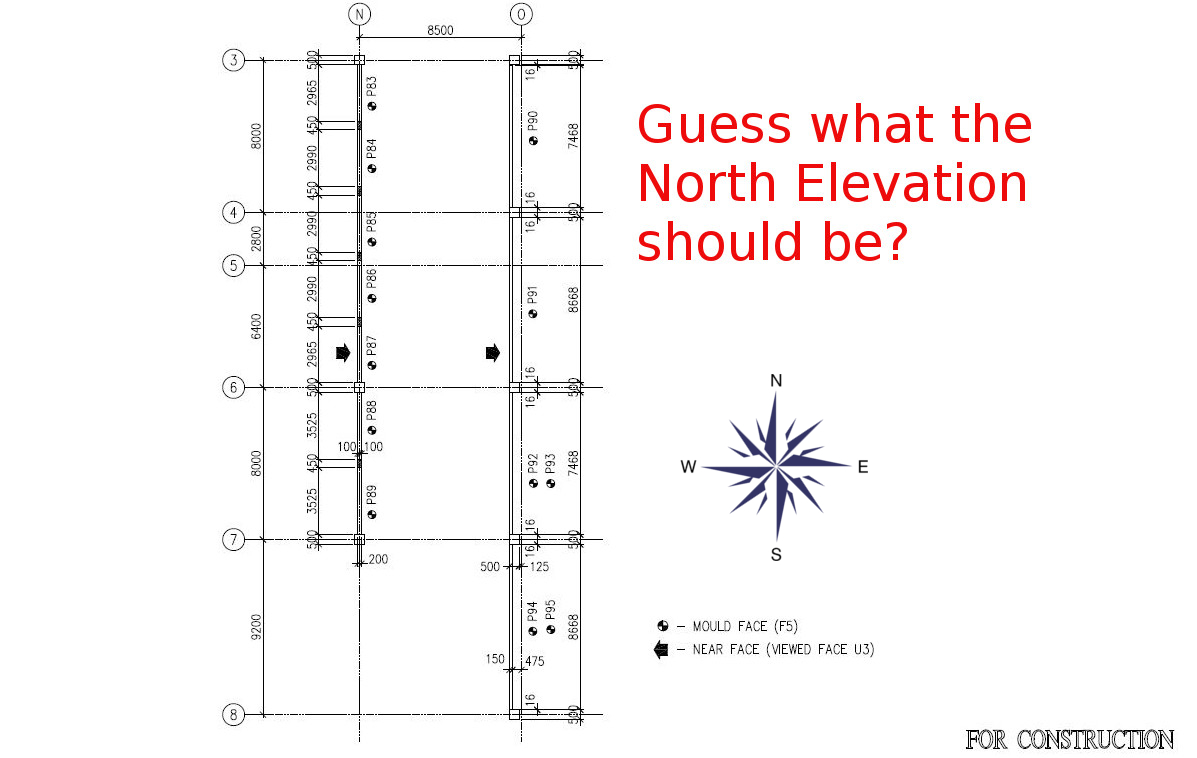
    What is the north Elevation in the drawing below?

    Guess the North Elevation.
    This is a plan drawing. Guess which is the north elevation?

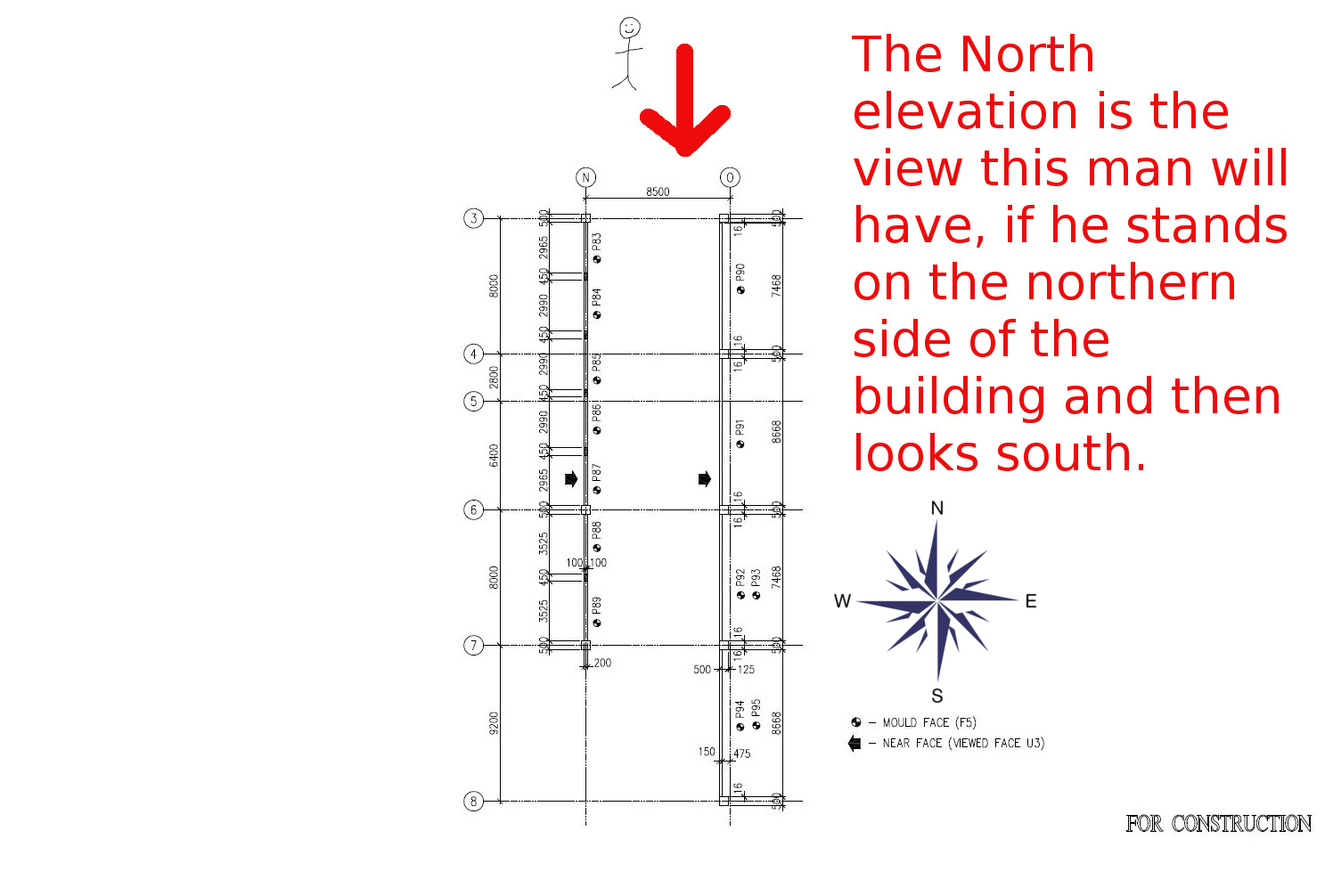
    Here is the answer:

    Diagrammatic Explanation of What a North Elevation (outside a building) is:

    From the North, looking south
    Showing what the north elevation actually is.

    What are East, West and South Elevations?

    Well, you’d basically have to face the opposite of the respective directions, and look at the building from there. For an East elevation, see the building while looking in a Westerly direction. For a West elevation, look at the building while facing East. All of this applies when outside the building.

    Hope that’s clear/helps. Any questions? Just post a comment.