If you are serious about joining us in around September, then you must try to complete all the training exercises, get it checked by our team leads, and re-submit until you get 100% right.
Also, you will be required to pass (score 100%) on the following items.
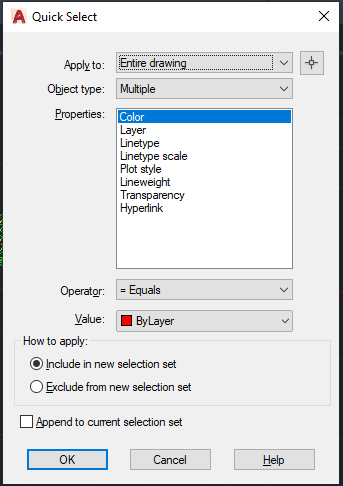
Shortcut command:QSELECT (right click on the work area to get this command)
When you need to select a specific element in an AutoCADD project, like for example some construction lines, you could select them either one by one or by using select similar when you need to select some specific items for which you know the properties we can use the quick select tool. This is very similar to the selection filter in Tekla Structures and in Revit.
Using Quick Select or QSELECT, you could select the line of specific length or a specific colour. You could also use the tool to select elements specifically needed to work on in any area.
Here is the list of options:
Apply to: This restricts your selection to the required area or to the entire model as required.
Object type: Select the object which needed. For example, if we need to select all the lines which has length less than 1m then you need to set the object type option as line.
Properties: in this category we can specify the property of the object we need to select. In case of above example it would be the length.
Operator: it is the usual comparison operators. for this case we could give lesser than.
Value: According to the property we select we need to specify the value. in the above case we could specify 1000mm.
How to apply: This is part is more interesting and very useful as well. If we use the radio button “Include in new selection set” the elements which passes the condition would be selected, if we use “Exclude from the new selection set” the case will be vice versa. ie. all the elements which does not satisfy the condition will be selected.
Please find a short video on demo of the content below.
Ever wondered about how easy and accurate it would be to study a GA drawing when it is overlayed on the IFC Model? Well, Trimble Connect gives you a way to do so. The GA drawings are exported along with the 3D co-ordinates as dwg files in Tekla Structures. This process is easy and we have to make sure to activate few options in Advanced Options and in Export Drawings dialog box.
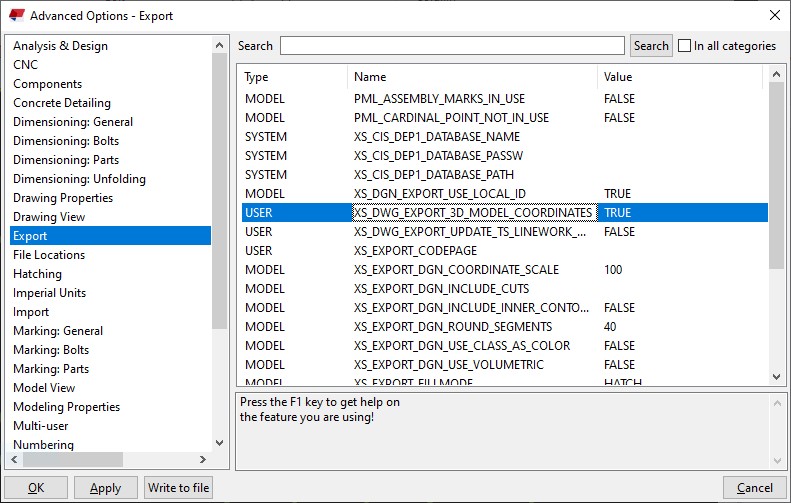
In Advanced Options dialog box, Select
Export and look for the option XS_DWG_EXPORT_3D_MODEL_COORDINATES and change
the value for it as TRUE.
Once this value is made true then we can proceed with the regular method of creating the GA Drawings and then export it.
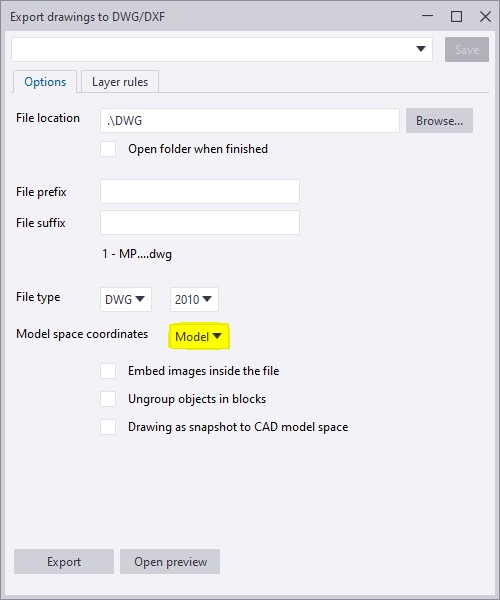
When exporting the GA drawing, we have to make sure that the Model Space Co-ordinate value is made Model instead of Local.
If the model space co-ordinate is kept as
local then the dwg file will take the local co-ordinate values as in the drawing
created and the 2D dwg files are exported.
If the model space co-ordinate is kept as model
then the dwg file will take the Tekla model co-ordinate values and the 3D dwg files
of the GA drawings are exported.
To have a more clear idea of how this option works refer to the video attachment.
Is programming knowledge necessary only for a Software developer? You will find an answer for this question in this blog. With automation ruling the world, it is important for every business to adopt it into their workflows to stay competitive.People may encounter lots of issues and errors in day to day work which may affect the efficiency and productivity. Laborious tasks can be automated using simple tools which can enhance productivity. This is where API comes into action.
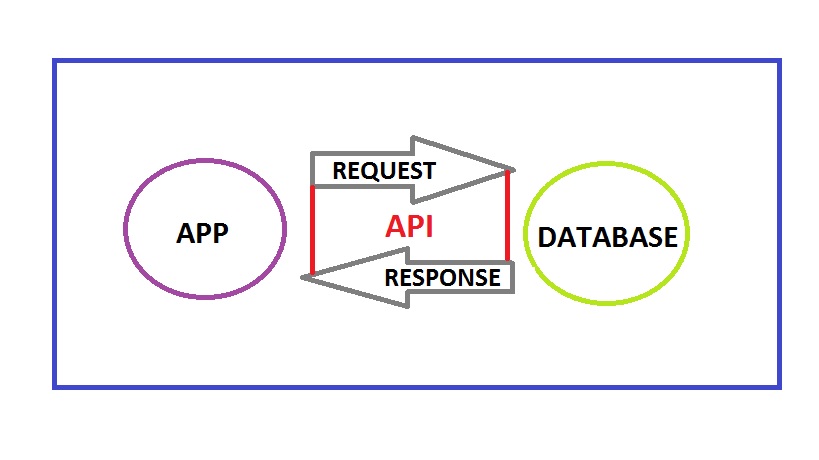
An API (Application Programming Interface) is a set of tools, protocols and methods offered by companies for their commercial software. Some of those companies offering API are Google, Mircrosoft, Autodesk, Tekla and the list goes on. Everyone who are using their software may want to have a customized tool to suit their special requirements. Hence for this purpose the application developers expose some of their core codes for their customers. Now the customers could query, retrive data, set values and do much more.
How API works.
A Civil engineer may be working with many software and when he has some knowledge on programming he could develop solutions using these API without hiring a software engineer and explaining all sorts of things to him. When he himself gets to explore the API, various possibilities will come into light and he could develop more productive tools for his business.
All one needs to get started with API is some basic understanding of the high school computer science concepts on C or C++. Even though they are low level programming language unlike JAVA and C# which is required to work with API the concepts remains the same. JAVA has a lot of scope than C# which is mainly used to develop Microsoft Windows applications. But the selection of which one to learn depends entirely on what your requirement is as each API has been built on its own language. Once you get a fair bit on the language next important thing is the documentation of the API.
This documentation is available in the websites of the software. It serves as a guide which explains the entire hierarchy of the software, data types, classes, methods etc. One needs to dig into this at the very beginning before accessing the API. Now you could start your coding after acquiring the basic knowledge on these things. Keep in mind that lots of trial and errors will only lead to success for a beginner. You should be continuously learning from the errors arising in the code and working on it further.
Hope this blog has provided an insight on how important programming could be for people in industries other than IT. Well then get started to learn coding and explore new heights in your business and work.