Author: admin

  • Getting Ordered Intersection Points of a Line along a Particular Direction (Part II)

    This part II of a two part post. Please see part one here.

    We’re moving forward with the next set of requirements. Once we have the intersection points we need to do the following:
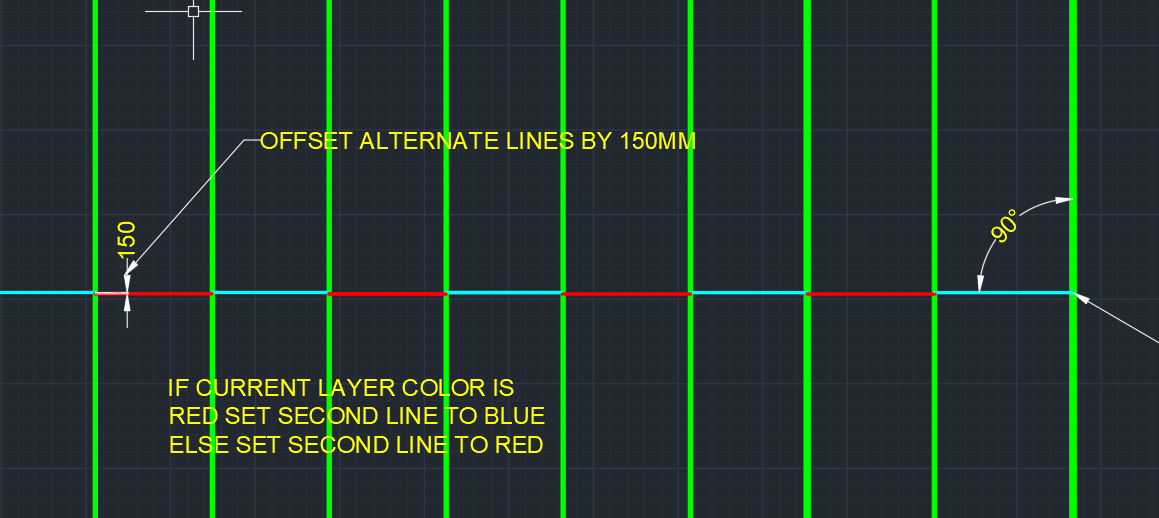
    Notice how these lines are staggered (in terms of their offset from the main line) and how the colours are alternating?
    Notice how these lines are staggered (in terms of their offset from the main line) and how the colours are alternating?
    1. Create lines out of them, and then
    2. Offset them from the main line, and staggered them by a specified amount
    3. and color every alternating line a certain color.

    The code to do so is as follows. Hopefully it will be pretty self explanatory:
  • Getting Ordered Intersection Points of a Line along a Particular Direction

    It seems to be a common problem: getting intersection points along a line.

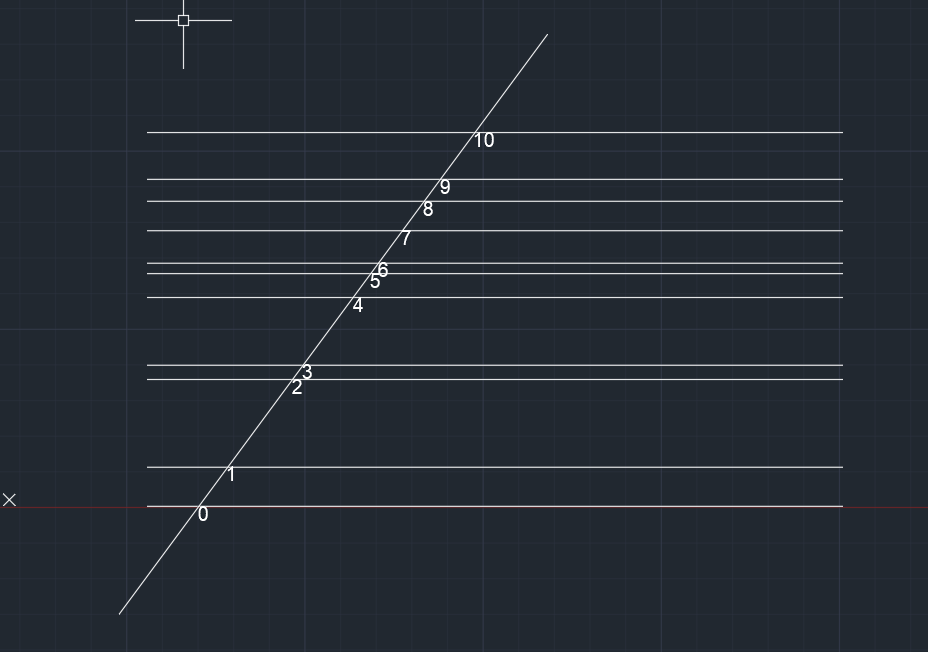
    This is what we want:

    We want the ordered points.
    Notice how the points are nicely ordered, from the start point of the picked line?

    Here’s how I solved it:

  • Ordering Lines using Linq (AutoCAD .net API)

    This is a simple example of how Linq can be used to filter, map and order a set of lines.

    The code is pretty self-explanatory. It is a useful example which can be used to springboard towards further, more sophisticated use-cases according to your own requirements.


  • Precast Tools – Place Sections Command (AutoCAD .net API)

    I’m continuing to write tools to make things more efficient. This is pertinent to precast, and highlights the use of a Jig and also the use of a pre-message filter. You can see a video demo here:


    Place Section Commands from Tek1 on Vimeo.


    And also they key sections of code below:


    Making this better, faster and more accurate!

  • Create new layer filter

    This video explains how to create Layer property filters and layer Group filters for Autocad. nano cad should be same. My nanocad Lic is not yet installed. Using layer filters is a great help to manage your cad files.

    Using layers

    https://youtu.be/9pcJ7OYXUn8

    p

    roperly increases your productivity many folds

  • Lesson 2- Tekla Beam Properties

    In this lesson, I have tried to explain most of the beam properties detailers will use. However I have not dealt with numbering, poly beams and curved beams.

    I will cover that in another video. If you like the lesson please like the video on face book, linked in and you tube.

    I am planning to publish one lesson every week. Let us see how it will go. A lot depends on the feed back I get from these videos

    https://youtu.be/uUatqKlEb2M

  • Tekla Training: Create Points

    I am creating a series of videos, basically to give initial training to my new recruits. Most of the videos will be public and will be available on youtube. If you subscribe to the youtube channel you will automatically get the videos whenever I publish on.

    The first lesson is about creating points in Tekla model space. You may download Tekla Campus version, which I believe is fully featured and free to use provided it is used only for educational purposes.

    I have covered all the common methods of creating points in this video. However, there are a couple of ways which I have not covered. If you require help please request in the comments section.

    https://youtu.be/pGt-h3AvwQ0

  • How to get help on Autocad command without wasting anyone’s time

    Help on Autocad commands are right there at the command line. However, too many times new users ask questions. Not just new users, experienced users as well get used to some way of working and  stay there without checking out the full documentation. This video show where the command is available

    https://youtu.be/3bEKW40A8SA