Category: Processes

  • Memo #7 – How to on Statuses, ETAs must be accurate

    When traveling overseas, especially India, I often hear the following:

    “Where are you?

    “I’m almost there”

    “When will you arrive?”

    “Five minutes!”

    They always say: “five minutes”.

    Once, I remember waiting, for at least 45 minutes.

    Not sure if this is a cultural thing. I’ve heard Indians say:

    “Oh, that’s IST – Indian Standard Timing”.

    Friends – Indian Standard Timing might work very well for your own personal arrangements, but it will not work well in the USA / UK / Europe / Australia / NZ, on construction projects, where tight deadlines are involved, and where “Liquidated Damages” are at stake.

    Why are ETAs important?

    Because clients need to order material, organise labour, and equipment. It will not do to organise a crane, and hire labour, only for them to sit idle for a couple of weeks because you were overly optimistic with your delivery times. Cranes alone might cost $5000 – $15,000 per day. What about site crews? If you give the wrong ETA, then it could cost your client a lot of money. Which means it’s gonna cost you a lot of money.

    Give real ETA. Not the typical: “5 minutes later” ETA. Update your clients constantly on your Tek1 status reports.

    Summary: Give the correct ETA, and make sure you meet it.

    Lesson – Keep the statuses short and sweet

    ETA – This means Estimated Time of Arrival. Just put the ETA and then the date, the time and the time zone:

    e.g. We will issue the Takeoff reports by the end of 02.04.2025

    Don’t do that.

    ETA: COB 2025-04-02 (AEST)

    Clients care about their time zone, not yours.

    Lesson – Clients Pyramid Their ETAs on top of Your ETAs – so add a buffer

    Why is a client asking for an ETA? Because they need to:

    1. Tell their client the ETA.
    2. They need to plan / arrange resources. So does their client. e.g. if they hire workers to come to their factory on date: XYZ to do work – how can they do any work without any drawings to work on? These workers will be sitting on the site twiddling their thumbs, and it is very expensive.
    3. If you promise a time and don’t deliver: then you will lose your client.

    The Cost of promising ETAs and not meeting them is large – if it does not come on time, and the communication is poorly managed – then we’re hurting our clients

    Let’s take this job for example: https://tek1-quotes.herokuapp.com/organisations/2/quotes/12046

    It was filled with issues: some from our side, the other from the client, and the other just due to coordination issues.

    We need to ensure that our communication on the hold-up points is clear.

    I’m not here to lay blame: but to make people understand the cost.

    • You promise a time to the client.
    • That time gets blown out. The reasons must be clearly communicated. If it is not communicated clearly you will get blamed.
    • The client promises a time to his client based on your ETA. If the drawings don’t come on the time, then the client cannot meet his ETA. In this case, the delays became so egregious that our client’s client – was threatening to de-scope him from the job, cancel his contract and go somewhere else.
    • This particular job is worth over $100,000 to our client. And our client is about to lose millions of dollars because he will have burned his client – because of the ETA issues and delays. Again not laying blame on anyone.
    • Think of the cost: our poor ETA management and poor communication costing our client, but it is also costing our client’s client.
    • In addition I had x2 clients who were about to be severely compromised because of LGS delays, and I was delayed in my other projects.
    • The cost? My x2 clients potentially burned (they were not), our client potentially burned, and our client’s client also potentially burned.
    • The cost is very very high.

    Do me a favour: add buffer time, and communicate your hold-ups effectively. Perhaps this might require a technological solution.
  • Memo #6 – Drawings not to be issued “IFC” markings without approvals

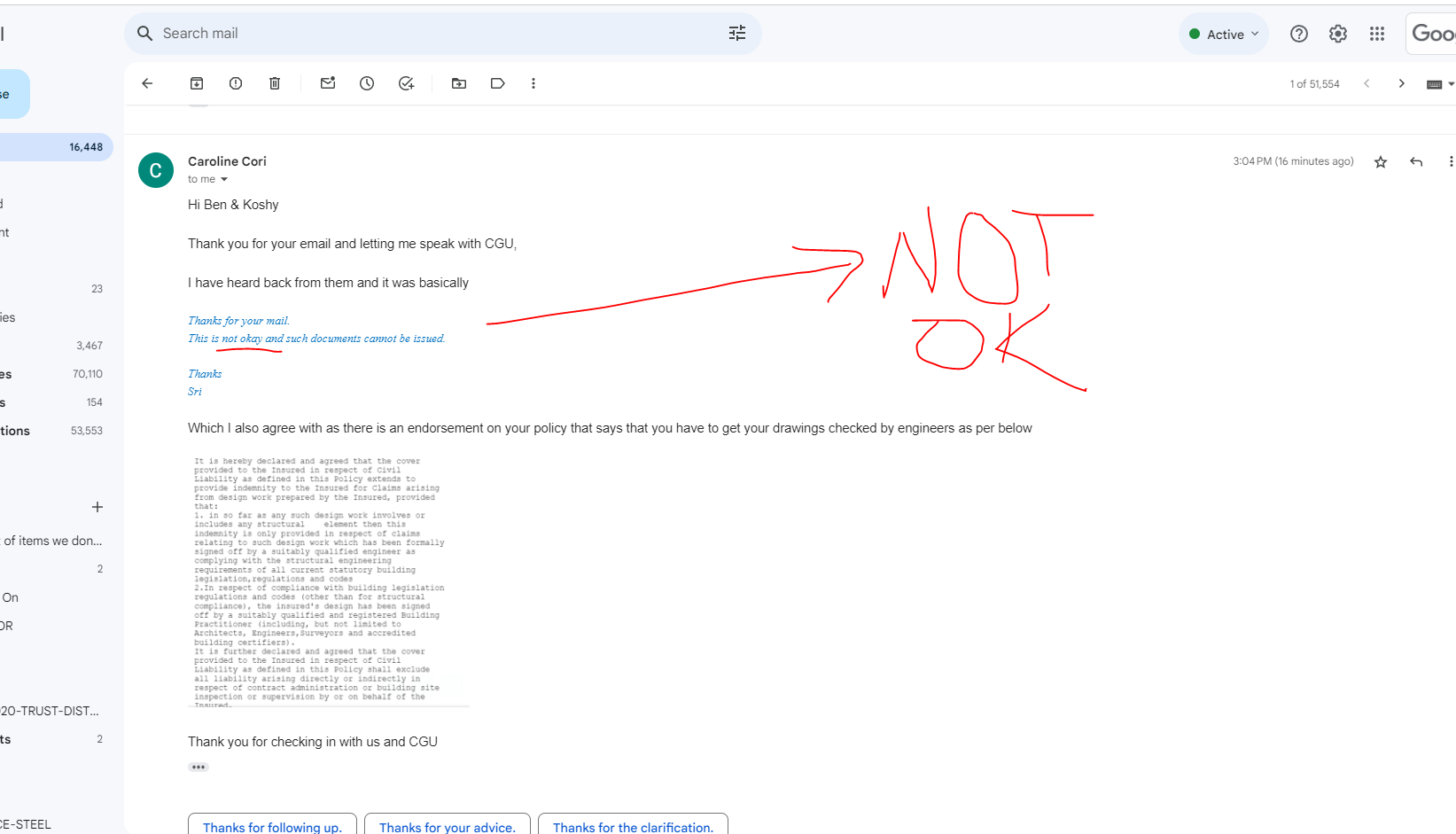
    Here is a memo we received from one of our clients. Such memos are not infrequent:

    I am pushing for stamped drawings, however from the IFAs issued there should be no changes made. I need to begin the steel ordering process tomorrow. There is a lead time on the ordering of the steel, and by that stage we should have the finalised drawings. Anything that gets altered can be held at the processing of steel stage.

    Can you please issue the full pack for the Spiral tonight.

    Thanks

    Question: what should you do?

    1. Do whatever the client says, because the client is always right?
    2. Stamp with IFC and send to the client?
    3. Ask your boss what you should do?
    4. Send the drawings without the IFC stamp?
    5. Send the drawings with an IFA stamp + a disclaimer on the drawing + another disclaimer in the same email?

    To answer this question, you need to first understand the approval work-flow in building and construction projects:

    Process in Building and Construction

    1. You do the shop drawings.
    2. You submit them for approval.
    3. The architects and engineers then approve the documents.
    4. AFTER they have been approved (not before, but after), then you can mark: “For Construction” and release the drawings.

    Please follow this process. It is very important from an insurance and legal liability point of view.

    Why is the process important?

    In every building and construction job, there is risk. If something goes wrong, then fabricators and builders are likely to start blaming people – lawyers will blame anyone who is not insolvent so they can recover the loss. If people fabricate from IFC drawings without a stamped approval, then we will not be covered by insurance: the entire firm could go under.

    When things aren’t approved: the things are likely to be in a rush, and things are likely to be poorly planned and coordinated. When the builder starts blaming you for releasing IFC without stamped approval, even though he demanded it: what are you going to say in response? We want to avoid problems and disputes at all hazards. To keep it simple:

    DO NOT MARK AS IFC WITHOUT STAMPED APPROVAL

    So what should I do?

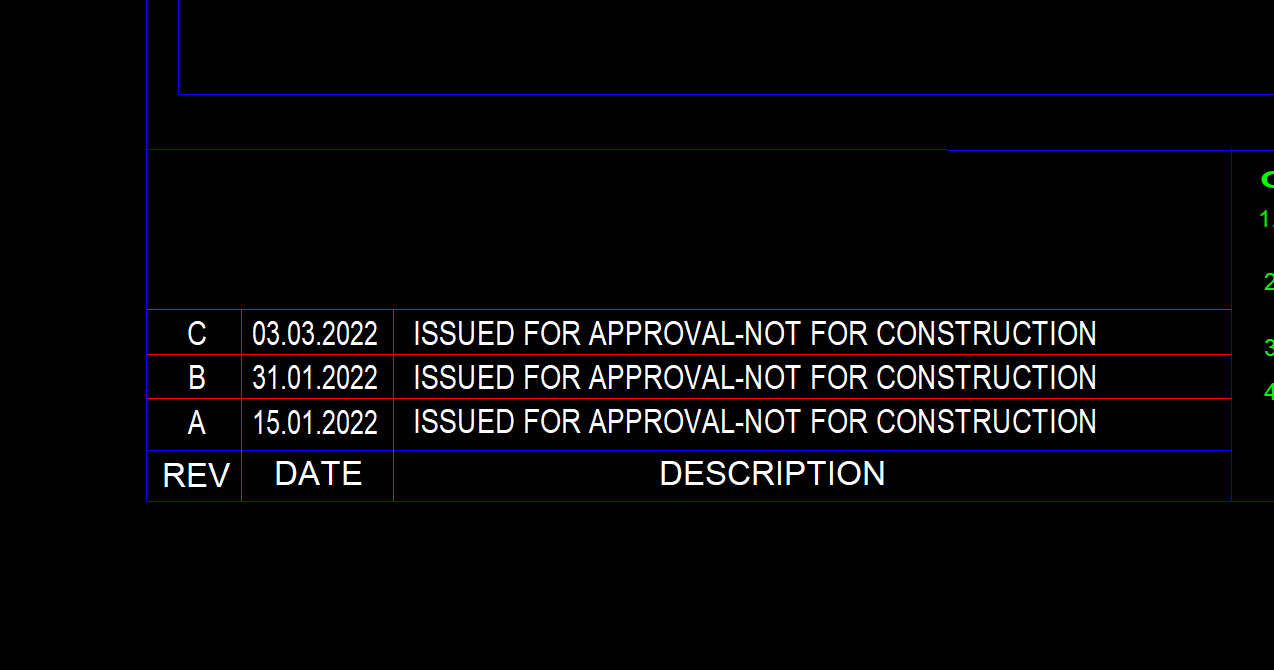
    1. Release the drawings as IFA with the following annotation:

    Shows how to annotate when you don't have the stamped approvals
    You defeinitely don’t want to mark as IFC without stamped approvals. If the client wants to fabricate, then he must very clearly understand that he is playing with fire.

    2. Add in the following disclaimer ON THE DRAWING:

    Summary:

    DO NOT MARK AS IFC WITHOUT STAMPED APPROVAL

    Why? Check the insurance documentation here (internal link):

  • BIM 360 DOCS AND PROJECT HANDLING ON IT

    Why Bim 360 Docs?

        Bim 360 is Construction project management software created by Autodesk. The main intent of using Bim 360 Docs will resolve the following thing

    • The project status with its workflow with project time frame can be easily tracked by every consultant and organization assigned.
    • It helps to access the different file formats directly online instead of installing the particular software required
    • The error can be sorted and make the decision handling by solving the RFI raised to the concerned consultant which  can be reviewed and easily sorted by accessing the file / Model directly
    • Anytime and anywhere access can be easily attained for the projects and their files
    • The mark-ups review provided by the consultant for the submitted documents can be reviewed and fixed easily
    • The file can be  Access easily  frim anytime and anywhere just by login to the Bim 360 in Browser or in mobile
    • It will make it simple in the documentation handling especially on the revised drawings and tracking the previous submittals history also. 

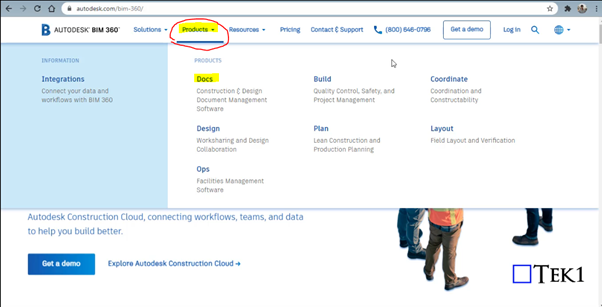
    Steps for Creating Project in Bim 360 Docs (Before these steps, log in to the Autodesk account you created in the Bim 360 and select the docs. Click “try now” after that you will see the images shown below 

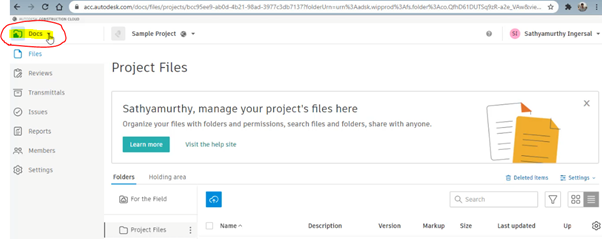
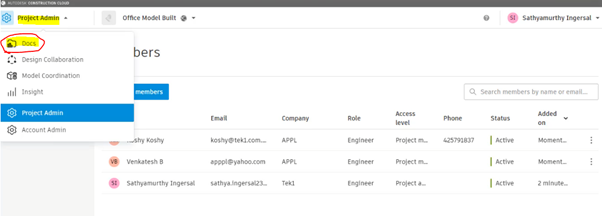
    Step 1: Select the “Docs” Dropdown box on the top left corner of the Bim 360 Docs

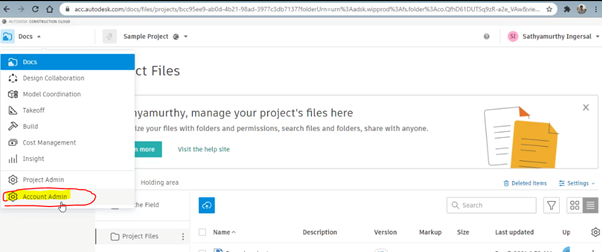
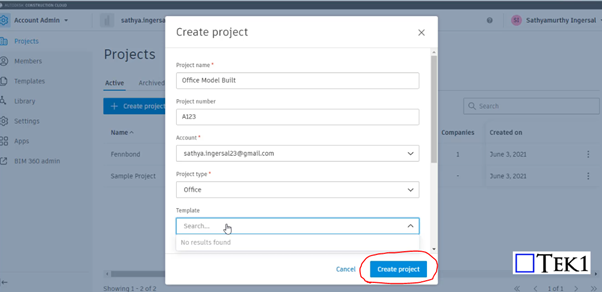
    Step 2: Click on the Account Admin to create a new project

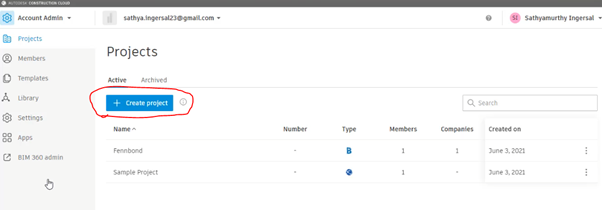
    Step 3: Click on to “ Create Project”

    Step 4: Fill the Project Details and Particulars with your Autodesk Email ID and click Create Project

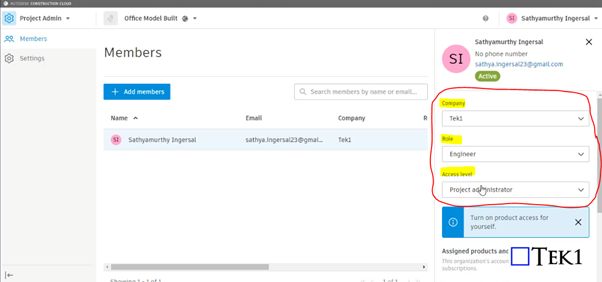
    Step 5: Provide your information such as role, access level, and organization on the right-hand side

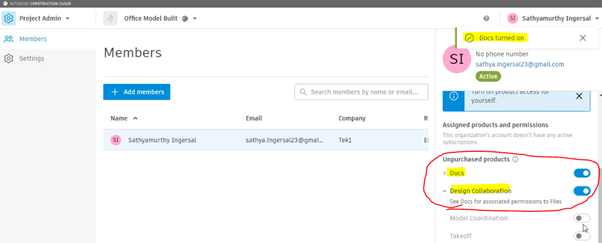
    Step 6: Please Turn on the products to be used by moving the scroll down. So that Turned on feature can be accessed as shown in Step 10

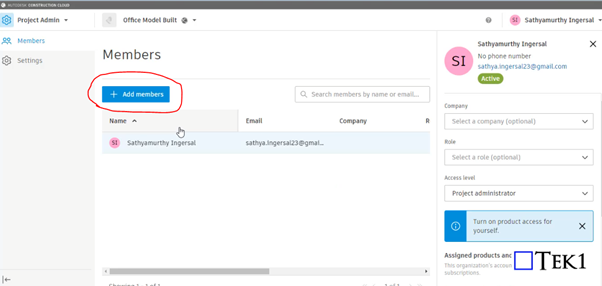
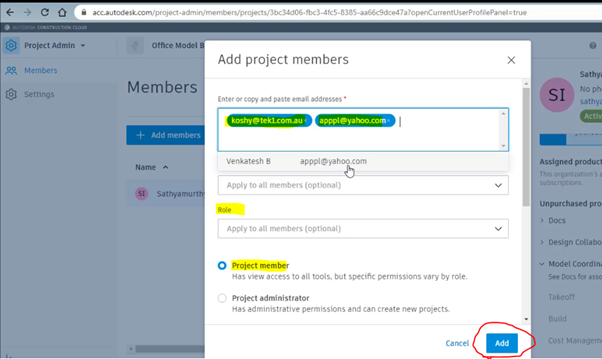
    Step 7: Click on to Add member to assign the members who are going to involve and access the files in this project

    Step 8: Assign the members by adding their Autodesk email with organization name and their role and select as project member and click Add

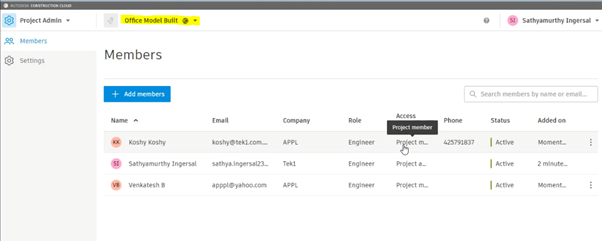
    Step 9: After adding the member you can see their active status and details under the project we assigned

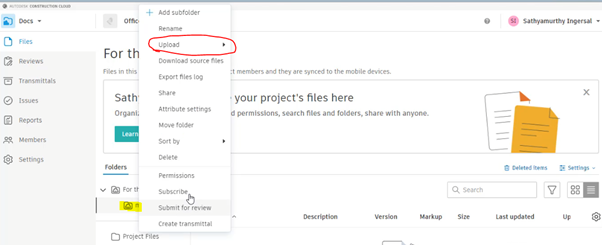
    Step 10: As we turned on the following highlighted things in step 6. So that now we can access the following by Selecting the Dropdown and click on the docs to upload the file

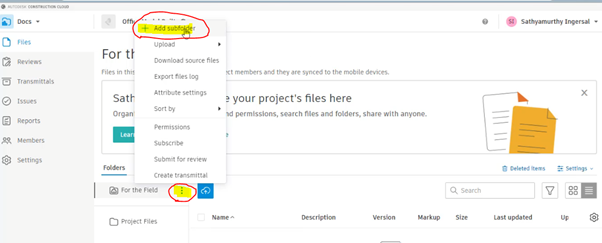
    Step 11: To create Subfoler and folder click on to the highlighted below and select Add subfolder

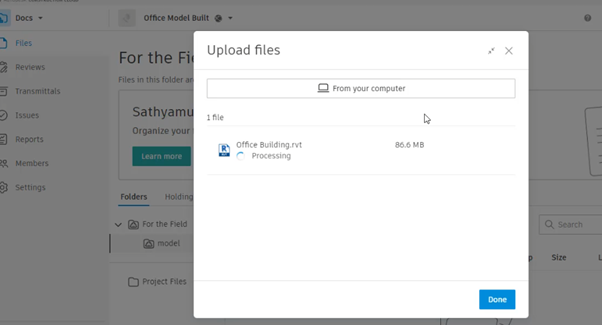
    Step 12: After creating and naming the folder right-click to it and click on the upload and file. then drag the file and start upload

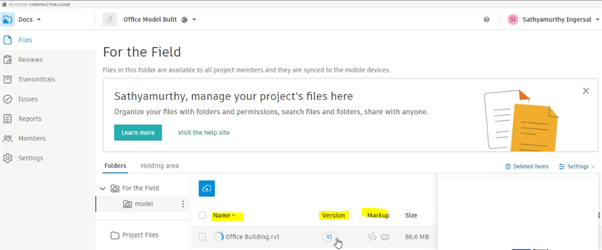
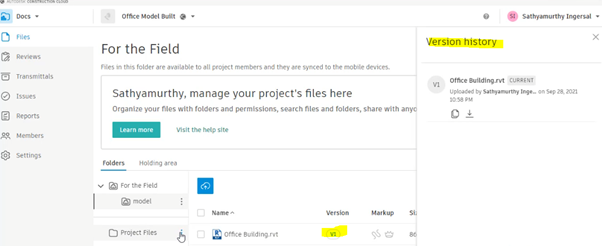
    Step 13: The file with its details and version, Mark-ups status will be displayed once the above steps are done

    By clicking on to version you can review the history of the file from start to upload till revised. The file model can be review online itself by clicking on Filename

  • Steel Detailing Primers and Processes

    The following codifies our processes. It is made for the following reasons:

    (i) to educate our own staff, about what they need to know and secondly,

    (ii) to make transparent to our clients, how we operate. We are essentially inviting you into our kitchen, so you can see for yourselves how we cook, and to then decide, whether you would like to dine with us.

    1. Mistakes are expensive. (Why this is the case?)
    2. Understanding risk and liability.
      1. Understanding risk: liquidated damages, contractual obligations, insurance. Understanding the legal system in Australia, USA, UK.
      2. e.g. to NEVER issue drawings for construction without consultant approvals.
    3. Confirm important details in writing. (Why is this the case?)
    4. Understanding: the importance of accurate estimation(s) of deliveries (Why is this the case?)
    5. What do clients value?
      1. To make things as easy as possible for the client, and to make the client money. This might involve:
        1. Quick drawings.
        2. Accurate drawings.
        3. Timely feedback (i.e. what is the status of their project?)
        4. Pushing the job along.
        5. Solving problems with minimal noise
        6. If they client asks for something, we need to either: (i) deliver what they ask exactly, or (ii) give clear reasons why it can’t be delivered. If the client asks for an program schedule, it will not do to say: “yes sir” and completely forget what the client asked for.
        7. Delivering on your promise. If you say “5 minutes” then deliver in extra 300 seconds, and not, 6 hours later. (Why is this important? (the client might allocate an entire team to fabricate something in 5 minutes, and you will cost the client $10,000s of dollars if they are sitting around in the factory floor, without nothing to fabricate, because you didn’t deliver the drawings when promised)).
        8. Making things easy for the client to fabricate and/or manage their projects.
        9. Good grammar, good English, and clear communication.
        10. Extra material: to be immediately communicated to the client. (Why? So clients can recover their costs).
        11. Tender drawings vs for construction drawings to be compared and the differences reported to the client in a report. (Why? So the client can recover costs).

  • AWS VPN Client Errors

    If you are having trouble with the AWS VPN Client, you need to systematically work through the issue. Remember, we are authenticating with Azure Active Directory (using what’s called: “SAML 2.0”). If you don’t know how to do something, or if you don’t understand something: please go to Google and find out.

    First start with the basic requirements:

    1. Check your internet speed. if your upload speed is less than: 5 mpbs then you need to upgrade your internet.
    2. Delete all your cookies in all your web browsers. (Please use Google if you don’t know).
    3. Check that you have the requirements: Windows, and .net etc. If you don’t have the requirements, then please upgrade your system to meet those requirements. Please use Google to find out how.
    4. Check Troublshooting Client VPN.
    5. Check Windows Troublshooting.
    6. Search Google and AWS forums for the error you are facing.
    7. Check the AWS Client Log files (search for them on Google). Read the log files and try to search for where the error is. Do further Google searches – continue until you find the problem.

    If you don’t understand what the instructions are, then please undertake a further google search. For example we are required to have Windows 10 Pro. How do I verify this? Google. Next we need .net 4.7.2. How do I verify this? Google. We have a port conflict. What is a port? Google. How do I know I have a port conflict? What is TLS? What is UDP? etc. you get the picture.

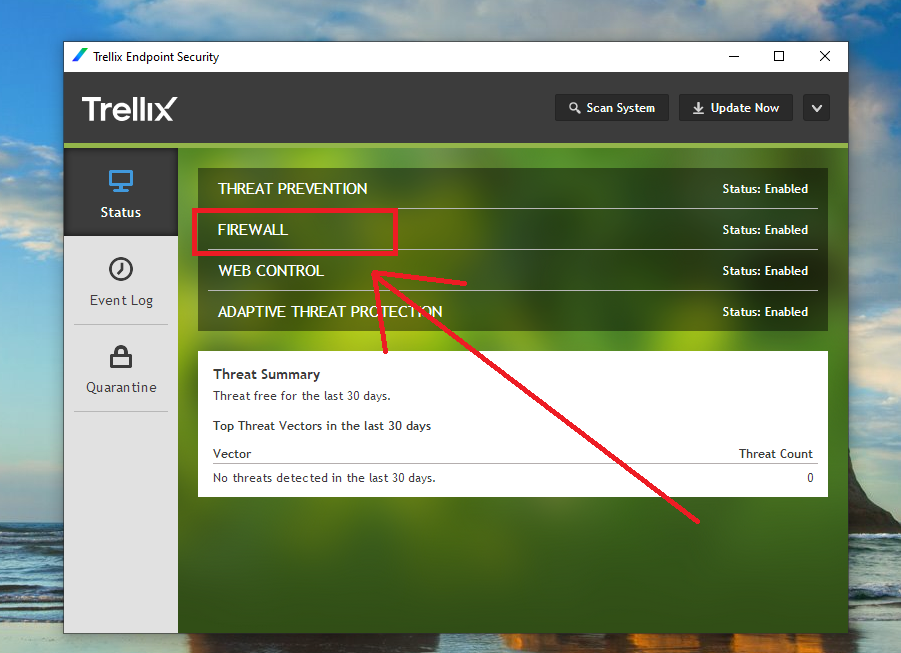
    Firewall

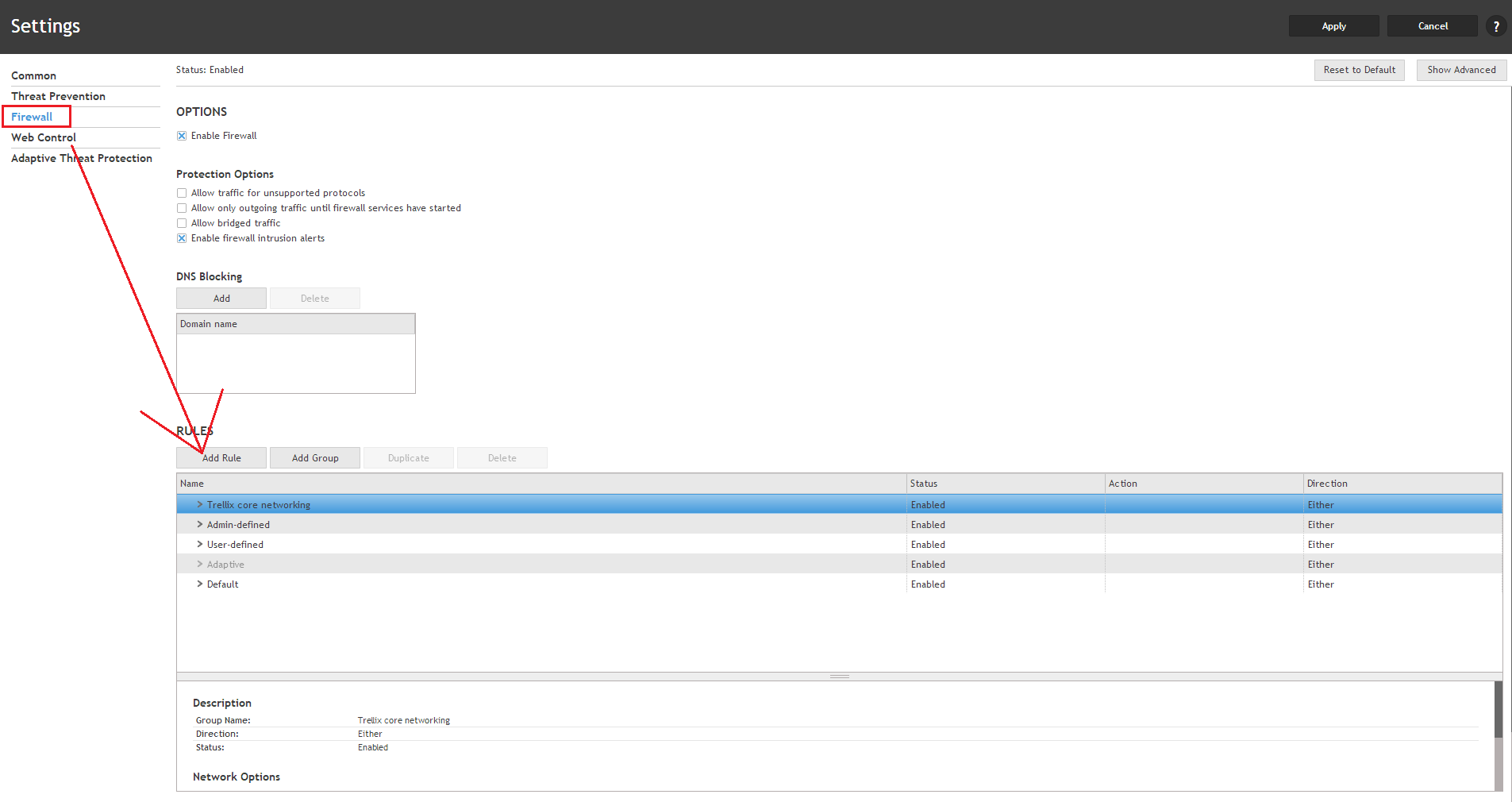
    Ensure the AWS VPN client can operate through the firewall:

    Trellex example
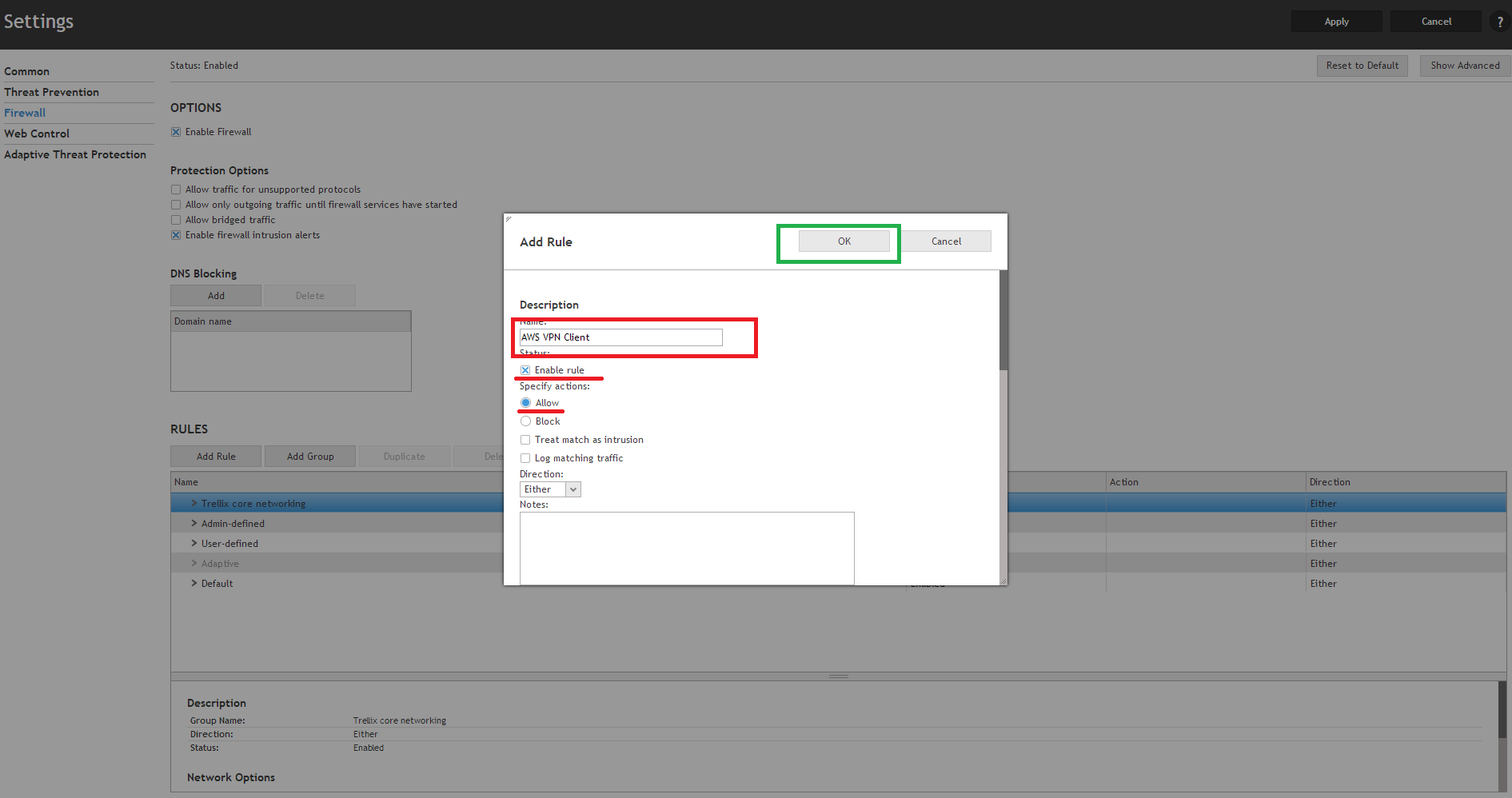
    Add a new Rule
    Ensure that the AWS VPN Client is allowed through the firewall.

  • Revit Project Data and Parameters Populate in Title sheet


    Input Data

    • Project Details – Does the Revit file allow us to create Project Details. How and where is the data available to read?

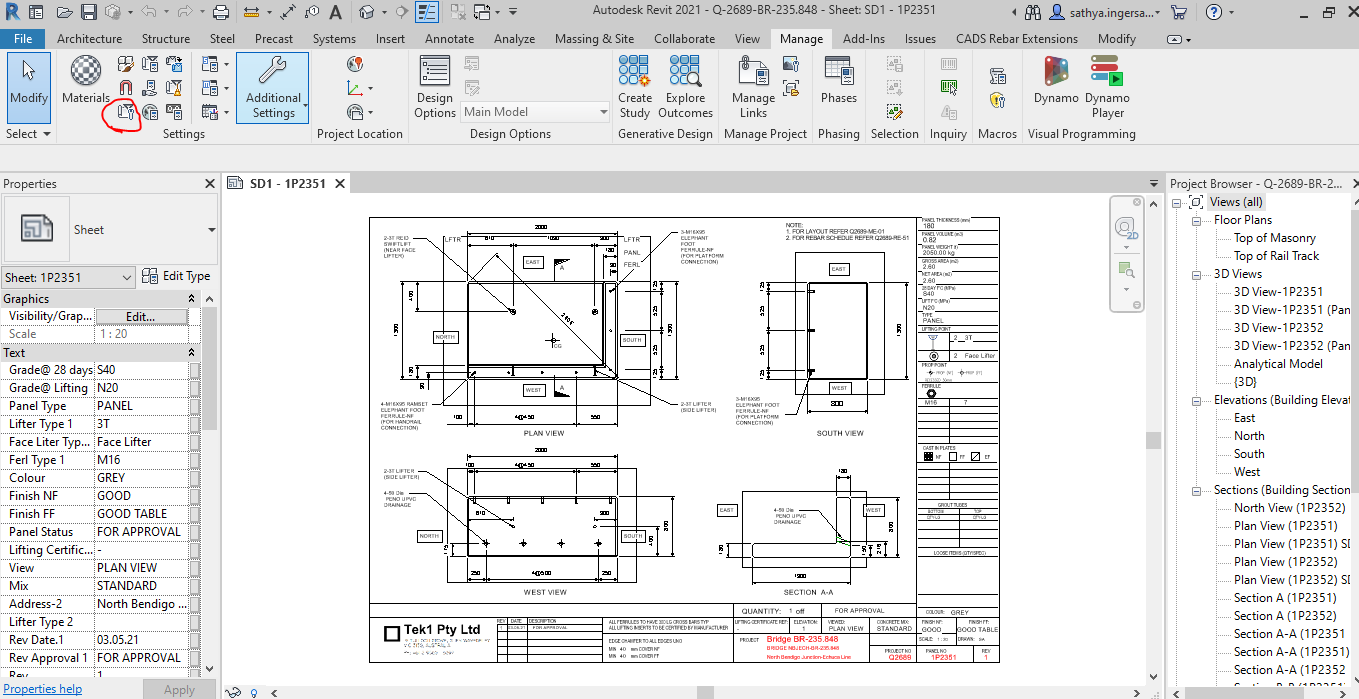
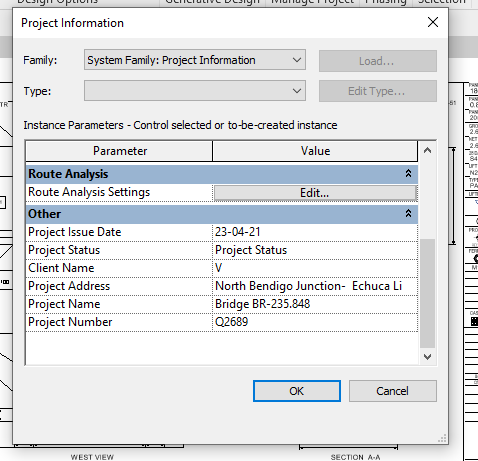
    For Project information the details will be added and done in the Manage tab as shown below

    Step 1: Clicking to manage tab and click on the red clouded region as Project Information


    Step 2: Entering the Data about the Project as Shown above


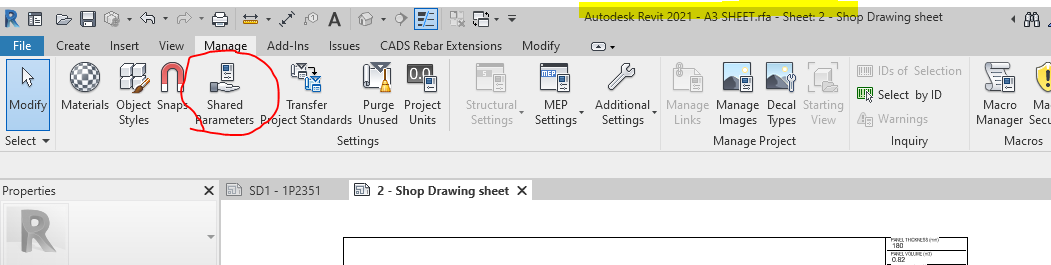
    Step 3: Open the sheet family and click on the Shared Parameter Option in the Manage tab


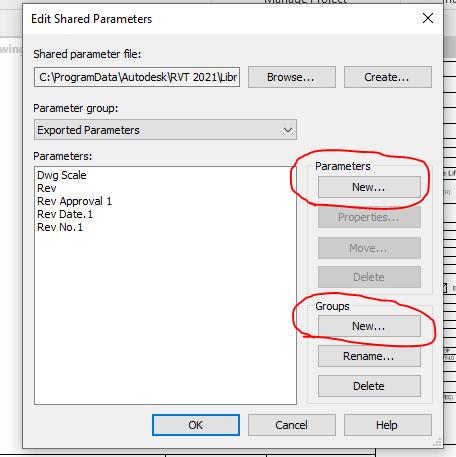
    Step 4: Create the new parameter if needed and Create new group where the parameters are to be called for.


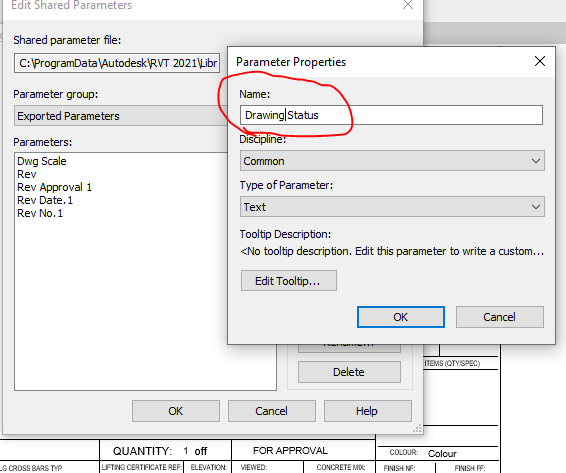
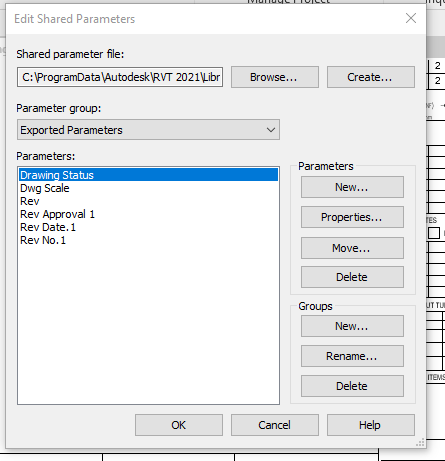
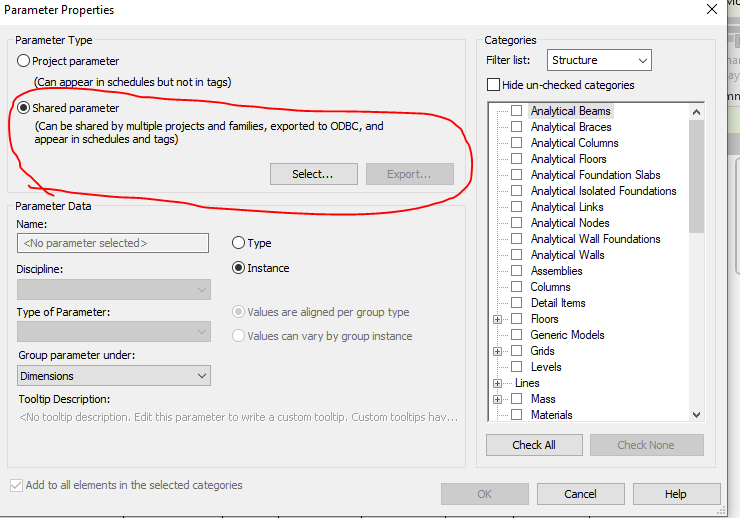
    Step 5: Add the new parameter in the Paremter property. Once parameter done it can’t be edited and it has to be removed and create a new one .


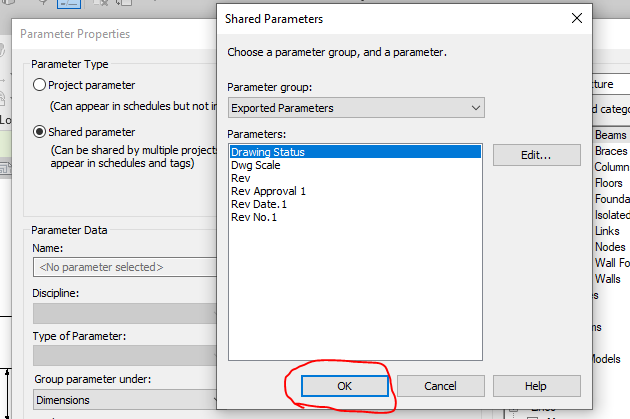
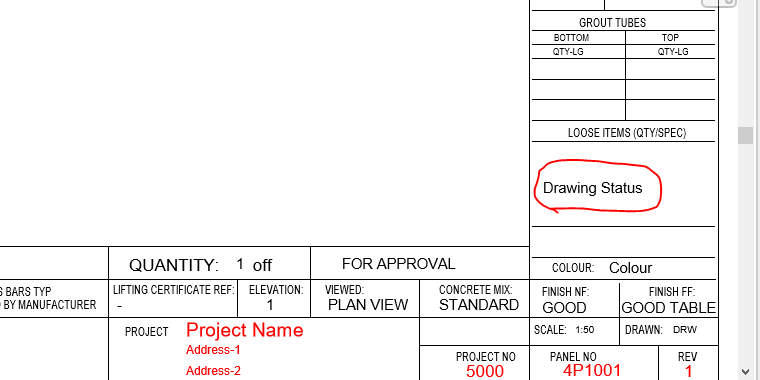
    Step 6: Now the “Drawing Status” Parameter are now called under the Parameter group exported parameter.


    Step 7: Click the Label Parameter to call the label that are already created in parameter


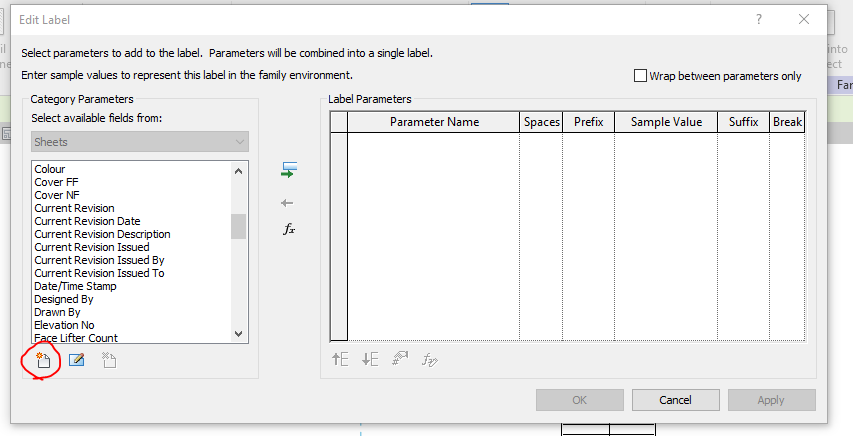
    Step 8: The parameter which was created in shared was not displayed so click on the add parameter to call from the group.


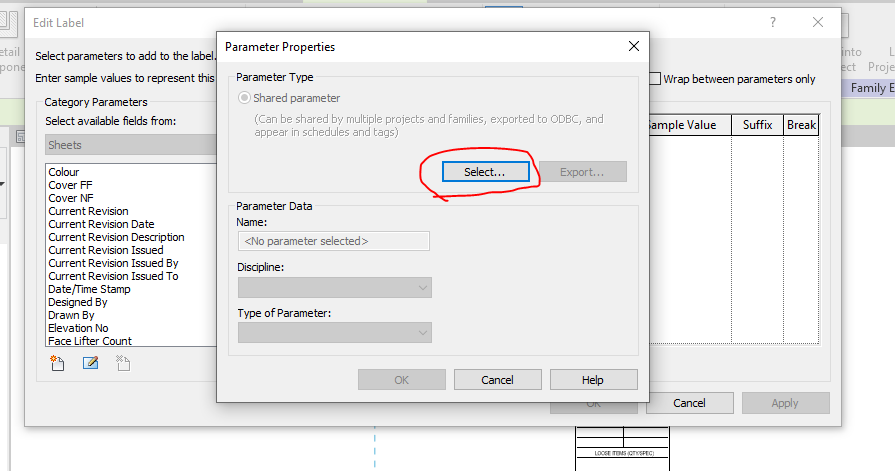
    Step 9: Click on the select button to call the shared parameter group defined.


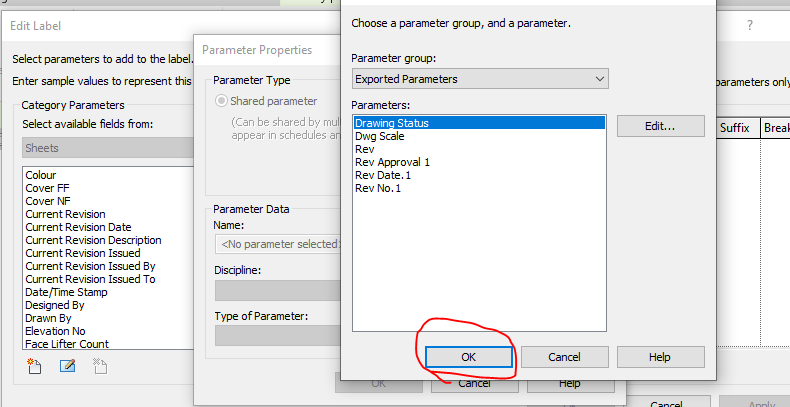
    Step 10: Click on the required parameter to call and click on ok


    Step 11: The parameter which was not available in the list are now generated and called


    Step 12: The parameter which was not available in the list are now generated and called to edit parameter list


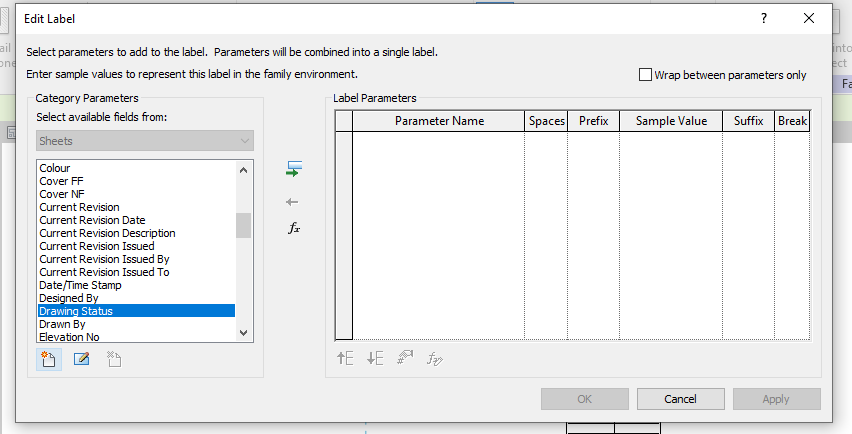
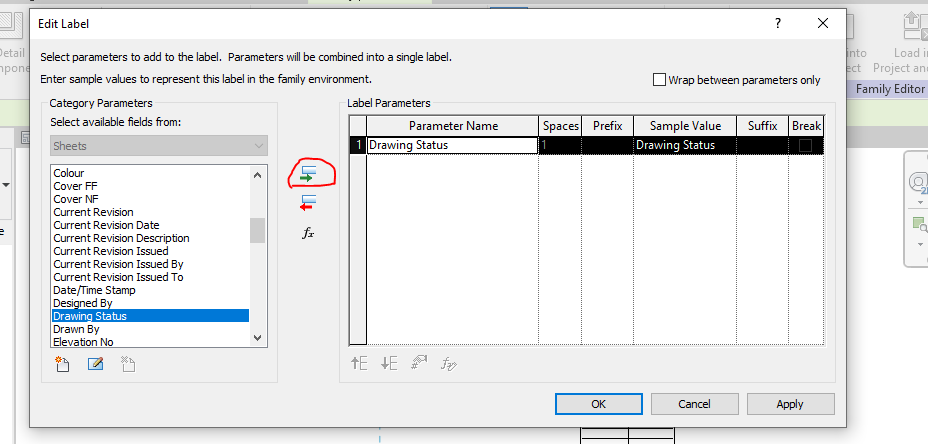
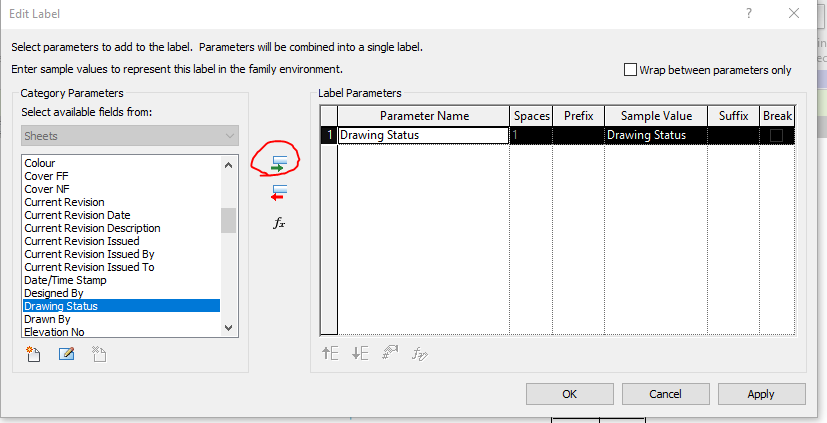
    Step 13: Then click the add parameter lab clouded in red and the following parameter will be added in the label and then click ok.


    Step 14: The Label “Drawing Status” was now added in the Sheet Family


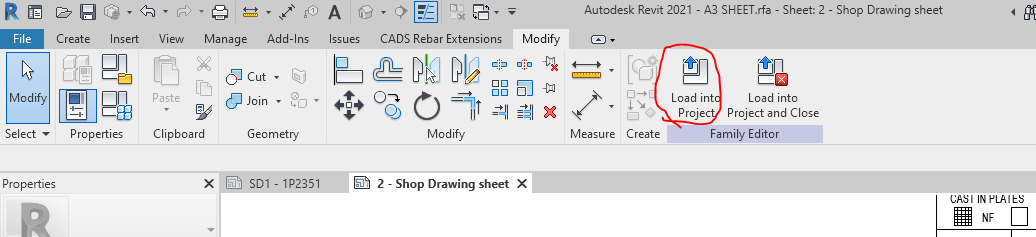
    Step 15: Then click on the “Load into Project“ button to load the Shop Drawing Sheet in the Project.


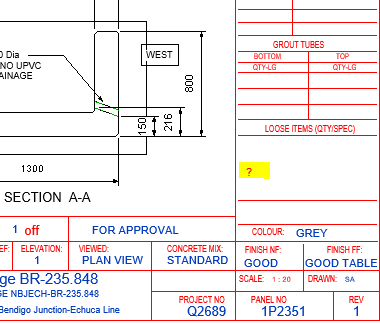
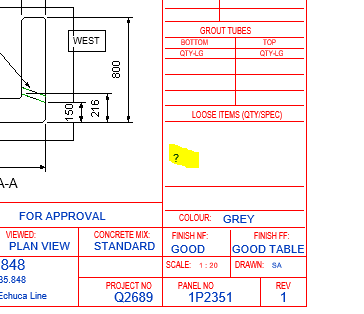
    Step 16: The question mark we highlighted are the Parameter “Drawing Status” and it’s not editable at this stage because this shared parameter was not called in the Project Parameter. To sort this please follow the below steps.


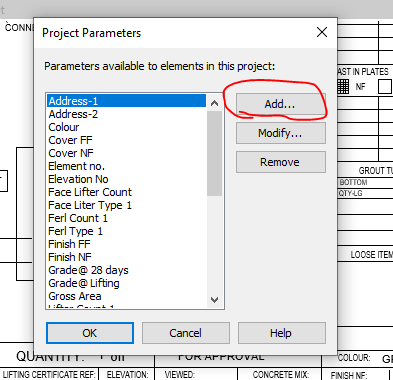
    Step 17: Click on the project parameter to call the shared parameter we defined in Sheet family


    Step 18: Click on to add button


    Step 19: Click on to the shared Parameter and then click select button


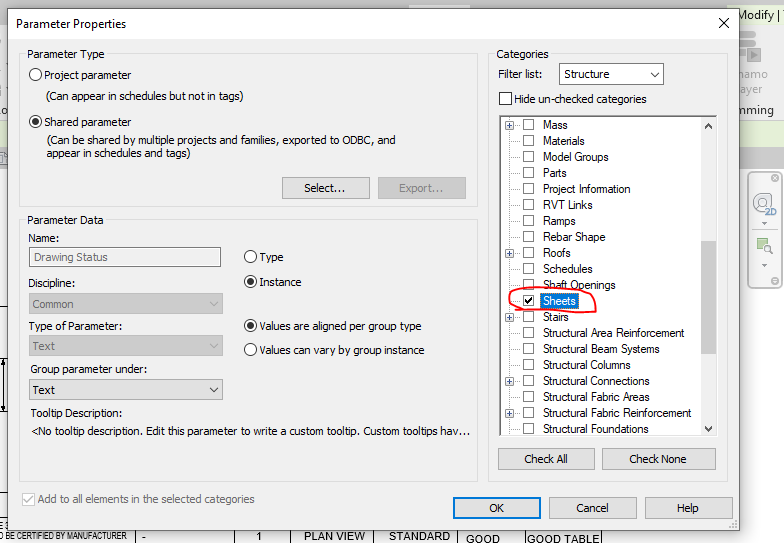
    Step 20: Click on the Parameter you defined previously and need to be editable and click ok.


    Step 21: Once the shared parameter are defined on Project Parameter then click the Check box on the right end shown where the parameter to be display in your revit file and then click ok.


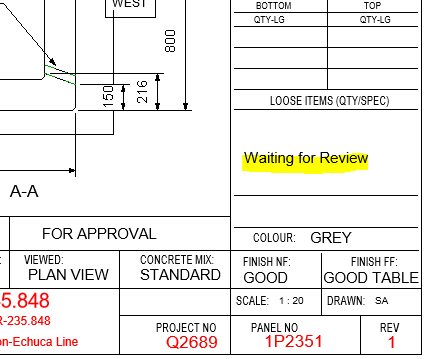
    Step 22: Now you can see the question mark colour changes from red to blue which is editable one.


    Step 23: The Parameters are added and edited in the Shop Drawing Title Sheet.


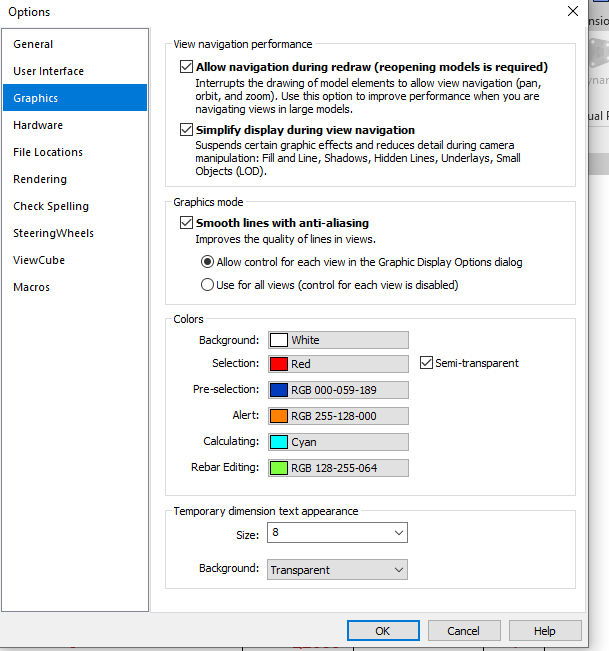
    Idea: If you like to make your visuals to find the parameter is in editable or not editable please do the following thing below

    Go to file tab and click on the option button below and set the graphics by changing the colours as shown below instead of same colour

    Thanks to Koshy, Ben ,Venkat and Parthee for Supporting and guidance .

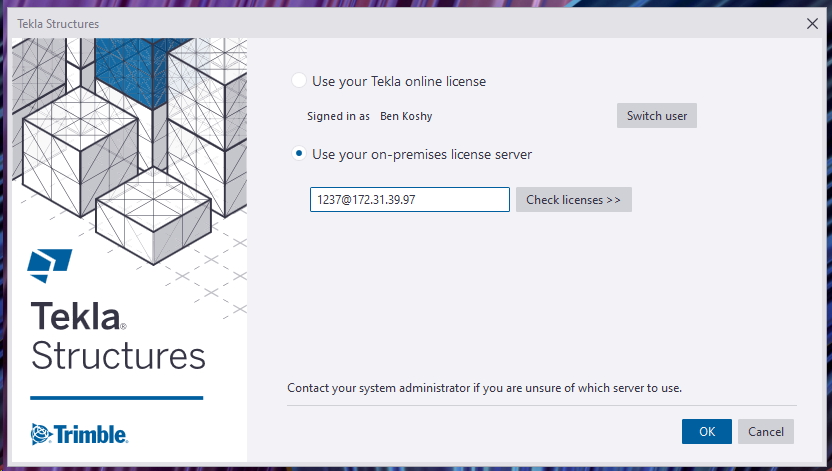
  • AWS VPN to Tekla License Server

    AWS VPN to Tekla License Server

    Documentation on how to do it, for all Tek1 Staff Only.

    Rules

    (1) DO NOT HAVE PIRATE LICENSES ON YOUR COMPUTER.

    Please contact me if you have any questions.

    No pirate licenses. This means genuine Windows, MS Office, and genuine Tekla licenses. In this organisation we pay developers/companies for their labour and services. We don’t steal. Moreover, I need to know the cost of operations, and costs we incur should be added to our invoicing. It is critical that our costs are accurate. If we have to resort to piracy in order to maintain profitability, then we ought to quit the business entirely and do something else.


    (2) Disconnect your VPN connection when not in use. So others in our team can access. VPN connections are very expensive.
    (3) Do not share your username / password with anyone else.
    (4) Do not use these licenses for your own personal work – i.e. for Tek1 use only. This ties in closely with the first point re: piracy.

    VPN Access to our Tekla Licenses
    VPN Access to Our License Server

    Outside the Office

    • If you are accessing our VPN from outside the office, please follow the instructions in the following video:

    I will tell you the client vpn passwords and codes that you need in order to connect. Just msg me please.

    Problems or Errors?

    Please read the trouble shooting page here.

    Administration Notes

    • Users must be added to the “Steel Detailing Group” to get access.
    • External users must be added to the: “External Contractors” group if they are contractors.
    • If staff should leave the organisation, they must be deleted from both groups. Access via Azure Active Directory’s portal.
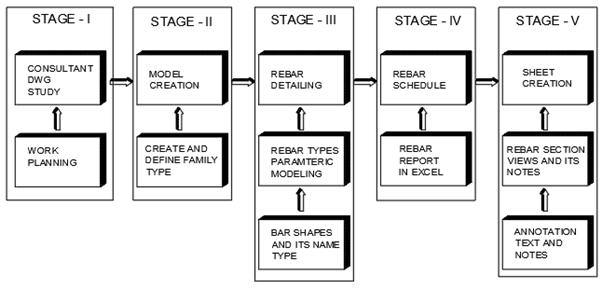
  • Rebar Detailing Basic Process

    STAGE 1:

        Work Planning and queries preparation based on the information received from structural engineers either as data or from the consultant drawing

    STAGE 2:

        Model creation  for the elements in the Project  like Walls , Columns, Beam , Slab ,Footing and stairs based on details and data received.  If elements are not standards one means it  will be created as families .

    STAGE 3:

         Rebar detailing and bars arrangements inside the element (Walls, Columns, Beam , Slab ,Footing and stairs) based on the cover distance between the Concrete and rebar. Rebar Parameters and it’s bars shape are reviewed before starting rebar detailing

    STAGE 4:

      Rebar schedule will be created from the excel sheet generated from the rebar type quantity and its arrangements provided in the element.

    STAGE 5:

         Sheet creation from the templates based on the sheet size to be used . The excel rebar schedule created are to be dragged and place inside the sheet. The Rebar section views and its detail notes and dimension are created with view pot and scaling, but before proceeding on the above the annotation and text size are to be set and created.

  • Stair & Platforms – AS1428 & AS1657 – Online Training, Standards, Codes and Tests

    Applicable stairs, and ladders require compliance to:

    • AS1657 standards (by law in most Australian states – Victoria being the exception) – (sorry I can’t source the original copy here because it cost me $500)

    How can you test whether you know the standard? Take our online test – all detailers must pass this before they are allowed to detail any stair.

    Contact us for your detailing requirements.