Tag: AutoCAD .net

  • Checking the Transportability of Precast Panels – Using the AutoCAD .net API

    Checking the Transportability of Panels – Using the AutoCAD .net API

    It is one thing to build a panel. It is another to ensure that:

    1. It can be lifted, and
    2. It can be transported to the site.

    Here is a video demo explaining everything:

    Can a precast panel be safely transported? from Tek1 on Vimeo.

    A short primer on the importance of efficiency

    When you are dealing with 100s, and perhaps even up to a 1000 panels per building, this can become extremely cumbersome and time consuming. Why not automate the entire process? This allows you to do things faster, to get the drawings out faster, and (hopefully) to build the panels faster, and ultimately the building faster. Speed is absolutely paramount! The faster a builder can get on and off of a construction site, the faster they can get paid. This lowers their working capital needs, and accordingly, their financing costs (however that may arise). Speed is king!

    Considerations When Transporting Panels to Site

    Every truck has a:

    • Size limitation (both length and height), as well as a:
    • Weight limitation (there is a maximum capacity).

    Secondly, trucks have different limitations, depending on where they are transporting a panel. E.g.

    • Trucks passing through the CBD (central business district) have different: length/height and mass requirements compared to those that are not, furthermore, these requirements are different depending on whether the truck has a permit or not.

    Let’s suppose you have the following hypothetical situation – take out a sheet of paper and pen and try and solve this by hand:


    Truck A

    • Length limitation: 6 m
    • Height limitation: 3 m (but a height limit of 2.5 m in the CBD; and a height limit of 3.2 m with a permit)
    • Weight Limit: 12 tonnes.


    Truck B

    • Length limitation: 4 m
    • Height limitation: 4 m (but a height limit of 2.5 m in the CBD; and a height limit of 3.2 m with a permit)
    • Weight Limit: 18 tonnes.


    How on earth are you going to work out, quickly and efficiently, whether your fleet can transport the following panels:

    1. ABC1 – Mass: 13 tonnes, Length: 5 m, Height 3 m
    2. ABC2 – Mass: 10 tonnes, Length: 3 m, Height 2 m
    3. ABC3 – Mass: 12 tonnes, Length: 4 m, Height 2.5 m


    Problem

    • Are you able to transport your panels by any of the trucks in your fleet?
    • Which of your trucks can you use to safely transport a particular panel?

    How was this particular problem was solved using the AutoCAD .net API?

    • I created a data structure for each of the limitations imposed by a truck.
    • Similarly, I created a data structure for each of the limitations imposed by each panel.
    • And very simply asked whether a truck and lift a panel? The output was compiled and put into an Excel report. They key method tying this all together is the `CanLift` method on the Truck class.
    • I used ClosedXML to combine it all together to produce a report.

    Here is an example of the results:
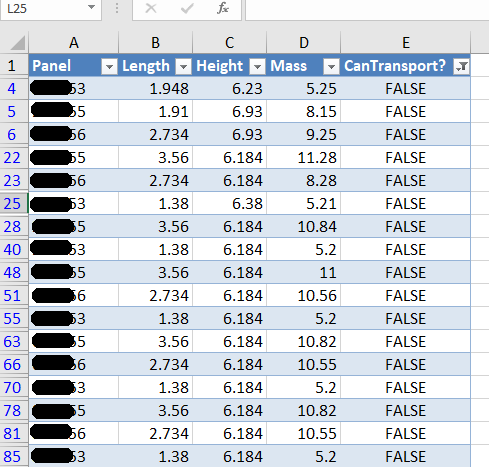
    panels that failed the transport check
    A sample of the report produced when running the command. This is showing all the panels that failed.

    Here are the key server classes:

    Summary

    • Tek1 has the resources and expertise in order to do Precast Panelling jobs fast and
    • Accurately

    These are just the tip of the ice burg in terms of the checks and processes we employ.

  • On Line Equality (AutoCAD .net API)

    Some lines may be more equal than other lines? The AutoCAD .net API's EqualTo method may disagree with your interpreation of equality. Here are the results;
    Some lines may be more equal than other lines? The AutoCAD .net API’s EqualTo method may disagree with your interpretation of equality. Here are the results;

  • Create Truss (Process) – BubbleDeck Detailing

    Not a truss, but it looks good.
    Not a truss, but it looks good.

    A nifty little tool that automatically inserts trusses into bubble deck panels depending on:

    • Their thickness
    • their width

    And also their:

    • specified ball / void spacing.

    Please remember to select all the panel lines.

    You can see a video demo here:

    Create Truss – Tek1 Tools for BubbleDeck from Tek1 on Vimeo.

  • A Poor Man’s Line Jig (well, there’s actually no jigging here) – (AutoCAD .net API)


    What are these guys doing, you ask? I suspect that they are jigging a line. They are probably doing it this way because they didn't read the ObjectARX documentation. Well actually, you don't need to. Just use the poor man's jig.
    What are these guys doing, you ask? I suspect that they are jigging a line. They are probably doing it this way because they didn’t read the ObjectARX documentation. Well actually, you don’t need to. Just use the poor man’s jig.


    I wanted to implement a jig for drawing a Line – but strictly speaking I didn’t want the line itself – I wanted its two points, yet I wanted all the features that come with jigging: snaps, polar tracking, and a nice line leading from the base point to the cursor, which shows you where you were, and where you are going. I was originally going to jig it all myself – and all of this to obtain two coordinates in a manner that would allow the user to see what was actually going on. Jiggig takes a lot of effort. It was only then that I realised I could get the same result, but with a massive short cut:

    Here is a poor man’s Line Jig – at the end of it, you’ll have the two points you are after, but without the effort. If required, you can encapsulate all the logic in it’s own class, so that the client doesn’t have to bother too much with the implementation details.

    Poor man’s line jig.


            [CommandMethod(“GetPoints”)]

    public static void GetPoints()

    {

    Document doc = Application.DocumentManager.MdiActiveDocument;

    Database db = doc.Database;

    Editor ed = doc.Editor;


    PromptPointResult pprOrigin = ed.GetPoint(“Click for point.”);


    if (pprOrigin.Status == PromptStatus.OK)

    {

    PromptPointOptions promptPointOptions = new PromptPointOptions(“Please get secondPoint”);

    promptPointOptions.UseBasePoint = true;

    promptPointOptions.BasePoint = pprOrigin.Value; ;


    PromptPointResult ppr = ed.GetPoint(promptPointOptions);


    if (ppr.Status == PromptStatus.OK)

    {

    ed.WriteMessage(“Congrats!”);

    }

    }

    }


  • Finding the Point on a Curve Which is the Closest Point to Another Curve? (AutoCAD .net API)

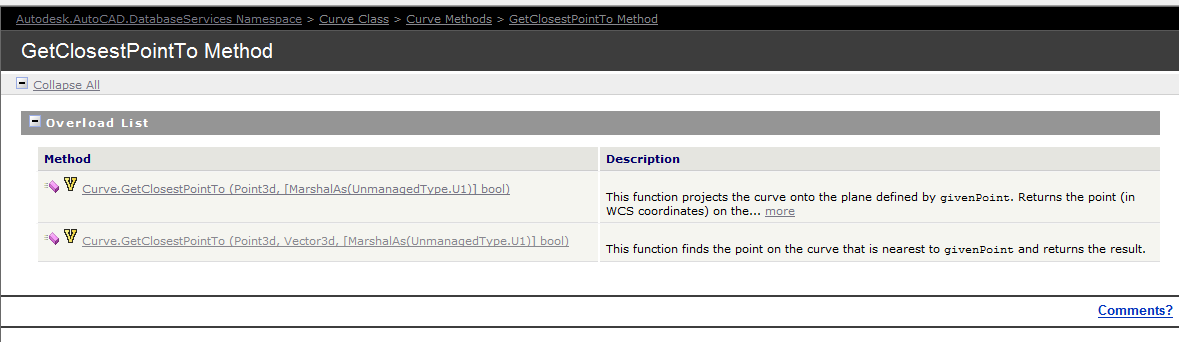
    Documentation of the GetClosestPointTo method of the curve object - the overloads are extremely limited. So we have to be somewhat creative in obtaining a solution.
    Documentation of the GetClosestPointTo method of the curve object – the overloads are extremely limited. So we have to be somewhat creative in obtaining a solution.

    The Genesis of this problem

    This is a tricky little problem and I could not find a solution on the forums. So I resolved, upon discovering the solution, to oblige posterity and the public, to publish my findings.

    Specific Notes about this problem

    Now the following code has been generalised to the specific case of Lines and a non-descript curve (which of course is an abstract base class), but the general principles can be applied to any type of curve.

    Notes on implementation

    Unfortunately, the curve object exposes a method: GetClosestPointTo, which is only overloaded to accept points and not other curves. In order to deal with this rigmarole we’ll have to first, convert the curve to a `Curve3d` object which is a member of the Autodesk.AutoCAD.Geometry namespace as distinct from the Autodesk.AutoCAD.DatabaseServices namespace.

  • Point Monitor Hello World (AutoCAD .net API)

    We have someone who is pointing to the monitor. Makes perfect sense right?
    We have someone who is pointing to the monitor. Makes perfect sense right?

    This is largely a replication of what is contained in the documentation without the extraneous (and extremely confusing) intertwining of WPF/WinForms functionality. Personally I believe when engaging in hello world functions that they should be as simple as possible.

    I have done as much here.

    In time, I will add further details to provide you with some more information on the classes that are used. The main thing to pay attention to here is the FullSubentityPath class as well as the PointMonitorEventArgs.AppendToolTipText(string) method. More details will follow later on. For the moment, parse this code and try to understand what you can:

  • Generating Bubble Deck Precast Order Forms From Excel To AutoCAD (Bubble Deck, AutoCAD .net)

    Ordering thousands of items in a layout is not easy. Order efficiently with Tek1!
    Ordering thousands of items in a layout is not easy. Order efficiently with Tek1!

    This is a demonstration of how we use Excel-Add ins and AutoCAD plugins to simplify the process by which order forms are created for Precast panel jobs.

    Please watch the below video:


    Print Bubble Deck Order Forms from Tek1 on Vimeo.

  • How to Access the Document Handle Given a Database Handle? (AutoCAD .net)

    A short post showing you how to access the Document instance given that you already have a database pointer.

    Here’s how:

  • Dimensioning Curves Using Jigs (AutoCAD .net, Precast)

    This is a beautiful little plug-in – it allows you to dimension a curve – a complex curve with a jig. It allows the user to choose the types of dimensions that he wants. It’s pretty cool.

    I must do an entire series on jigs.

    And I will slowly, when I get the chance.