Tag: dynamo

  • DYNAMO: MODELING COMPLEX STRUCTURES

    When it comes to 3D modeling, there always exists limitations with conventional modeling software while working with complex structures. In business, it is very important that each and every need of the customer must be fulfilled without compromise. With these things in mind we started experimenting various ways to model complex structures. Dynamo came into help here. The main advantage of using Dynamo is its accuracy and speed.

    We have done a aesthetic facade for an atrium using Rectangular hollow steel section which comprise of a Sine wave geometry in its elevation. Without the need of creating each and every piece individually we created a script which automatically generated the facade with the required profile. The final output was really accurate which may be limited when doing it manually. The size and shape of the overall model can also be adjusted easily to our requirements by using Dynamo.

    If you want us to model any challenging structure like this, please do contact us.
     

  • DYNAMO: THE GAME CHANGER

    Automation is the process of making a task automatic, an essential requirement for all business processes to achieve accuracy in repetitive tasks, where humans or manual tasks are prone to error. One of the most powerful automation package of recent times in the construction industry is the Autodesk’s Dynamo. It is an open-source visual programming tool which works with Revit and other Autodesk products but could also be integrated with non-Autodesk programs using Standalone releases like Dynamo Studio, Dynamo Sandbox, and Project refinery.

    Unlike other Application Programming Interfaces which are used by well-grounded programmers, people with minimal coding knowledge can create custom scripts using the Dynamo to access the Revit interface. It runs on the background of Design script and Python. With Dynamo, the opportunities are endless and many time consuming tasks in various disciplines such as design, detailing, modeling, analysis, documentation can be automated.

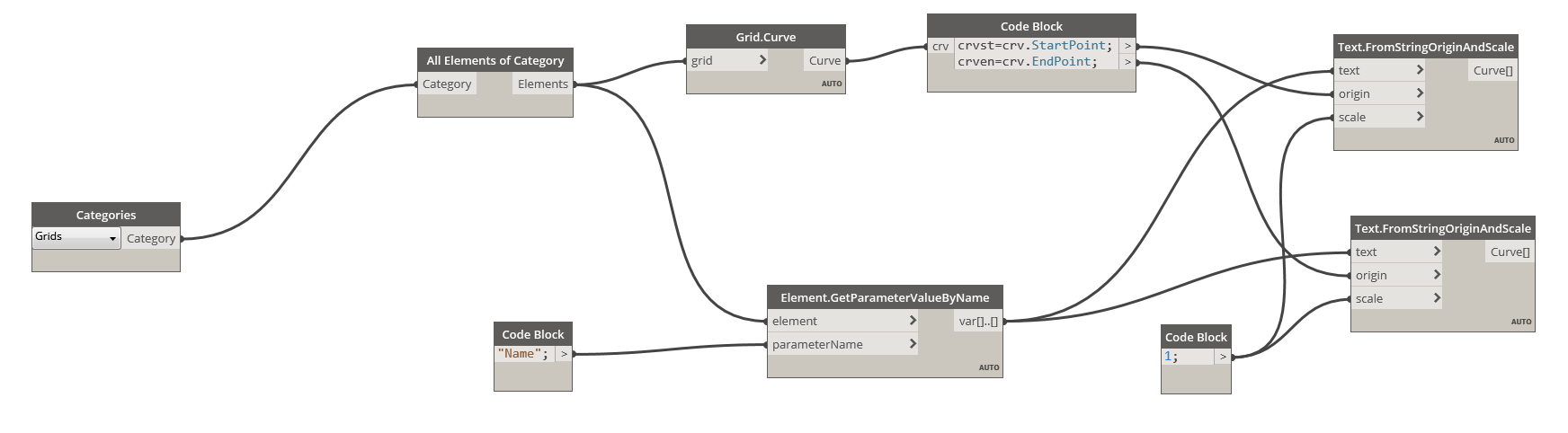
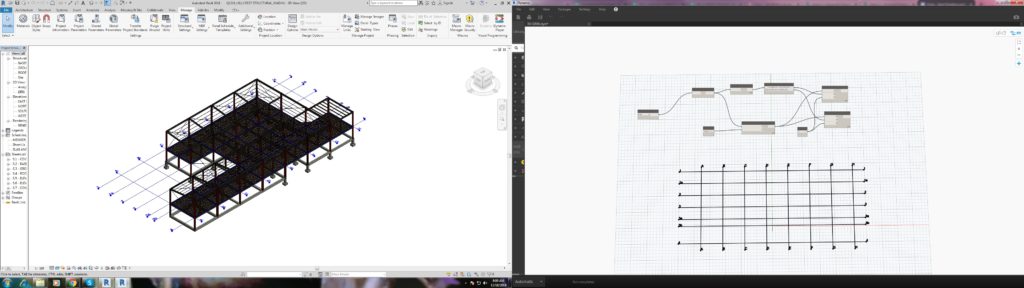
    We use Dynamo to find potential solutions to problems we face day-to-day. One such problem was the unavailability of 3D grids in Revit. Moreover even when exporting a Revit model to CAD .dwg format, the grids failed to show up but they are available with Ifc exports. We developed a simple script to solve this issue using Dynamo.

    The workflow between Revit and Dynamo is shown here.

    The above snip shows the sequence of nodes in the dynamo workspace which were used to create Grids in 3D view.

    We found it quite interesting when we started digging to explore the capabilities of Dynamo to help us with our jobs. Learn more about Dynamo: https://dynamobim.org/

    If you have any questions or opinions about this post please do comment below.

    Written by Madhumitha Balaji