
Tag: trimble connect

  • Trimble Connect- GA Drawing 3D-Export [Ep-6]

    GA Drawings overlay on IFC Model

    Ever wondered about how easy and accurate it would be to study a GA drawing when it is overlayed on the IFC Model? Well, Trimble Connect gives you a way to do so. The GA drawings are exported along with the 3D co-ordinates as dwg files in Tekla Structures. This process is easy and we have to make sure to activate few options in Advanced Options and in Export Drawings dialog box.

    • In Advanced Options dialog box, Select Export and look for the option XS_DWG_EXPORT_3D_MODEL_COORDINATES and change the value for it as TRUE.
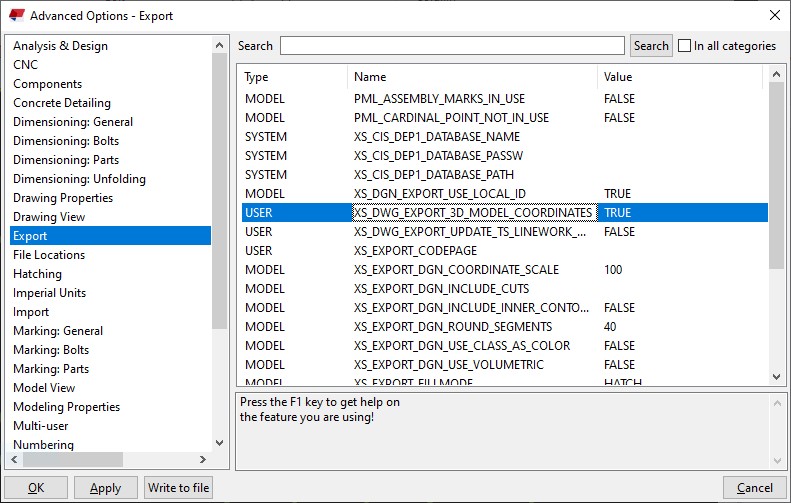
    • Once this value is made true then we can proceed with the regular method of creating the GA Drawings and then export it.
    • When exporting the GA drawing, we have to make sure that the Model Space Co-ordinate value is made Model instead of Local.
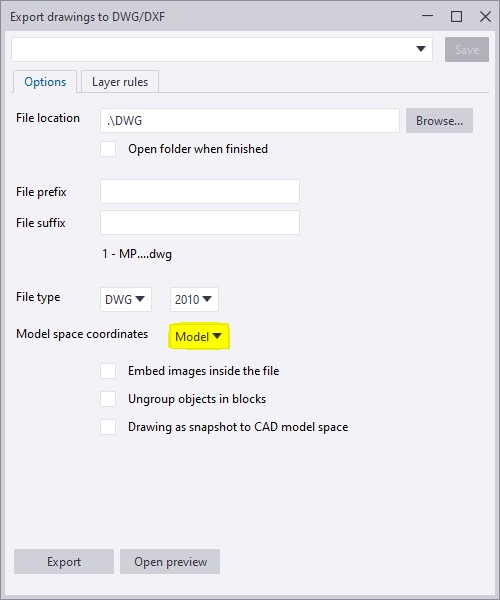
    • If the model space co-ordinate is kept as local then the dwg file will take the local co-ordinate values as in the drawing created and the 2D dwg files are exported.
    • If the model space co-ordinate is kept as model then the dwg file will take the Tekla model co-ordinate values and the 3D dwg files of the GA drawings are exported.

    To have a more clear idea of how this option works refer to the video attachment.

  • Trimble Connect – The powerful collaboration [Ep-1]

    Trimble Connect is a powerful collaboration tool for Architecture, Engineering and Construction (AEC) Professionals including the Architects, Engineers, Detailers, Sub contractores, General Contractors and Project owners. This tool helps in collaborating the models among all the members of the project. This tool makes the project information accessible, transparent and traceable and to help users to build better.

    It keeps everyone in the hierarchy of the project updated about the progress and the next course of action. Trimble Connect accessibility via the web, desktop and mobile devices makes it userfriendly to share, view and access construction project data anywhere and anytime. Some of its main features include an activity feed, align models, export reports, create a project, coment on to-dos, file explorer, model object filtering and clash detection.

    TRIMBLE CONNECT FEATURES :

    • 3D markup

    • Align models

    • Activity Feed

    • Comment on to-dos

    • Combine and view selected models

    • Change color of some objects

    • Control visibility of entire model

    • Create a project

    • Define custom reports

    • Create and manage folders

    • Create and manage releases

    • Exchange to-dos using BCF 1.0

    • Export reports

    • File Explorer

    • Manage permissions and notifications

    • Model object filterin

    • Manage users and groups

    • Save views

    • Run clash checking

    • View/comment clashes

    • Temporary local offline storage

    Let us see how we are going to collaborate using Trimble Connect in upcoming blogs. Follow the blog updates regularly for more Trimble Connect videos.