Month: February 2017

  • How to obtain a small offset around a polyline? (AutoCAD .net API)

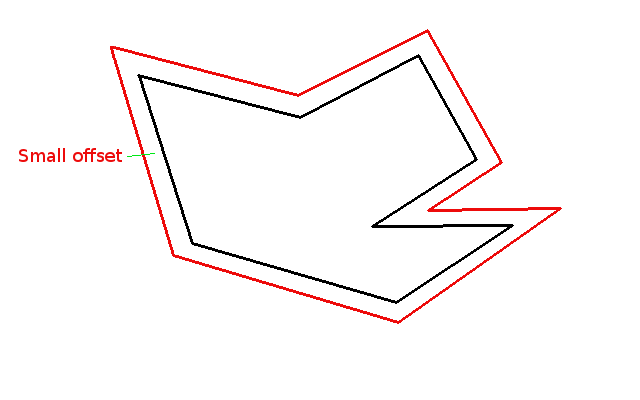
    smallOffset
    Shows a small offset around a panel. This would need to be created.


    Offsets from a panel are used extensively in detailing.

    Here’s how to do it – simple, no? See below:


    DBObjectCollection _offsetPolylines = polylineInstance.GetOffsetCurves(25);
         // offsets the polyline by 25 mm
         // the object collection should really have only one item in it: a polyline offseting the original by 25mm.
  • How to return a selection of Objects to the user (AutoCAD .net)

    Here’s the code:

    And that should select any objects that you want to select. You’ll have to put it in an array though. A handy hint which can save you a bit of grief.

  • Tek1 Now With SolidWorks Expertise

    Traditionally we have been a precast and steel operation. With a very strong and talented team, familiar with AutoCad (and many similarly related CAD systems), Tekla and also Catia and SolidWorks.

    Given Toyota’s Design facility is now defunct in Melbourne, we now have Tony on board, capable of handling anything pertaining to SolidWorks and Catia. We original met Tony in Toyota, and we know what he’s capable of. He brings to us a wealth of knowledge and expertise – one of the best in the world – and are absolutely delighted to have him on board.

    If it’s got to do with SolidWorks, he’s one of the best out there. Pick up the phone and we’ll give you a quote. And you can judge for yourself the quality of his work.

  • The importance of identifying the assumptions Behind Every Problem

    My estimable colleague Rafik Ben made a blog post concerning a problem.

    For reference, here it is: http://routetomastery.com/blog/2017/01/08/has-pair-with-some-problem/

    So what’s so good about Rafi’s problem?

    Well like most things in the world, the problem, is not the actual problem. When it comes to computer science, the *actual* problem lies in identifying or understanding it. And the assumptions one makes are no less important.

    Let’s see this in example:

    > A man and his son are driving in a car one day, when they get into a fatal accident. The man is killed instantly. The boy is knocked unconscious, but he is still alive. He is rushed to hospital, and will need immediate surgery. The doctor enters the emergency room, looks at the boy, and says…

    > “I can’t operate on this boy, he is my son.”

    > *How is this possible?*

    It’s one of those things where you either have the answer instantly or you will never get it. It’s because your underlying assumptions and expectations were hidden and/or incorrect. The thesis of this post is this: identify the assumptions inherent behind every problem. For in doing so, you will be more likely to solve it successfully.

    Assumptions area always inherent in a problem

    Every problem has its own assumptions. And these assumptions will drive very different solutions. For example, in the post Rafi made:

    • what if one assumes that the input into the “Pair with sum” function was a disorered list vs ordered list?
    • What if one assumed that the input contained invalid data?
    • Each assumption would in turn require it’s own unique solution. And those solutions might be drastically different. It should be remembered that not all solutions were created equal.

     Assumptions to consider when formulating algorithms

     Some assumptions which I feel are important when considering problems:

    1. What are the domain/range of the inputs and outputs? (e.g. positive or negative, above zero or less than 400)
    2. What are the characteristics of the inputs/outputs? (i.e. divisible by 2, integers only, irrational numbers?).
    3. The data structure(s) of the inputs/outputs?
    4. Can you think of a structure that will make your algorithm more efficient.
    5. Is near enough, good enough? What are the costs of inaccuracy? Can we later fix inaccuracies?
    6. Time limitations?
    7. Computational power limitations?
    8. Human factors:
    • Remember, algorithms are created for the user. You might have to compromise on efficiency and/or accuracy in order to meet this need.  For example: I am positively sure that Google can do a  lot better in its search results: but the boffins there are acutely aware that it’s bad business if the user is left waiting for a search result for more than a few seconds. Consequently, there are some compromises on accuracy in favor of speed. These factors are essential when considering a solution to a problem.

    Another human related issue: the problem must be understandable to the coder, and easily maintainable:

    1. Can you easily understand the problem by looking at it? Easily understood code makes maintenance a breeeze.
    2. What parts do you think will change?

    Summary

    Understand the problem and its assumptions, and you’re halfway there.

    Here is a gist basically listing the above:

    https://gist.github.com/BKSpurgeon/69f624f959e80a7842a2a319d797f120

  • Roof Modelling

    When you model the roof, pay attention to how the flashing will work.  In this video I am explaining, the roof flashing explaining the error in modelling.

    Few things to remember when modeling roof

    •  Roof need support everywhere.
    • Take care of roof slope and gutter requirements
    • Gutter will require 65 mm gap clear if the gutter support is to run under the gutter.
    • It is not necessary for the gutter support to run right through. Gutter support can stop at certain members and continue from the other side of members.
    • It should be possible to flash the roof to the design requirement. Do not model the roof in such a way that flashing is not possible

  • Associative functionality in the Autocad .net API

    Associative functionality in the Autocad .net API

    Question: What is the most exciting thing since sliced bread?

    The answer is AutoCad’s associative framework. It’s been two years since it’s been released, and it’s arguably one of the most powerful features of AutoCAD which has now been exposed to .net. You’d hardly know it exists because hardly anyone seems to talk about it in the forums. Anyways, I”m really excited about this new tool and I hope to be walking you all through it in the upcoming few weeks.

    There’s a tutorial out there:

    http://au.autodesk.com/au-online/classes-on-demand/class-catalog/2014/autocad/sd5217

    but I suspect it might be too hard-core for most of you so I really want to simplify it and walk you through the process. I hope you’ll derive as much pleasure from devouring it, as I will have producing it.

    What is the benefit?

    It’s just really really cool

    Ben

  • How to Copy Tekla Component Settings Between Two Models (Tekla Tips)

    There is more than one way to do this. But this could be the easiest:

    Other ways are setup your computer to read the favorite componets from a location, Set up the network such that all Tekla machines load their favorites from a location.

    You can download the custom files from the link given below

    Click to Down load the files