
Month: August 2018

  • Tekla Model Sharing

    Tekla has got model sharing with latest releases. However, nothing like that exists in previous releases.

    Now with API plugin from Tek1 you can share member placements on earlier versions. There is no Lic fees to for model sharing to be paid to Tekla.

    You as the main modeller decide to farm out member placements to external modellers. You give them a log in and assign the project to the external contractor.

    The external contractor models the elements. The modeler selects the elements and users of our API to share the model elements.

    The main modeler then users our API to synchronize the model elements with the main model. The main modeler or the contract modeler can now adjust set outs and RLs on their model and the respective model can be synced with full control (accept or reject sync)

    Update: This API is not available for sale. We thank you for your interest nonetheless.
  • TeklaInterop Minimum checks

    Friends, there is no substitute to reading the documentation. The most up to date version of this is located in our Team Drive – but here is a local copy nonetheless.

    AutoCAD-Tekla-Interop-Documentation

    Following minimum checks should be carried out for interop

    1. The member-schedule CSV file has the all the layer names in the cad files
    2. Layer names do not contain special characters
    3. Command Verifylayer is run from Autocad/Nanocad
    4. Command DSL is run in autocad/nanocd
    5. overkill is run in autocad with tolerance set to 0.5
    6. autocad/nanocad file is saved
    7. If the tekla model is to be in imperial then Autocad file is scaled by 25.4


    To draw cols (Autocad/nanocad)

    1. Make sure the start point of the line is at the col location
    2. Draw short lines not less than 100 units  in plan view in the col layer
    3. run command MakeCol (to turn horizontal lines to vertical lines – which represent cols)
    4. Run command SCL (Set Col Length) to set the top RL of the lines selected.

    Commands you can run using Tekla Interop (Autocad and Tekla)

    1. “Deletesmalllines” (deletes all small lines from Autocad)
    2. ConverttoTekla (converts all lines from Autocad into Tekla as per local UCS set in acad and Tekla)

    Files you will require

    • SetSt and EditLine_1.1 (Lisp)
    • Verifylay (Lisp)
    • Teklainterop files

    Location of lisp file

    GoogleDrive Link

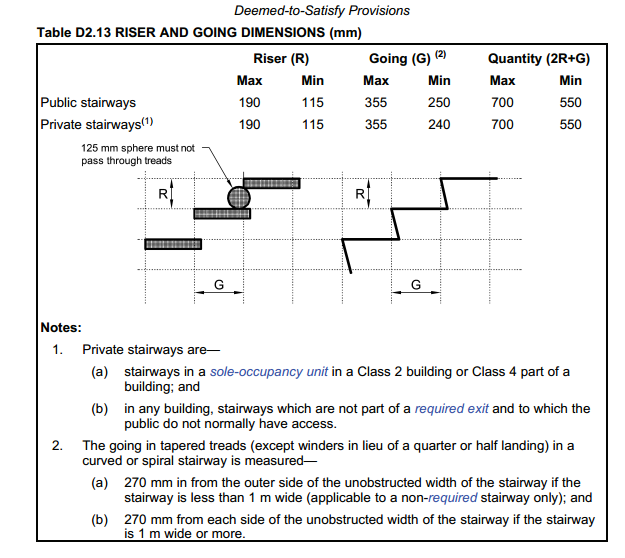
  • STAIR RISE AND GOING NCC 2016 -BUILDING CODE AUSTRALIA

    As per NCC 2016 D2.13 (Page 183) following requirements have to be met for public and private stairs

    Public Stair ways, Riser – Max 190, Min 115 Going Max 355 Min 250 Quantity (2R+G) – Max 700 Min 550

    Private Stairways Riser – Max 190, Min 115 Going Max 355 Min 240 Quantity (2R+G) – Max 700 Min 550

    STAIR RISE AND GOING
    BUILDING CODE AUSTRALIA