Month: May 2021

  • Bolt to be used in Glazing location

    Bolt to be used in Glazing location

    Author: Pon Dhileepan

    While working in a project called Bateman Bay, TEK1 came across a situation where PFC members are provided to support glazing. PFCs are laid flat, a 50mm U channel is run along the PFC which supports the glass. The below image is the cross section across the glazing and it elucidate the set up.

    This image has an empty alt attribute; its file name is image-1.png

    Problem 1:

    These PFCs are connected to columns by 10mm end plate & 16dia 8.8s bolts. The problem arose here as the bolt head of 8.8s bolt would clash with the glass. Refer below image for clarity.

    Hence, TEK1 raised a query as to whether they can cut the glass where ever bolts clash or use CSK bolts. The structural engineer changed the 8.8s bolts to CSK bolts.

    Problem 2:

    Another problem came as the PFC web is just 4mm whereas the CSK head is 8mm. The bolt head will still clashes with glass.

    Then we proposed to weld an 8mm plate under the PFC and CSK drill is to be made together. The proposal is accepted. The below images show that the glazing runs without any hinderance.

    TEK1 detected the issue earlier which saved cost in cutting the glass at site. Structural engineer often do not consider these kind of clashes and it is the duty of the modeler to find this out and make this to structural engineer’s knowledge.

    Thanks for reading.
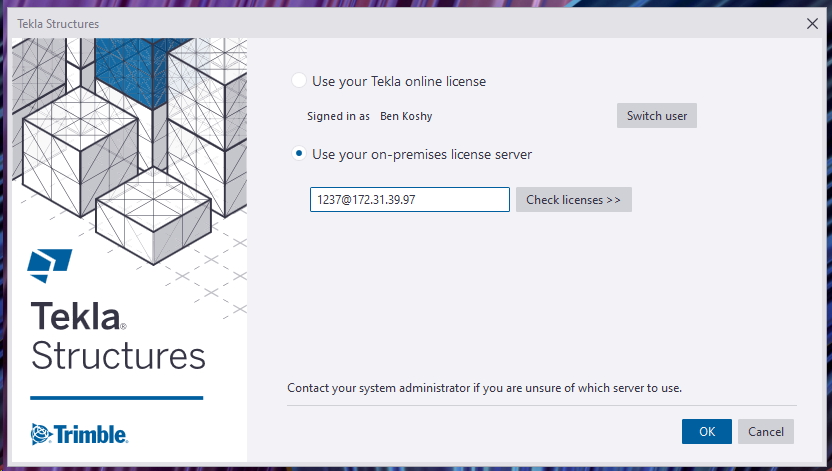
  • AWS VPN to Tekla License Server

    AWS VPN to Tekla License Server

    Documentation on how to do it, for all Tek1 Staff Only.

    Rules

    (1) DO NOT HAVE PIRATE LICENSES ON YOUR COMPUTER.

    Please contact me if you have any questions.

    No pirate licenses. This means genuine Windows, MS Office, and genuine Tekla licenses. In this organisation we pay developers/companies for their labour and services. We don’t steal. Moreover, I need to know the cost of operations, and costs we incur should be added to our invoicing. It is critical that our costs are accurate. If we have to resort to piracy in order to maintain profitability, then we ought to quit the business entirely and do something else.


    (2) Disconnect your VPN connection when not in use. So others in our team can access. VPN connections are very expensive.
    (3) Do not share your username / password with anyone else.
    (4) Do not use these licenses for your own personal work – i.e. for Tek1 use only. This ties in closely with the first point re: piracy.

    VPN Access to our Tekla Licenses
    VPN Access to Our License Server

    Outside the Office

    • If you are accessing our VPN from outside the office, please follow the instructions in the following video:

    I will tell you the client vpn passwords and codes that you need in order to connect. Just msg me please.

    Problems or Errors?

    Please read the trouble shooting page here.

    Administration Notes

    • Users must be added to the “Steel Detailing Group” to get access.
    • External users must be added to the: “External Contractors” group if they are contractors.
    • If staff should leave the organisation, they must be deleted from both groups. Access via Azure Active Directory’s portal.
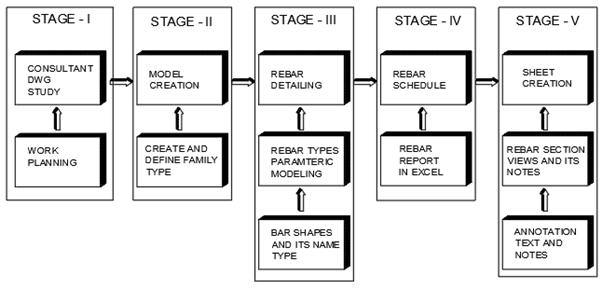
  • Rebar Detailing Basic Process

    STAGE 1:

        Work Planning and queries preparation based on the information received from structural engineers either as data or from the consultant drawing

    STAGE 2:

        Model creation  for the elements in the Project  like Walls , Columns, Beam , Slab ,Footing and stairs based on details and data received.  If elements are not standards one means it  will be created as families .

    STAGE 3:

         Rebar detailing and bars arrangements inside the element (Walls, Columns, Beam , Slab ,Footing and stairs) based on the cover distance between the Concrete and rebar. Rebar Parameters and it’s bars shape are reviewed before starting rebar detailing

    STAGE 4:

      Rebar schedule will be created from the excel sheet generated from the rebar type quantity and its arrangements provided in the element.

    STAGE 5:

         Sheet creation from the templates based on the sheet size to be used . The excel rebar schedule created are to be dragged and place inside the sheet. The Rebar section views and its detail notes and dimension are created with view pot and scaling, but before proceeding on the above the annotation and text size are to be set and created.

  • Estimation / Take off Tools

    We’ve created many libraries that handle estimation. Here are some examples which you may view or use as the case may be.

    Apologies folks, this is documentation for our own staff. If you’re not on staff, I’m afraid your access will be limited. Videos are located in the documentation contained in the Drive Folders. Please carefully read the documentation and watch any videos if required.

    Advanced Steel Member Placement:

    Draw some lines in AutoCAD or Advanced Steel. Set up a CSV file that maps lines to Advanced Steel Beams. Run the command in Advanced Steel, and Advanced Steel beams are produced.

    Advance Steel – ConvertToBeams (CTB) Command from Tek1 on Vimeo.

    MemberPlacement tool (AutoCAD):

    Draw lines that come up as 3d lines with a Tekla like interface, which using interop delivers them straight to Tekla:

    Line Based Take-Offs

    • Draw lines and an Excel Spreadsheet is produced showing total lengths and counts for certain steel types. Dlls are located here.

    Take Off Tools

  • Advance Steel Macro – To place Members

    I’ve created a macro to help create Advanced Steel Members, given a particular spreadsheet file. You are welcome to download and use it – see here. Unfortunately, I don’t have a demo video for you so: Please read the documentation / manual.