
It is important to check for fake dimensions before using it as reference model in Tekla
Please watch this video
Author: admin
-
Check for Fake dimensions in Autocad before using it as reference model
-
Connection Schedule – Read Loading conditions
Analyze load transfer before blindly applying connections.
Here is a markup from the engineer, which is right. The load from the UB350 beam is not transferred to SC7. Hence 4 bolts not required.
-
Tekla Model Sharing
Tekla has got model sharing with latest releases. However, nothing like that exists in previous releases.
Now with API plugin from Tek1 you can share member placements on earlier versions. There is no Lic fees to for model sharing to be paid to Tekla.
You as the main modeller decide to farm out member placements to external modellers. You give them a log in and assign the project to the external contractor.
The external contractor models the elements. The modeler selects the elements and users of our API to share the model elements.
The main modeler then users our API to synchronize the model elements with the main model. The main modeler or the contract modeler can now adjust set outs and RLs on their model and the respective model can be synced with full control (accept or reject sync)
Update: This API is not available for sale. We thank you for your interest nonetheless.
-
TeklaInterop Minimum checks
Friends, there is no substitute to reading the documentation. The most up to date version of this is located in our Team Drive – but here is a local copy nonetheless.
AutoCAD-Tekla-Interop-Documentation
Following minimum checks should be carried out for interop
- The member-schedule CSV file has the all the layer names in the cad files
- Layer names do not contain special characters
- Command Verifylayer is run from Autocad/Nanocad
- Command DSL is run in autocad/nanocd
- overkill is run in autocad with tolerance set to 0.5
- autocad/nanocad file is saved
- If the tekla model is to be in imperial then Autocad file is scaled by 25.4
To draw cols (Autocad/nanocad)
- Make sure the start point of the line is at the col location
- Draw short lines not less than 100 units in plan view in the col layer
- run command MakeCol (to turn horizontal lines to vertical lines – which represent cols)
- Run command SCL (Set Col Length) to set the top RL of the lines selected.
Commands you can run using Tekla Interop (Autocad and Tekla)
- “Deletesmalllines” (deletes all small lines from Autocad)
- ConverttoTekla (converts all lines from Autocad into Tekla as per local UCS set in acad and Tekla)
Files you will require
- SetSt and EditLine_1.1 (Lisp)
- Verifylay (Lisp)
- Teklainterop files
Location of lisp file
-
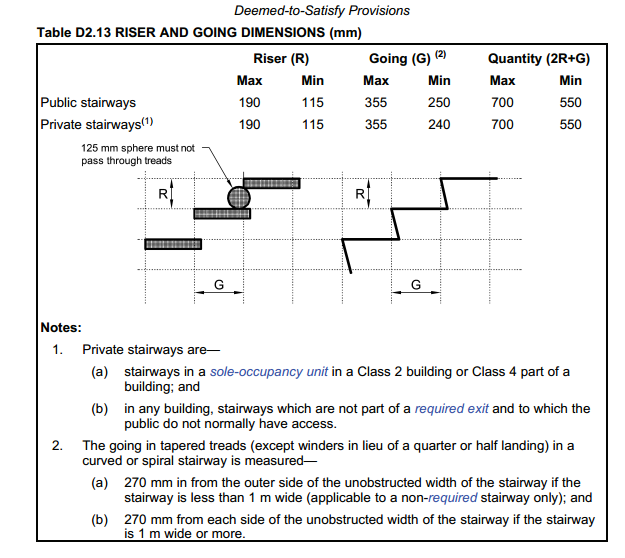
STAIR RISE AND GOING NCC 2016 -BUILDING CODE AUSTRALIA
As per NCC 2016 D2.13 (Page 183) following requirements have to be met for public and private stairs
Public Stair ways, Riser – Max 190, Min 115 Going Max 355 Min 250 Quantity (2R+G) – Max 700 Min 550
Private Stairways Riser – Max 190, Min 115 Going Max 355 Min 240 Quantity (2R+G) – Max 700 Min 550
BUILDING CODE AUSTRALIA -
Revit Modelling and Architectural detailing
We have 5 Revit AEC Licenses and trained modelers in Revit Architecture and Revit Structure.
Our modelers are competent in the Australian building code.
We can help you complete your design work on time on budget by taking carrying out mundane work.
- Develop your design sketches
- Check your design with RESCODE.
- Create shadow diagram
- Create working drawings.
- Develop structural drawings based on your design sketches.
- Create walls, door and window schedules
- Develop details
- Create Revit Family
- Develop stairs and Balustrade concepts within Building code
- Develop, walkways, ramps etc within building code
- Modify your Revit model to your instructions
- Modify your revit model in coordination with MEP and structural models.
-
Add If Layer is Missing (AutoCAD .net)
A very handy method. Often detailers will ask for something to be placed on a particular layer. But since they are using a 100 different drawing templates without any consistency nor standards, the onus is on you to impose that standard on them. So you’d have to check for a layer and add it if it doesn’t already exist. Anyways, that’s enough griping: here is the code:
-
Time Waits for Nobody: Steward your resources effectively

Efficiently steward your resources: namely time. Massive Investment With Little Return?
There are a million things out there in the world. Are you going to learn/master it all? Here’s how the typical educational program works – a monumental waste of resources in my opinion:
- 12 years in basic secondary and higher ‘education’.
- Another 3-6 years in tetiary ‘education’.
- Learning a billion other frameworks
And all the while, you are “learning” things without combining it with any real practical applications whatsoever. In fact, the application of your learning is some contrived hypothetical problem in an exam. That’s a waste. If you’re going to learn, then you should learn while also producing something useful to mankind: there’s no sense in wasting 3 years on a PhD which has no practical purpose apart from giving you the right to call yourself a PhD. (Don’t get me wrong, tertiary education does have some awesome benefits too).
In programming, in the same way:
- Are you going to master HTML, then
- CSS
- Javascript
- React
- The HTTP specs
- TPC/IP
- Data structures and algorithms (Knuth’s four volumes).
- As well as useful tidbits of info like Martin Fowler’s Refactor, or Uncle Bob’s books,
- As well as Ruby, and the rails framework,
- Databases and SQL
- Git
- Ioc containers
- Then Windows desktop programming: Tekla API and AutoCAD .net plugins + Unit testing and mocking frameworks.
…..before you then start programming your world-changing application?
The key is to learn as little as possible. And when I mean little, I mean as little as possible. One day for learning some basics, before starting to write your first rails app etc.
You’ll definitely struggle.
But provided you can quickly resolve those issues, you will have done A LOT without spending too much down time ‘learning’ a lot of useless crap. You’ll win out on time.
Get something half working, and if it has promise, then you can invest further resources into perfecting it. By the time you learn something, you may find that it is obsolete.
Avoid Massive Capital Expenditures If Possible: Get An Expert To Do The Work
Even better is to entirely avoid learning the implementation but to focus on learning and understanding the principles of what/why something is working as it is working and to simply outsource the implementation of those details to an expert. A fixed price for time. The hard part is finding that expert. That connotes you being able to distinguish between professed experts and those who aren’t – and that in turn requires knowledge of high-level functions. But if you don’t even know the higher level functions of what is going on, and if you don’t know how to procure an expert, then you’re effectively no better than a highly trained chimpanzee.
In other words, the common problem in programming (as well as in business) is to find a way to obtain maximum output with the least amount of expended resources (both current and future).
The basic point being: Everything takes time. Make it work with the least amount of time and resources expended.
Summary
- Time and resources are limited.
- Do the most you can with the least you have.
- If something shows promise, then add some fuel to the fire and let it shine!