There are situations where you may prefer to cast in a Reckli groove.
If the Reckli is contained within one panel, then you must surely cast it in. However, if the flashing groove runs past several panels, it may be better to saw cut the groove at site.
The main principle is the work points of the beam to the column must intersect. To achieve this the cleat should be offset to onside by half the Beam web thickness. This is usually done when you layout the main members. Make sure the layout is good
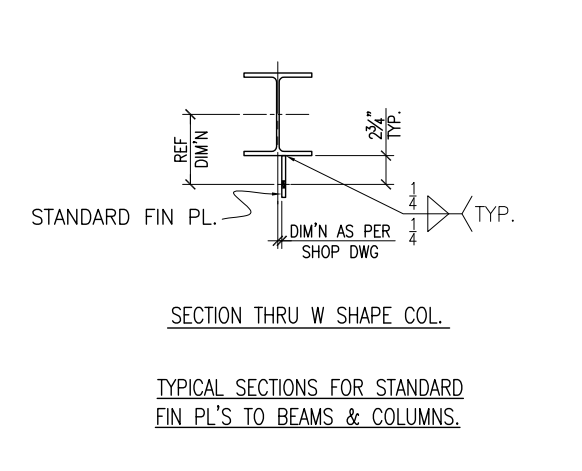
Here is a drawing to a shop detail which shows offsetting of the cleat to beam or column center line. Please note that the beam centerline and column center line should be matching. For US Fin plate the bolt distance is 2-3/4″ from the face of Beam/Column. For Australian situation, it will 55mm
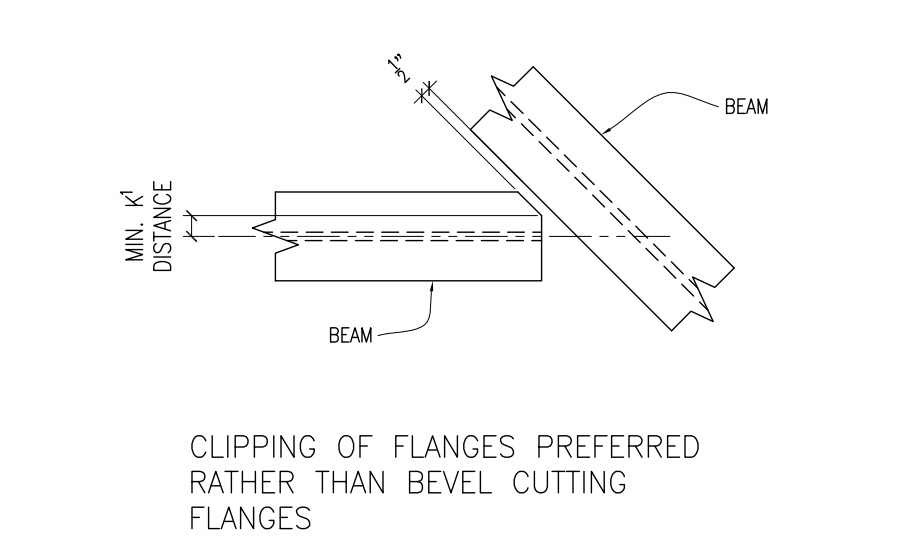
Given here is an image of how do the bevel cut in a beam to beam shear plate connection where the beam does not connect perpendicular. There is no benefit in creating full width bevel cut since it will only add material. All you have to do is remove the clashing bit
How to detail Column end when end plates are skewed
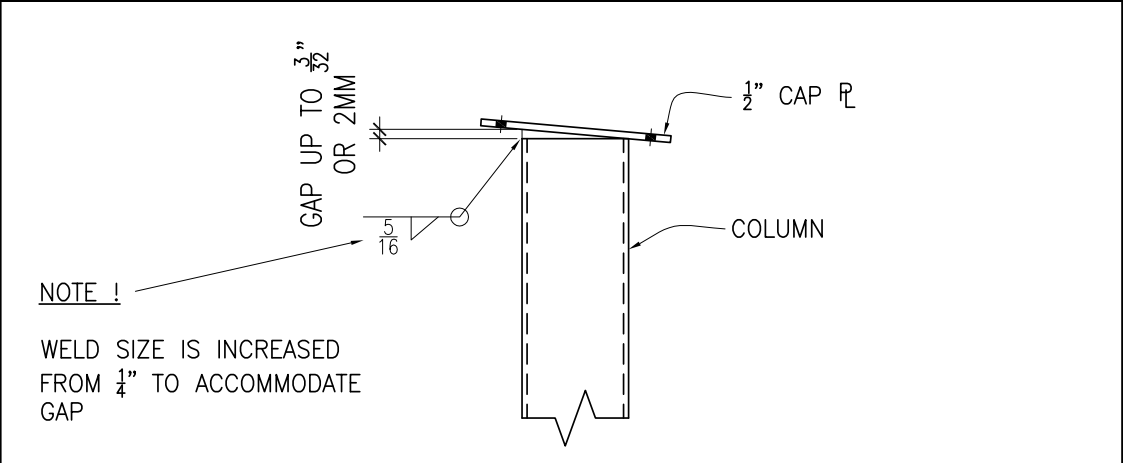
Here is a picture of an included end plate. Fabricators and easily weld and fill up upto 2mm. Hence there is no need to skew cut end plate. Will save a heap of time and cost in the fabrication shop.
We’ve been detailing Bubble Deck for around 5 years now.
We’ve learned the Bubble Deck standards and we’ve developed some very efficient tooling and processes that allow us to get our drawings out to clients quickly and without errors.
As in everything we do, the primary focus is error trapping and productivity.
Our Resources:
1 lead Bubble Deck detailer.
3 supporting drafts persons.
1 full time software developer.
Our capacity:
As of now, we have the capacity to shop draw about 1500 bubble deck panels per month.
If you have a requirement to shop draw bubble deck panels, please contact us on info@tek1.com.au or give us a call +61 3 9560 6397.
Please checkout our tooling and video samples on our Bubble Deck blog!
Our Tools – Here are demos of the tools we have available at our disposal:
Tekla BIMSight is a free tool provided by Tekla to view and markup up Tekla model. We use this too extensively for highlighting and resolving model issues. It will be very convenient if you can download and install this software on your machine and have some basic skills on using the tool
What type of models can be viewed with Tekla BIM Sight?
You can view at least the following types of CAD formats using Tekla BIMSight
Tekla BIM exported models
IFC Models
Autocad 2d and 3d Models
How to view IFC and Autocad files with Tekla BIMSight.
Create a project and simply add the files to the project.
How to markup and send the marked up Tekla BIM model?
There are one or two things to know about this. Please watch the videos below to get a handle on this. The key thing is make your comment public, and also save as package so that others can view your markups.
User Input is critical. You gotta make the user experience amazing.
Any AutoCAD programmer knows that things which an algorithm may take a million years and infinite computational power to do can sometimes be easily done by a human being instantly. In the same way it is sometimes much easier to give a human being the ability to choose: then you can get an optimum result without complex algorithms.
This post is a code snipped of how you can utilise the CTRL + SHIFT + Mouse Wheel (up/down) mechanisms in order to produce different desired results when operating a custom jig.
Here is the code:
So when the appropriate user input happens, then the jig can respond accordingly. Yes it’s true – the OOP purists will say: “you’re passing a concrete type in there” – I can always change it later if I want.
The effective point of this blog is to demonstrate the use of a jig – not just any old jig – but a jig which accepts user inputs using the CTRL + SHIFT + MOUSE-WHEEL (up or down) to change the jig’s behaviour. When the jig is finished running, everything returns back to normal.
We use this jig and command as part of our Bubble Deck tools dll.
The reason we utilise tools like this:
This allows us to turn over shop drawings faster, more efficiently. This allows our precast fabricator to massively improve their working capital position:
Their factory staff is always utilised – they don’t have massive overheads of 50 guys sitting on the factory floor twiddling their thumbs,
They can get in and out of jobs quickly – minimising their liabilities and expenses and also collecting revenues faster,
Faster revenue has huge benefits in terms of interest saved vs interest earned – especially for the developer. If you can allow the developer to finish the job a couple of weeks earlier you save on: construction costs, and also, as before, their interest expenses and their liquidity also improves. That’s worth its weight in gold.
There is nothing worth more than: accurate drawings, done quickly. That’s what we strive for.