
A short post showing you how to access the Document instance given that you already have a database pointer.
Here’s how:
A short post showing you how to access the Document instance given that you already have a database pointer.
Here’s how:
What is the purpose of this lesson?
The purpose of this lesson is for you to:
What is a stud wall?
A stud wall is made up of:
In steel stud walls, light steel pressed members or standard steel studs (mostly standard steel studs) are used instead of timber.
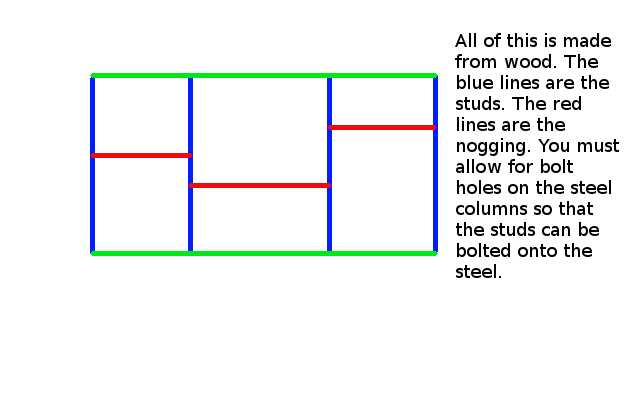
Please view the diagram below.
What is nogging?
Do you see the horizontal 90 x 45 timber pieces – the short red horizontal timber members? These short timber members are called nogging.
The nogging members of a stud wall are usually smaller in size than the main vertical members.
Nogging members run horizontal and give some strength to the wall.
Inside of the wall is empty space. Insulation material can be put in there.
Cross pieces are called NOGGING.
The Key Point of this lesson:
A stud wall cannot stand in the wall without some connection.
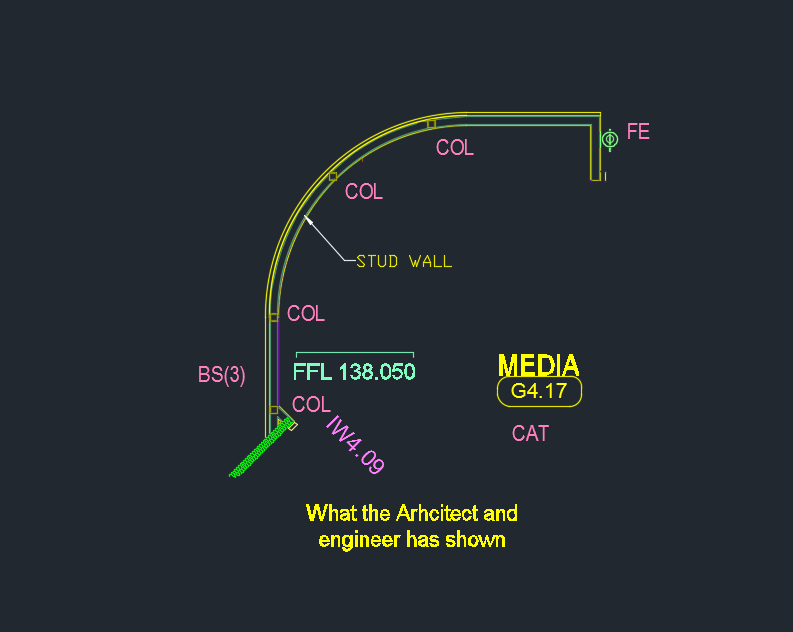
Please see the below diagram to show you how things are drawn in the engineering and architectural drawings:
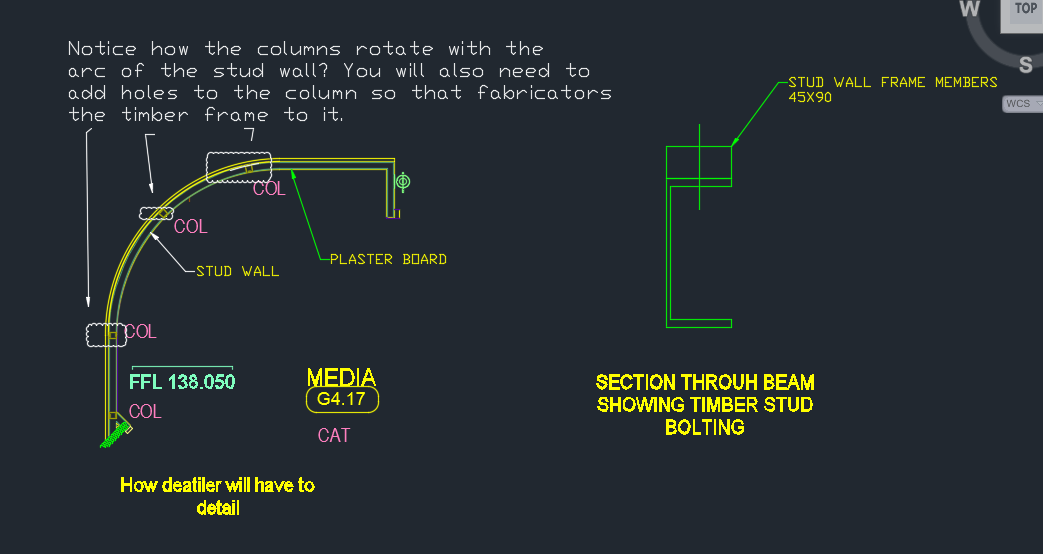
Now see below how you will need to detail the above design:
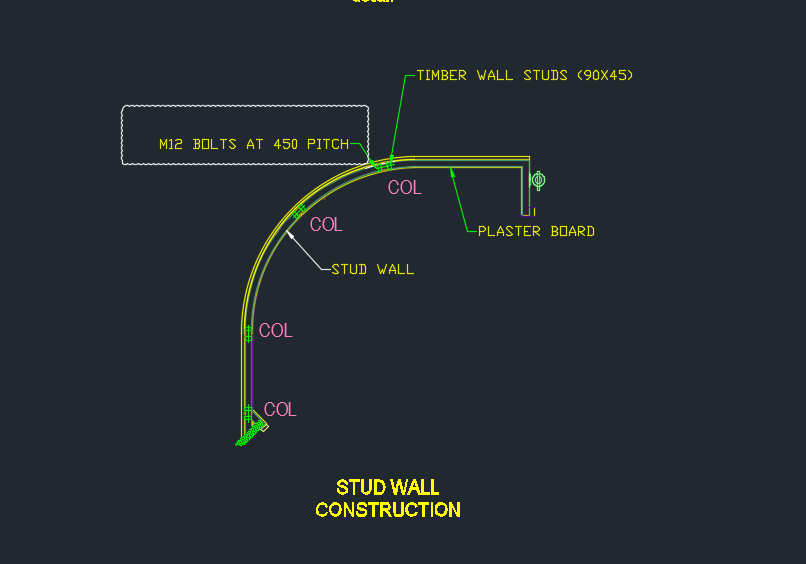
See here as well:
And a section view:
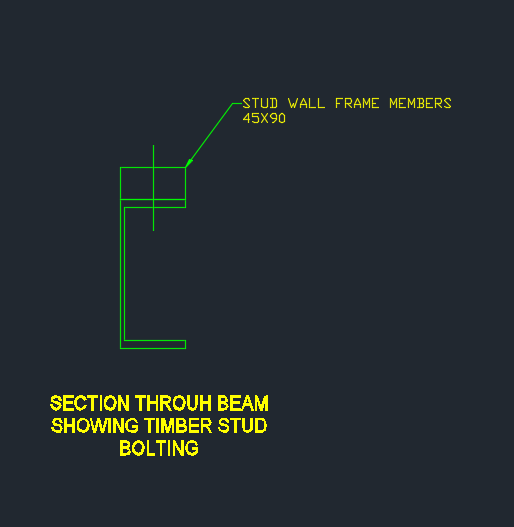
Shows a section view of the steel column and the stud.
I hope this helps.
A very perplexing question:
Why isn’t overkill working?
The result will stun you.
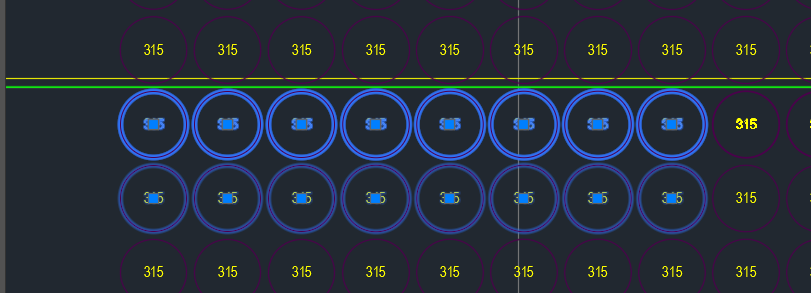
As you can see in the above picture, the top row of panel voids were doubled and in some cases tripled up. Obviously we don’t want this. Ordinarily, when such drawings are passed on to us we employ the overkill command. But for some reason it wasn’t working. And I couldn’t for the life of me figure it out.
That was until our lead Bubble Deck detailer suggested that the insertion points of the block references were not all on the same plane – some of them were in the Z plan – if that’s the case, then overkill would not recognise them as being the same block – and will allow them to continue to co-exist in the same drawing.
Solution:
Check that all similar items have similar insertion points. If they’re different – that’s why overkill might not be working for you.

It seems a common scenario that folks want certain polylines/curves etc to turn into a revision cloud.
At the end of the day, the revision cloud is nothing but a polyline. You could roll your own polyline which handles the bulges and vertices so that it looks like a revision cloud – but that takes a lot of effort – the quick and dirty way of doing so involves creating the polyline programmatically and then calling an AutoCAD command on that Polyline.
There are a few ways you can call commands:
I prefer the latter, because it is more flexible. SendStringToExecute operates after the command is completed – which may not suit your needs.
Here is a simple implementation – It should convert the circle into a RevisionCloud circle. Of course, you can tweak it to your own needs.
HOW TO AVOID TROUBLE IN BUILDING AND CONSTRUCTION PROJECTS (PART III)
We continue our series on how to avoid trouble in building and construction projects.
This example draws from a recent experience. And it also draws from famous instances of projects stuffing up. I can’t emphasize this enough: a good project manager – one who competent – is worth their weight in gold.
Good project managers:
People design and fabricate according to the plans and drawings set out in the engineering and architectural drawings. More often than not – these details are often missing. A good project manager would be aware or should be aware of:
Examples
For example, a good project manager would know that laying down the foundations of a building is critical to its success and structural integrity. So Joe Bloggs – the guy pouring the concrete comes along. He dumps some concrete here and there, and says, “Yup – I’ve done my job!” The project manager glances out of his window and sees some concrete and concurs:
“Here’s $15m dollars for your efforts my good man!”
The concreter snatches the cheque from Mr Project Manager with glee and prompts scampers out of the site office into the neighbouring pub.
Meanwhile, other trades come on site: one particular trade has to erect some steel columns. When they try to do so, they realise that the concrete has been badly poured – that it hasn’t been poured according to the agreed upon dimensions and tolerances – the steel beams and columns they purchased and cut and welded – it now doesn’t fit. None of it. It’s all useless.
Who carries the can?
Notice very carefully what happened, and how it happened:
What should the project manager have done? He should: check!
Maintains Good Lines of Communication between Relevant Parties
They know who to call. They can get the job done quickly, and effectively. A bad project manner will hire any Dick off the street without verifying their credentials and expertise. Of course, who suffers if that particular trade fails to deliver?
They know how valuable they are. And they charge. But ‘cheap’ is a relative term. These managers might be expensive, but they’ll probably be a whole lot cheaper than a poorly designed/built building.
My friend, if you have a good architect, and a good engineer and also a project manager who is also an accountant, then you are in a much more favourable position to successfully prosecute your building and construction project.
This is a beautiful little plug-in – it allows you to dimension a curve – a complex curve with a jig. It allows the user to choose the types of dimensions that he wants. It’s pretty cool.
I must do an entire series on jigs.
And I will slowly, when I get the chance.
Demo – Tool To Compare Panels and Easily Identify Differences
Here’s the situation:
Someone from the factory floor calls in:
“Hey can you move a cast in plate across panel number ABC123”
“Sure – let me just check there are no —”
“GIVE ME THE DRAWINGS NOW!”
The problem with handing over the drawings without checking the layout is that you might make a big mistake! Or you might forget to ensure the two drawings link up and are the same.
You need a tool to easily check the panels, identify differences and to alert the detailer. This will also allow you to easily split up work. – you can assign that work to a junior detailer, so he/she gains experience, while it frees up time for you to focus on other things.
And if you do find a difference, it’s a big ordeal brining the layout up to speed. With this program, it automatically imports the pertinent block/polyline etc. without you lifting a finger.
The advantages are many. The simplicity is sublime. Enough talk.
Here’s the demo of the tool. I hope you enjoy it.
This tool currently works for only Bubble Deck. But I am going to make it work for all clients across a variety of edge cases and am going to speed up the algorithm considerably. I will post the new tool when it is completed.
Panel Comparison – Tek1 Tools from Tek1 on Vimeo.
Experts in AS in Stairs/Handrails/Ladders
We’ve done a lot of work on Australian Standards – both public and private access. We specialise in Steel Detailing – and have a special focus on stairs and ladders. Since we deal extensively in this area, we require all our staff to be thoroughly versed in the Standards. Consequently, we have developed testing frameworks to ensure that all staff are well trained and accountable.
Our Testing Infrastructure Now Freely Released to the General Public
We are now releasing our testing framework to the public at no charge. These tests should help you learn and reinforce your knowledge of Australian Standards – namely, AS 1657 and AS 1428.
We hope and trust you will find it of immense benefit.
Keep people safe – design and build according to the safety standards prescribed by law.
https://training.tek1.com.au
The AutoCAD .net/ObjectARX APIs have a handy feature all the pick first selection. This means that prior to running a command, the user is able to select some objects in the model. The command is then able to use these objects. The question is, how to obtain a selection of objects using the Tekla API – prior to running your plug-in?
It’s really simple (if you already know how):
And that’s all it is! Hope this helps.