Category: Staff Memos

  • Memo 51: When recording a video and posting online, don’t forget to…

    • Set the playlist. (usually to Tekla Tips and Tricks).
    • Add your name.
    • Add links – to the website, and your personal blog.
    • Add invitation for projects to be quoted.
    • And then embed that video in a blog post

    Ideally we want to add on youtube AND vimeo.

    Sample Description below:

    Pon description

    Visit https://www.tek1.com.au/category/steel-detailing/

    if you wish to learn more about steel detailing, and Tekla. Video by Dhileepan (senior team lead) and Dinesh.

    Visit https://www.tek1.com.au/author/pon_dhileepan/ for more details about my work. If you’re interested in Tek1 to do your steel detailing, please email: koshy@tek1.com.au with details about your project and a description of your goals / objective.

  • Memo 50: When coordinating with others, you have to charge; When the scope changes, your price need not change simply

    When coordinating with others, you have to charge; When the scope changes, you price need not change simply;

    (A) Prices need not be reduced by crossing out a line item

    Please see below:

    Hi Koshy,

    Sorry to do this, but we will need to remove line item 5 from the invoice. The structural steel components of Lift 11 have already been modeled by a different company. We will be receiving the model soon and will send that to you to work on the other parts of the scope that you priced for.

    Do you mind sending through an invoice without Line item 5 so we can put it through with this months invoices?

    This is not uncommon. Clients are wont to shop around for the lowest price. Which I don’t mind.

    Except it is a PITA to manage with admin, invoicing and purchase orders. Second, when I price a job, I look at the overall make-up of a job. If they remove an item, piecemeal, then that changes the make-up, of the job entirely – viz you can think of it like this: e.g. when you go to MacDonald’s you can purchase the following individually:

    1. Burger – $8
    2. Fries – $4
    3. Coke – $2
    4. Total: $14 (as separately priced items)

    or you can purchase them in a combination for $10 for example (discount):

    1. Burger – $3
    2. Fries – $4
    3. Coke – $4
    4. Combination: $10

    And then after you agree on purchasing all three, imagine then a customer cuts the scope and says: “actually I only want the burger”……………. Well then if you want just the burger, the price does not remain at $3, it will have to rise to $8. You do not have to cut the price in line, if the customer changes the scope. If I can afford to drop the customer, then I may refuse the discount entirely – and ask the customer to take the entire job elsewhere. I suppose this puts a spanner in the customer’s works, but then again, so is being a clever dick by asking for a job in bulk and then cherry picking parts by price after one has already been given in bulk, and asking others to manage the coordination overheads. And if the client says they will “manage” it – what if they miss something? Of course, at that stage, then you have to raise the matter.

    (B) The Risks of Coordinating with Others

    • The second thing to note – if you are coordinating with someone else’s work – who is responsible for making it work?
    • If their work is wrong, will it not delay my portion of the work? Will it not cause problems and add costs?
    • If there is a problem, then I want to be remunerated for finding out that a problem exists, pointing it out, and also providing the solution.

    There is a coordination cost involved when dealing with others. Which I hate doing because I cannot control a third party – I have no idea if they are using the latest drawings, or have captured all the information required in order to make the job successful.

    Here is my reply:

    Please find attached an invoice with a credit note applied – i.e. line item 5 eliminated.

    Please note there may be coordination overheads associated with managing third party drafties and their models – that may be something we can address if such a need arises.

    any issues pls LMK.

    And the client respond as such:

    Hi Koshy,

    Yes, no worries. We will see how we go.

    Thanks,

    Very good – our client understands this. We have asked permission and warned him in advance that the coordination costs exist, and the client has agreed. We are experts at managing coordination, and do not be shy about charging for that expertise. It is better than our clients pay our invoices than for their job to meet with disaster because there were too many chefs in the kitchen – or worse, that there weren’t any chefs there at all


    My philosophy is this – getting two detailers to manage a job is one too many. It must either go entirely to the other guy, or entirely to us. There is a very significant coordination cost associated with this, and that cannot come for free. Remember, a house divided by two detailers cannot stand.

  • Steel Detailing Tips – How to fix “path” too long errors

    Steel Detailing Tips – How to fix “path” too long errors

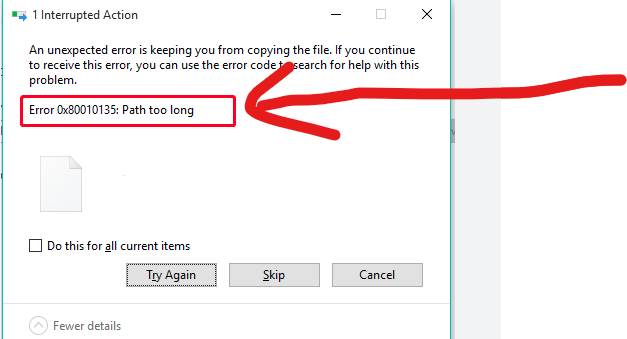
    In the construction business – you will often find yourself zipping / unzipping large sets of documents, and copying them from A to B etc. Often when dealing with deeply nested folder structures, you will get an error – regarding long path names. Like this:

    Path too long error.

    This is especially annoying if you are copying large sets of documents.

    Ordinarily I would suggest that clients avoid deeply nested folder structures – but then I thought: who am I to presume to how anyone should structure their affairs?

    Why not allow for long file paths in the first place? This is how you can do it?

    • In the Administrator terminal, run the following command

    Set-ItemProperty 'HKLM:\SYSTEM\CurrentControlSet\Control\FileSystem' -Name 'LongPathsEnabled' -Value 1

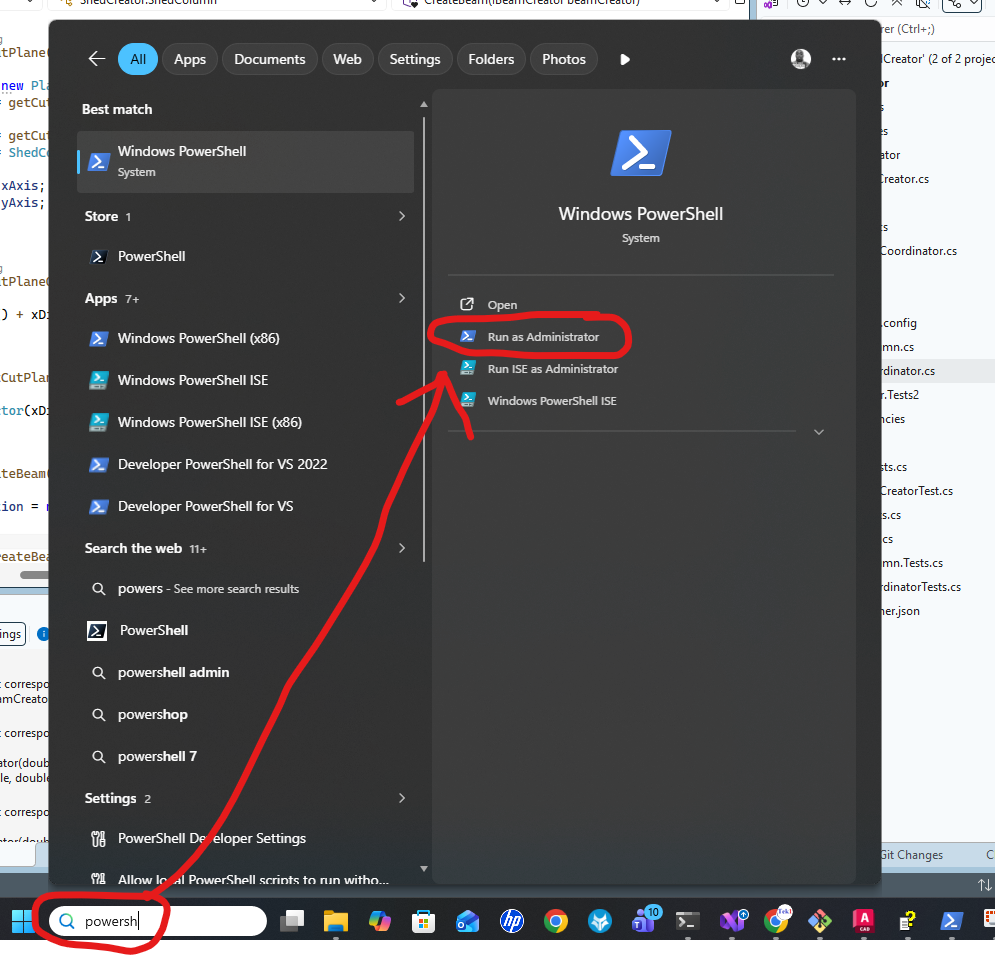
    Here’s how to open the terminal in admin mode:

    • So to the Windows search bar.
    • Type in “CMD”
    • Then click on “Run as administrator”

    How you can unzip deeply nested folder structures, in your own deeply nested folder.

  • QR Code on Drawings

    We are now placing smart QR codes on drawings. Why? What benefit is accrued by doing so?

    1. You can see a 3d view of an assembly.
    2. You can conduct spot measurements of the assembly.
    3. You can check whether your drawing is the latest revision.
    4. You can add markups directly to a document number – and see it’s revisions over time

    Instructions on how to make it work

    • Set up a project on prolox.io
    • Get the project’s public access token.
    • Log into the Prolox’s Tekla’s client application. Use your prolox login email and password and the project’s public access token.
    • Using Tekla 2023 and with the relevant model open (please open only 1 model) – run the client code.
    • All the values will be updated.

    Rules – To prevent obsolete data from being used or shown

    • If you update the model, you must re-upload the IFC file in prolox.
    • If you update the revision number, you must re-do the prolox Tekla client program. This will update the revision numbers in prolox.
    • If you delete a drawing you must update the revision number for the deleted drawing and re-run the TeklaQRCode program. (so that all revision numbers are updated on the cloud, and so that if anyone scans an old drawing, they will be immediately notified.)

    Updating the Drawings:

    • When you update the drawing PLEASE USE THE SAME REPOSITORY. This is so that we can have old revisions.

    Setting up the template

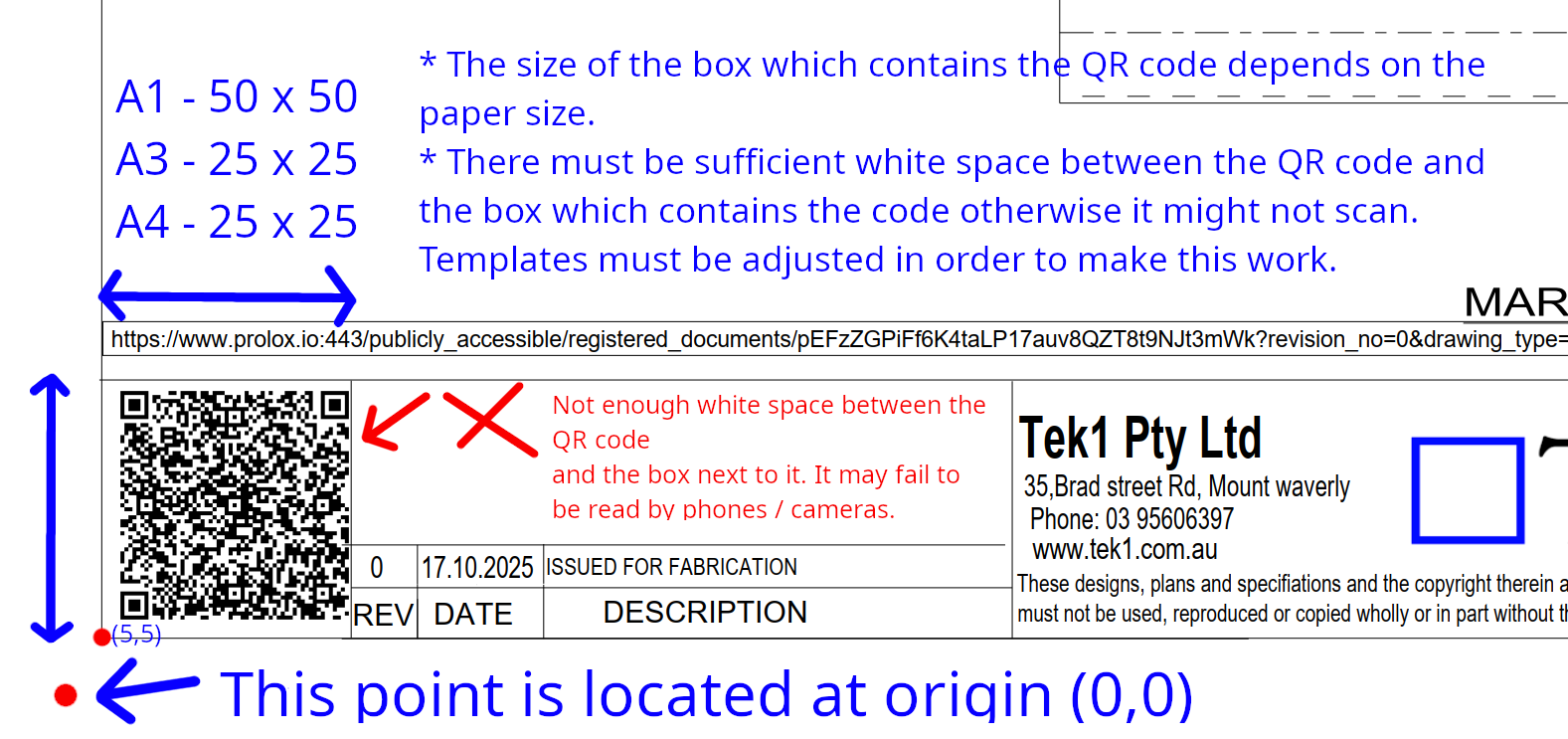
    • You must set up the drawing template to that the QR Code program works and puts the QR code in the right location. If you don’t set it up properly it will fail.
    • Assume each page has an origin point of (0,0) at the bottom left hand side of the page.
    • The drawing template’s borders start at (5,5).
    • There must be a good amount of white space between the QR code and borders, otherwise the QR code may fail to be read. Which means the entire thing fails.
    QR standards / documentation.

  • Memo 49: Context Switching – Projects Placed on Hold – Add an Invoice

    • You work on a project spending a lot of time on it e.g. three weeks on it. And then the client says: “actually, we want to place the project on hold”. That’s fine – but the question remains: as a detailer – what should you do?

    If a project gets placed on hold, you should immediately invoice a pro-rata amount for the work that is completed.

    • Let us consider a second scenaro: you work on a project for three weeks, and then you issue for IFA. And then the client puts the project “on hold”. 3-4 MONTHS later, the client returns you the approvals and wants you to immediately issue IFC. What do you do now?

    The costs of Picking up a project after forgetting it

    • Looking through our list, we have some 20-50+ projects that are “on hold”. Yet we are carrying the project for weeks (and sometimes months). In that time – we incur risks and expense: the project must be stored somewhere, and intimate knowledge required on the project must be stored / managed. You may forget this information when you return to the project, it is all a little “rusty” when you return, the chance of mistakes increases, sometimes, important staff may leave the firm, taking with them context specific to a particular project. All of this will affect your ability to deliver quickly, effectively, and without mistakes.

    The Costs of Context Switching

    If a client demands that a project be completed NOW, then you have to stop what you are currently doing, figure out the entire context of a project (that was placed on hold many months ago), and then you have to restart and complete it, now.

    That is not easy.

    You Must Charge

    You have to charge for that. Feel free to charge 5-6 hours for this.

    There is a cost and risk associated with delays. It does not come for free.

  • Important Note regarding TEK1 MTO:

    Please note that once we assign a job to the team members, the next step is to provide your ETA.

    • Whether our ETA is within or beyond the client’s expected date, it must be clearly updated in the status.
    • If the client decides to cancel the job due to late delivery, they will respond to the status, and Ben will inform us.
    • If there are any RFIs in the received documents, they must be raised immediately, and the status should be updated as “RFI raised on [date]” & “xxx days required to deliver the take-off reports.”
  • Memo 47 – Mediocre Work will incur demerits

    Axiomatic statement:

    Clients will only pay for fantastic work, not “mediocre” work.

    If the work is mediocre here is what will happen:

    • Client will not pay you for your existing jobs.
    • The client will walk away.
    • If that happens, how do you plan to get paid?
    • If you have any remaining clients, and if you service them poorly – then you will lose those clients as well.
    • Then you will be forced to reduce your prices, out of desperation in order to win the little work available.

    Every business in the world faces this problem.

    We are not a government office. We are operating in a highly competitive and commodified market. This means it’s easy for clients to get another detailer. And if that happens en masse then we will all lose our jobs. Every one of us.

    Till now, it has been the policy of the firm to make corrections by mere words.

    This has not proven very effective because mistakes have been repeated: especially when people have been warned via memos, training videos, phone calls, messages etc. I will accept that not everyone will bother to educate themselves – which is fine. From now on you will be educated by a demerit system:

    • A formal record of your performance (of mediocre work).
    • And you may incur a tariff which will be applied against your bonuses / EBs.

    YOU HAVE BEEN WARNED. Igorance of this memo is not a good excuse.

  • QR code for Trimble Connect

    QR Code for Trimble Connect to be on Every GA drawing.

    Produce Steel only IFC Model, upload to trimble connect.

    Use the following link to download QR Code Generator

  • Memo 48: Model Format and its sequence Submission to Client

    Based on a requirement with one of our precast Clients. The following things need to be followed while submitting the Precast Model

    IFC Model: (For Builder and Consultant Use)

    • Source files such as Tekla or Revit format model should be Convert and submitted in the IFC Format
    • IFC Format model files will be submitted with the drawing set while issuing for Approval or For Construction.
    • Those .ifc files will reflect the corresponding drawings it is submitted with. The two will always be in sync.

    Purpose:

    • For Document Register upload
    • Downloading model
    • Overlay the IFC model with the Consultant Source Model

    Live Link: (For Precast Manufacturer and Erection Engineer Use)

    • The live link(s) will be updated on a daily basis.
    • Soucr files can be uploaded directly to the source software online platform such as Autodesk Dics, Trimble Connect
    • The live link will not necessarily reflect what is on the drawings you may have – because, remember, it will be continually updated on a daily basis.

    Purpose:

    • For Model Viewing without any external application
    • To View Panel Properties and Information.