Documentation on how to do it, for all Tek1 Staff Only.
Rules
(1) DO NOT HAVE PIRATE LICENSES ON YOUR COMPUTER.
Please contact me if you have any questions.
No pirate licenses. This means genuine Windows, MS Office, and genuine Tekla licenses. In this organisation we pay developers/companies for their labour and services. We don’t steal. Moreover, I need to know the cost of operations, and costs we incur should be added to our invoicing. It is critical that our costs are accurate. If we have to resort to piracy in order to maintain profitability, then we ought to quit the business entirely and do something else.
New Policy – Our Infrastructure
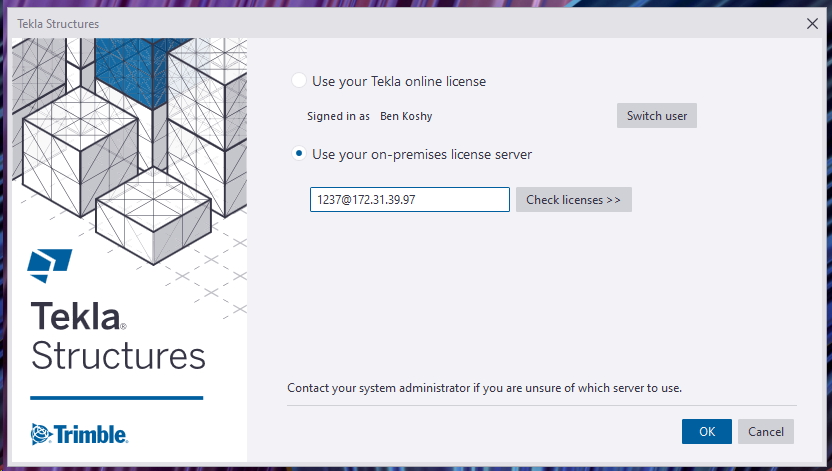
- If you are in the office, then you should automatically connect to Tek1’s infrastructure via Meraki VPN. All you have to do is enter the correct internal IP Address.
steel detailing: [email protected]
For drafter: [email protected]
Outside the Office
- If you are accessing our VPN from outside the office, please follow the instructions in the following video:
I will tell you the client vpn passwords and codes that you need in order to connect. Just msg me please.
Old Policy was to connect via AWS VPN to Amazon Infrastructure
(2) Disconnect your VPN connection when not in use. So others in our team can access. VPN connections are very expensive.
(3) Do not share your username / password with anyone else.
(4) Do not use these licenses for your own personal work – i.e. for Tek1 use only. This ties in closely with the first point re: piracy.
- Download the AWS VPN Client here: https://aws.amazon.com/vpn/client-vpn-download/
- Download the configuration file here.
- Set the number as: [email protected]
- Start Tekla.
- You will be asked to authenticate via Microsoft Azure.
Problems or Errors?
Please read the trouble shooting page here.
Administration Notes
- Users must be added to the “Steel Detailing Group” to get access.
- External users must be added to the: “External Contractors” group if they are contractors.
- If staff should leave the organisation, they must be deleted from both groups. Access via Azure Active Directory’s portal.