Category: Uncategorized

  • DEMOULDING SLOPE

    Demoulding of precast member without damage to either the components like lifter or mould is critical to successful replication process for the particular complicated design. During mould design, the designers concentrate to make minimum draft (nearly 10 ) on mould to wherever the possible  to minimize demoulding force and resultant stress on lifters and prevent on weaker part of the precast member.

    For Example,

    CONTRIBUTORS DURING DEMOULDING WITHOUT SLOPE

    The above picture shows influencing factors for demoulding force. In this case the resultant DEMOULDING forces like vacuum & friction (Area of contact, Coefficient of friction & Normal contact Pressure) along with self-weight of precast will increase demoulding force. If the demoulding force exceed the lifter capacity limit leads to fail the lifters. So, we can’t able to lift this precast member. To eliminate this type of failure. We need to provide slope where contact pressure or interface adhesion develop.

    CONTRIBUTORS DURING DEMOULDING WITH SLOPE

    The above picture shows the effect of demoulding slope. Where the 10 slope didn’t affect too much the original shape of precast, but considerably minimize the demoulding force. The slope reduces the frictional force & provide passage to air enter where vacuum force develops.

  • CONCRETE WITH SPECIFICATION DIFFERENCE (N & S)

    CONCRETE:

     (AS 1379 Specification and supply of concrete) A mixture of Cement, aggregates and water with or without the addition of chemical admixtures or other materials.      

    Cement: (AS 3972 Portland or blended cement) A hydraulic binder composed of Portland or blended cement used alone or in combination with one or more supplementary cementitious materials.

    Concrete is defined as follows,

    • Plastic concrete:

    Concrete in the state between completion of mixing and initial set as defined in AS 1012.18 Methods of determining setting time of fresh concrete, mortar and grout by penetration resistance.

    • Hardened concrete:

    Concrete after initial set, as represented by test specimens that have been subjected to a specified process and duration of curing.

    • Normal- Class Concrete:

    Concrete that is specified primarily by a standard compressive strength grade up to 50 MPa and otherwise in accordance with Clause 1.5.3.

    • Special- Class Concrete:

    Concrete that is specified to have certain properties or characteristics different from, or additional to, those of normal-class concrete and otherwise in accordance with Clause 1.5.4.

    SPECIFICATION OF CONCRETE:

    Concrete shall be specified,

    (a) as either

    (1) Normal-class(N), or

    (2) Special-class(S), or

    (b) By strength grade or other readily verifiable parameter by which compliance with the specification can be assessed.

    NOTE: Standard strength grades should be specified wherever possible.

    • NORMAL-CLASS CONCRETE:

    Normal-class concrete shall be specified only by the parameters given in Clause 1.5.3.2(Basic parameter), and shall have the following attributes:

    • A mass per unit volume in the range 2100 kg/m3 to 2800 kg/m3 when determined in accordance with (AS 1012.12.1 Determination of mass per unit volume of hardened concrete) in the saturated, surface-dry condition.
    • Acid-soluble chloride and sulfate contents within the limits given in Clause 2.7, when determined in accordance with Clause 5.5.2.
    • A shrinkage strain not exceeding 1000 × 10−6, when determined in accordance with Clause 5.6 after 56 days drying.

    NOTE: This maximum value of 1000 × 10−6 is consistent with the use for design purposes of a median basic shrinkage strain value of 850 × 10−6.

    • A mean compressive strength at 7 days, assessed in accordance with Clause 5.7, of not less than the values of Grade designation for N20-9MPa, N25-12MPa, N32-16MPa, N40-20MPa & N50-25MPa.
    • A cement complying with (AS 3972 Portland or blended cement) alone or in combination with one or more supplementary cementitious materials.
    • No lightweight aggregate as defined in AS 2758.1 Aggregates and rock for engineering purposes Concrete aggregates.

    Basic parameters of normal-class concrete:

    The following basic parameters shall be specified by the customer:

    • A standard strength grade selected from 20MPa,25MPa,32MPa,40MPa, 50MPa,65MPa,80MPa or 100MPa and designated as one of N20, N25, N32, N40 or N50.
    • The slump at the point of acceptance, selected as one of 20 mm, 30 mm, 40 mm, 50 mm, 60 mm, 70 mm, 80 mm, 90 mm, 100 mm, 110 mm or 120 mm.

    NOTES:

    1. The customer should carefully consider that the specified slump of concrete suits the placement method.
    2. For residential slabs and footings, if the slump is not specified by the customer, the specified slump should be considered to be 100 mm.
    3. The maximum nominal size of aggregate, selected as one of 10 mm, 14 mm or 20 mm. Unless otherwise specified, the default value shall be taken as 20 mm.
    4. The intended method of placement, including relevant details of equipment.
    5. If project assessment is required to be carried out by the supplier (see Note).

    NOTE: If unspecified, it will be assumed that project assessment is not required.

    • If required, a level of air entrainment up to a maximum of 5.0%.

    (2) SPECIAL- CLASS CONCRETE:

    Concrete other than normal-class concrete shall be specified by the customer as specialclass and, if applicable, by strength-grade. The parameters and attributes that should be specified for special-class concrete should be as set out listed below with reference to Appendix B and Table B1 on AS1379.

    Special-class concrete commonly has the same basic parameters as normal-class concrete with some additions and(or) exceptions. Parameters or attributes that are different from, or additional to, those of normal-class concrete should be included in specification below. If the requirements of specification for any concrete are inconsistent with those for normal-class concrete then the requirements of specification take precedence for that concrete.

    Where any parameter other than strength grade requires the specification of a special-class concrete, or the proportions of the mix are specified, the concrete should be identified by an appropriate code agreed to between the supplier and customer that identifies that particular mix.

    Basic parameter for specification of special-class concrete:

    • It is recommended to select from standard strength grades of S20, S25, S32, S40, S50, S65, S80 and S100.
    • Where concrete is specified as special-class and a strength grade is applicable, the strength grade is designated by the prefix:

    S, for compressive strength grades;

    SF, for flexural strength grades; or

    ST, for indirect-tensile strength grades.

    Where concrete is special-class and any property other than strength grade is Specified as the principal criterion, or the proportions of the mix are specified, it is designated by an appropriate alphanumeric code, agreed between the supplier and the customer, to indicate the criterion.

    • Special-class concrete should be subject to project assessment.
    • Certain concrete exposure classifications may require special provisions for aggregate durability (AS 2758.1 Aggregate & Rock for engineering Purposes.)
    • Any departures from the parameters or composition, or both, of normal-class concrete and any other criteria or limitations shall be specified by the customer in consultation with the supplier.

    NOTE: A summary list of several such parameters, some or all of which may be specified for the production of special-class concrete for a project, is given in Appendix B on AS 1379.

    • Other requirements additional to these parameters may be specified.

  • Quiz on getting Approvals

    Here is a quiz that Bharath has written. Very relevant.

    Engineers Architects are trying to wriggle out of their responsibilities by stamping “VIEWED” or “No COMMENT”. They do not want to stamp approved for fear of any error in the document could come back and bite.

    Insurance companies on the other hand are trying to minimize their risk when they provide insurance to detailers by explicitly stating, they will not cover the detailer unless the drawings are stamped for approval by the engineer and architect, and anyone else.

    To cut the discussion short, if the detailer issues without approval then the detailer will put everyone at risk because there will be no insurance cover. Detailers are the smallest in the chain. Try to litigate against the detailer is unlikely to get any good result. They could simply windup.

    Now here is the quiz

    https://docs.google.com/forms/d/e/1FAIpQLScspZzCdNBlwVb4FJcB3rUebNuaZHBk28goPcUBHGFXz-aQiA/viewform

  • Our Privacy Policy

    We comply to Australian Governments privacy policy as in the URL given below

    https://www.oaic.gov.au/about-us/our-corporate-information/key-documents/privacy-policy/

  • Steel Detailer Jobs

    12 Positions available for Trainees / Experienced

    Tekla Trainees to work from our new Trichy Office

    Send applications to hr@tek1.com.au


    Take on line Test if you are fresh or less than 2 years experience as steel detailer

    After the quiz is completed we will contact you if you have cleared the test and eligibility criteria we will contact you.

    Go to our Testing URL: https://training.tek1.com.au/login/index.php (Copy paste link to a new tab)

    Click the button: ‘Create New Account’

    Enter a user name & password of your choice. If the username already exists, please try another.

    Enter your valid email address & your official First Name & Surname.

    Create your account. In your inbox, open the email from the System Administrator at Tek1, open the web address link in the email. This will confirm your account & login. If you haven’t received it immediately, check your junk mail box or let us know.

    Now go to the URL: https://training.tek1.com.au/mod/quiz/view.php?id=115 (Copy paste link to a new tab)

    Under ‘ Interview Test from home‘ at bottom of page, enter Enrolment key: Hometest@2025

    Enroll. You will see a page subtitled ‘ Interview Test from home’. Important: Read the instructions.

    When ready, take the quiz by clicking the button: ‘Attempt quiz now’.

    Complete the quiz & submit.

  • Basic Autocad Tutorial

    Here is you tube series which could help in getting started with Autocad

  • Rhino Tekla Interop

    Here is a demo on how a Rhino model can be brought into Tekla

  • Data Enriched COBie

    Data Enriched COBie

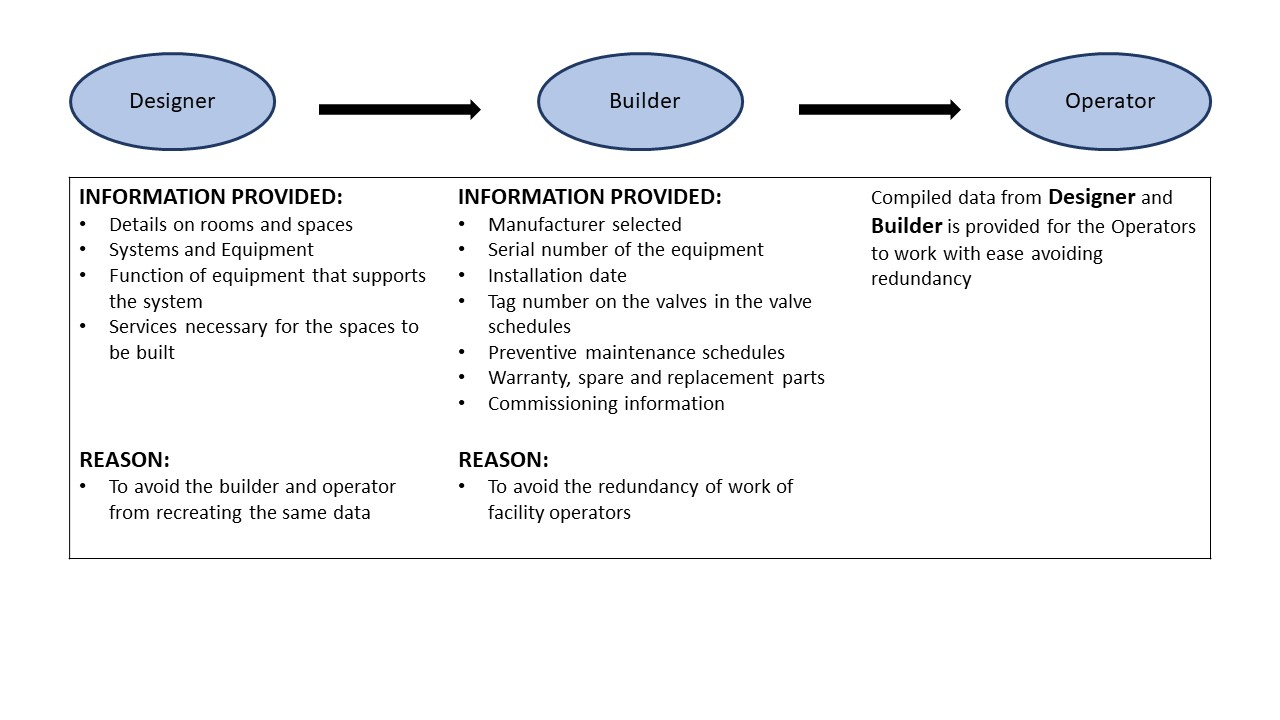
    COBie: Construction Operation Building Information Exchange

    COBie is a standard for the exchange of Building Information during the life of a building project. Information containing specific project details helpful for understanding, operating and maintaining a facility properly. One of the items is the inventory of spaces and their functional requirements.

    To facilitate requirements the designer must provide a spatial layout for building, facility, floor & room number which forms the basis of assigning equipment and products to specific space. Strictly, there is no information on interior components such as furniture nor on structural members.

    In order to obtain information at right time throughout the life cycle of a facility in BUILDING DELIVERY PROCESS, a mechanism is needed. Such a mechanism should filter out unnecessary information, reorganise for owner’s convenience.

    Spreadsheets can be a good tool to manage information in small amounts and simple relationships. The COBie project bridges the gap in interpretation by identifying the similarities in the process that contractors, operators, maintainers & asset managers use to accomplish daily activities.

    What COBie does: As an information exchange standard, it has capabilities of everything from planning, vdesign, construction, commissioning all the way to operations, maintenance & management of spaces. It simply changes the required deliverable from paper documents to electronic formats, facilitating building information interchange.

    “If you use COBie in a way which violates the COBie specification you are no longer meeting it’s requirement. You are doing something else that is not COBie”  Bill East, Inventor of COBie

    Here is the data flow in COBie:

    Compiled and edited by Shantha Priya S.

  • Minimum Steel Checks

    General Discipline

    PDF DOWNLOAD LINK

    Minum check List 2

    1. Update clients on ETA of drawings. Constantly. Clients love status updates, and learning where their jobs are currently at.
    2. Update line items when they are ready to be invoiced. If you don’t, how can you invoice your clients? If you don’t invoice, then how do you expect to receive payment for your work?
    3. Follow up on RFIs that are not answered: push the job forward. Clients are relying on you.
    4. Changes to a drawing? Please markup the REASONS for changes to a drawing. Use markup links if appropriate. If you don’t do this, clients might be confused as to WHY. Especially applicable if a client instructs a change to be made, but the change was not made as instructed.

    Checks Prior to Detailing

    1. Compare the quoted drawings to the drawings you are detailing from: are there any differences – if there are differences then: (i) send a report to the client noting the differences + (ii) send the mark ups + (iii) send any extra steel required. Add these to the extra billables. If there are not differences, then please send an email to the client saying: there are no differences + add your report. You must always send a report, regardless of whether there are differences or not. Add in your reports here: https://docs.google.com/spreadsheets/d/1zmO_dBpxX-ajwoKL0Z-8lgD33I-gQcv6pVp05iBlQqg/edit?ts=5e4577f6#gid=972410357
    2. Evaluate Site measure requirements.
      • Is Steel Fixing to concrete- Get Concrete site-measured, or sent the concrete drawing for approval. Ask for photographs and site measure
      • Is Steel Connecting to Existing Steel?. Do we have to ask for site measure? Or can cut to suit at the site be used.  Ask for photographs and site measuure
    1. Check Autocad file for true dimension using the macro. (CD.lsp)
    2. Clash check
    3. Member Nomination Check
    4. Material Check (Under Guidance)
    5. Standard Flat bar check (All flat bar grade is 300). for 250 use plates
    6. Tek1 Bolt Tolerance check. (With Select Bolt Option clicked, Select Parts within components Clicked in)
    7. Tek1 Bolt Check Report- To pickup bolts Bolted to to only one part. (With Select Bolt Option clicked, Select Parts within components Clicked in)
    8. Loose Plate check (ie whether there are unintended Loose Plates not welded to beams)
    9. Purlin Cleat Hole Check.
    10. Surface finish Check. Some drawing study and instruction from modeler.
    11. Stifner clearance – 2mm for plates within W beams.
    12. Root radius Clearance for stiffeners and fitting plates.-25 mm chamfer at the root (New). For Gal Venting (Requirement from DM Group)
    13. Cleat holes at 70 pitch
    14. Stanchion bolt center distance check for angle mounted and corner stanchions.
    15. PLATES AND PARTS WITH SMALL DIM DIFFERENCE (LESS THAN 3MM) WHETHER COULD BE MADE SAME.(from drg creation Check)
    16. Cleats do not change sides between beam to beam. (Check-in plan view)
    17. Drawing Creation Check. (Use for Profile check and small length difference of plates and beams)
    18. Part names are set to reasonable names.
      • All webforge Names to Webforge Grating spec.
      • Is the grating type checked
      • Is the grating direction modeled with a part cut using PLT6*20 cutting at the top and not at the bottom?
      • Is the grating part drawing showing the cut in full lines and NOT DOTTED 
      • Is the grating end view correct and consistent with the plan view  – download sample grating drawing.
      • Is the grating template used for creating drawing (View orientation is local on Grating template) Check(new)
      • All Monowills Names to Monowill Catalogue specification.
      • Everything else to reasonable names. Do not name a stanchion as Col. a small outrigger as Beam.
    19. Check Beam Rotation. (Use macro to check). Also Col Rotation. (Use macro to check)
    20. Run report on Cols top and Bottom RL – Check the top and bottom RL are same unless there is ta reason to be different.
    21. Run Report on Beam RLs check Rls are same unless there is a requirement.
    22. Bolt Check. Run the Bolt Check Macro (newly added in checklist on 14/3/17)
    23. Number setting – Is the name ticked. Name must be ticked because the bridging list depends on the name to get the bridging Number. At the very least the while numbering bridging Name should be ticked. The main Part must take Assembly Mark. (This is required for beamline Marking) (new)
    24. Are there Anchor bolts going into masonry wall hollows?. If yes, do you know the block wall set out downlink for bim modelImage of problemDownload pdf.
    25. Roof requires support on all edges. Make sure no edge is without support
    1. Profile marks and part marks appear on part mark
    2. Shortening is switched on in member drawings. minimum cut 100. (Shankar to change the Tek1 Beams template to this setting in starter model)

    Drawing Checks prior to detailing Assy drawings – Checked by generating only – No editing

    1. Unnecessary Part Nos due to small changes in part size
    2. Base plate drgs for web forge staunctions. Create base plate drgs of stanchions check hole sizes and then delete the drgs.
    3.  Edge distance check on unedited single part and plate.
    4. Drawing Creation check to confirm all drgs are created- But No part drgs created for purchased items
    5. Cleat hole pitch 70 mm by default.
      • 60 mm if required due to space constraints.
      • 50 mm if required due to space constraints. (M16 only)
      • 90 mm Gage for 200 PFC, 200 UB AND 200 UC
    6. Minimum edge distance default 35 mm.
      • If edge distance is a constraint then it can go down to 1.5 bolt dia.
    7. Bolt group modeling. No individual bolts if it can be modeled as a group.
      • bridging bolts are individual
    8. Purlin and bridging hole pitch. for 150, 200 and 250 and 300 purlins.
    9. Are we using polybeams for anything? Handrails, curved beams Are there at least 2 views? Plan and Elevation?
    10. Study roof plan. Locate Gutters, roof Slopes, identify Steps if any in the roof. Mark and put notes on Roof Plan
    11. Study Slab drawing. See if there are floor coverings. See set down areas, Hobs. Mark on Structural drawings set down, Hobs
    12. Before making assemblies/assembly drawings check erection feasibility and shipment sizes.
    13. Switch on orientation marks on assemblies and ga plan for the easy erection.

    Assy Drawing Checks

    1. Running dimensions on holes along the beam
    2. Running dimension for cleat positions along the beam
    3. Dimensioning to cleat plate on Assy drg is to bolting face.
    4. Drawings are right side up. (Not upside down) on Assy drgs.
    5. Root Radius Clash
    6. 2 mm Clearance for stiffeners in PFC, UB, an UC
    7. No projected dimensions. (Fabricator has no means of measuring projected dimensions)
    8. No dimension which can be used for setting up, or cross-checking
    9. Are Check dimensions there. (Refer this link).
    10. Provide iso metric Assy view for complicated assemblies.
    11. Default weld is 6mm fillet weld. All other welds must be called up in Assy drawings.
      Welds should be modeled correctly. We cannot model all welds as 6mm fillet weld. If the drawing calls for 8mm weld, it should be modeled as 8 mm weld.
    12. Brick lintels are usually stitch-weld. Make sure the note is on (New) 13/3/2020

    Checks while modeling (Main Modeller)

    1. Did you read Steel Notes and highlight points to note.
    2. Check whether rod bracings with D Nuts can be used. If yes RFI the engineer if the engineer has shown other types of bracings.(New)
    3. Beam rotation check. (All beams rotated to top).
    4. Curved beams Handle to the outside of the radius. Verify using drawing at the modeling stage.
    5. Test Assy drgs creation. Drg should come right side up
    6. For CHS with end cleats. CHS rotation matches with End cleats.
      • (Procedure. Set UCS to end cleat front)
      • Set CHS rotation degrees to zero. (CHS main part)
      • Create Assy drawing and make sure end cleats are not rotated.
    7. No items modeled as folded plates except for parts which will require folding while manufacturing (Sheet metal only)
    8. No base plate showing up through walls. or projecting into doorways. (Check-in Arch Plan View)
    9. Clash Check
    10. Turn Buckle – Check F dim with Catalog. Example https://www.townleydropforge.com.au/catalogue/stub-stub-turnbuckles/
    11. Minimum ceiling height for offices, public facilities – is 2700

    Grating Checks

    1. Load bars need support.
    2. Check maximum span. If the span is more, then additional support is required.
    3. FRP GRATING 
      1. For FRP grating there is no dominant load bar direction
      2. For FRP grating support is required for all direction of load bar
      3. Span cannot exceed the specification in both direction
      4. Do not mark load bar direction for FRP grating

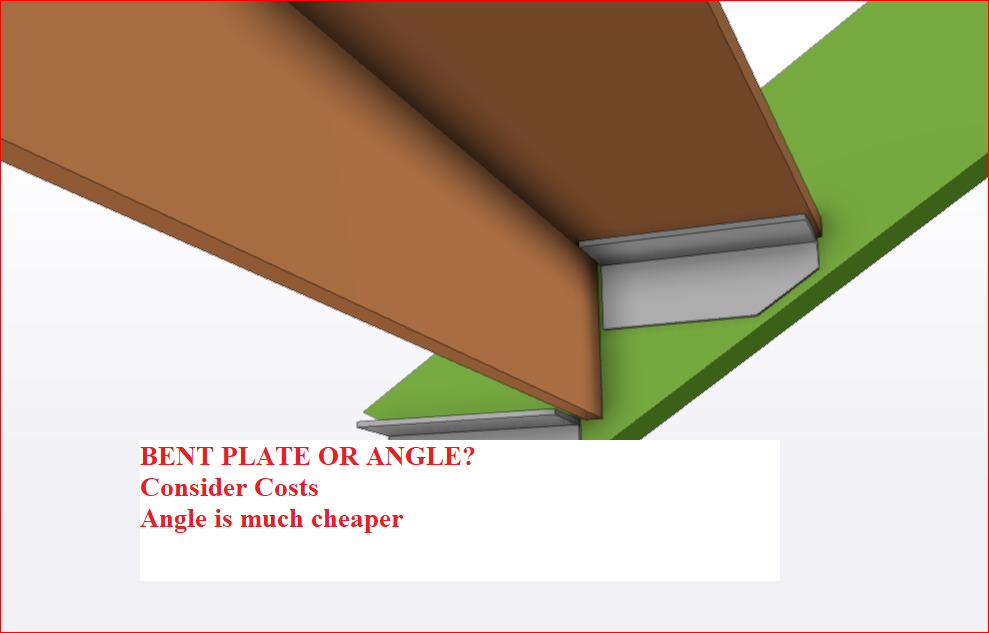
    Bent Plate or Angle

    When possible use Angles because

    Bent plate is more expensive, more time

    GA Checks

    1. Whether Views are taken from the correct side on GA (From where Items are Installed)
    2. Check RLs on GA while modeling.
    3. North Mark setting on Cols and model. (Create test Assy drawing). Check out North Mark.
    4. Steel below Ceiling Check (normally for houses).
    5. Site Welds must call in GA with detailed.
    6. Do not connect in GA with dimensions Framing Assemblies which has no relationship with each other.
    7. Brick Lintel position lines up so that Lower end of brick does not fall out of line with window top (No gap required as bricks are visible)

     Single Part Drawing Check (Responsibility of modeler)

    1. Curved beams – Dimensions are to the outside of the radius.
    2. Material list length and the dimensioned length matches. –  See Example

    Modeling checks

    1. When mullions sits on Hob, RFI whether the mullions should.
    2. DO NOT MIRROR COLS, BEAMS PLATE. You can mirror points and construction lines(new)
    3. Bolts to Timber (Only Holes to be provided since bolts are not supplied by fabricator)
    4. Standard welds are 6mm fillet welds. All other welds must be modelled correctly and called in shop drawings.
    5. Don’t Draw unnecessary walls and other elements which has no impact with our scope of work.
    6. At Timber framing connection, Don’t supply the Connection bolts for the Timber Rafters.

    Modeling checks for Houses

    1. Can door open. The sliding door must open without clashing with steel col or base plate.
    2. Lintels should extend to each side to support brickwork.
    3. Garage Lintels must support the brick above the door. (Usually with a plate welded under the beam)
    4. Slab must be modeled correctly prior to starting modeling.
    5. FFL and SSL should be clearly identified.
    6. Base plates must either be hidden is walls or under FFL. Top of the bolt should be minimum 30 mm below FFL if not in stud wall (Walking area)

    Bridging check

    1. Check bridging specification in member schedule and notes
    2. If no bridging is the specified check against Lygsaght catalog
    3. Put a filter to show only bridging. Make sure there is no gap between bridging to bridging

    Facia Purlins

    1. Angle of the Facia Purlins should be specified to match with Roof Angle
    2. Facia Purlin Must have a drawing
    3. Check bracket hole distances. Bracket specifications are different for Facia purlins. Check against Lysaght catalog

    Modeling checks for Stairs.

    1. Is there a site measure required.
    2. Is the site measure to concrete, have you considered floor covering.
    3. Ask for the rise and going on the last nosing point. Because landing may have different thickness flooring.
    4. Are the handrails stainless? The maximum length of the available stainless steel pipe in 6M.
    5. How is the pipe to pipe connection? Will inline splice be used? Check https://stainlesscablerailing.com/ss-15-splice-inline.html
    6. Have you checked for125mm ball not passing through pickets and all gaps?
    7. The maximum number of steps in one flight is 18. Have you checked?
    8. What is the code to be used? 1428 is public access. 1657 is maintenance. BCA is for residential.

    Bolt Checks (New)

    1. Provide Blue Color for Chemset Bolts – Tolerance 4 mm
    2. Provide red color for bolts through Galvaniszed members – 4 mm tolerance on Galvanized plates.
    3. Take a Bolt Summary sheet. Check Bolt sizes
    4. Put a filter on Galvanized items. Check hole sizes for 2 mm tolerance.
    5. Special Attention for CSK bolts. Check DXF.
    6. Do not supply bolts at timber connections. Model holes without bolt option.

    Dxf files

    1. Do not provide centerlines for holes
    2. Open and check dxf files. Especially plates with CSK holes, since there is a good chance that we can make an error.

    Setting out site measure

    Minimum 2 Points should be aligned and identfied in drawings and model.  One point is not enugh.

    How we have used the site measure should be clearly shown in the drawing

    Site measure should never be scaled. If the .dwg file turns up with no units, then set the units as appropriate to mm or meters. Never scale meters to mm or in anyway modify site measure. Site measure should be used as is

    Clouds and RFIs on IFA and IFC drawings.

    1. All clouds on IFA drawings should be numbered.
    2. Project History sheet must have all the clouds which are in the drawings.
    3. Clouds status should be coloured in as open, or closed.
    4. Clouds should be removed only if satisfactorily closed.
    5. The pdf of open cloud list should be sent along with IFA drawings.
    6. Reason for removing clould should be listed in the Project History sheet.
    7. If client insists on getting issuing IFC drawings without answering clouds, do not remove clouds. Send IFC along with list of open clouded items

    Chequer Plate Checks

    1. Check in model all plates are drawn front. Put drawings early on to check plate rotation
    2. Architectural plates must not have scribe marks on visible face
    3. The Bend line should be visible in dxf.
    4. Use correct material. Material used affects developed length
    5. Chequred plate dxf should be created with backside up. Bend lines should be present in dxf.
    6. Always open dxf and check.
    7. If CSK holes are there, then make sure that the holes cut are only for the bolt size and NOT the head size.
    8. Check whether smaller holes are cut. Sometimes, we need cut small holes in dxf. Sometimes we need to cut. Check requirements and check the dxf.
    9. Make sure the settings for dxf is correct.
    10. For cutting Stringer plates, contour marking for cleats is required. So Check wether the countour markings are coming on dxf.

    Existing Members

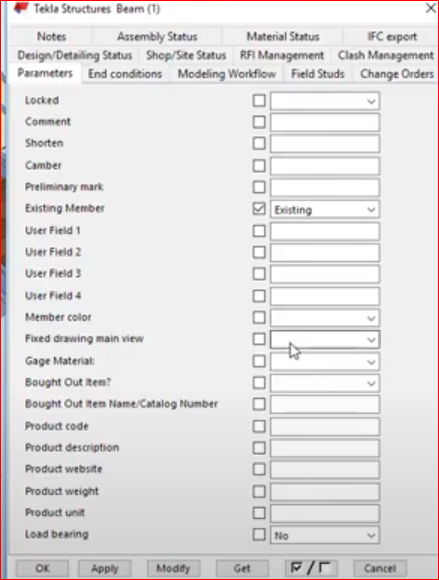
    Existing Member

    Did you set the existing member user attribute to Existing so that no mat list, Drawing will be created