Help on Autocad commands are right there at the command line. However, too many times new users ask questions. Not just new users, experienced users as well get used to some way of working and stay there without checking out the full documentation. This video show where the command is available
Author: admin
-
Setting dimensions style using a template cad file
You can download the template cad file by clicking this link
late dim.dwg fileDIM . It is zipped file only because wordpress does not allow me to upload a .dwg file
-
SENIOR SDS2 TRAINER (CONTRACT) ONCE A WEEK -4 HOURS ONLY
We are looking for a trainer who can come into our office once a week between 1 PM and 6 PM to train a mix of experienced tekla detailers as well as fresh graduates basics of SDS2 software.
This will be a casual position. Excellent rates apply.
-
What is the cost of drilling a web hole in a Beam in Australia
While detailing structural steel, one could add a lot of web holes willy nilly on structural steel.
Detailers are blissfully unaware of the costs most of the time, especially when detailing offshore.
In Australia, it costs approximately $2 to drill one inaccurately positioned web hole.
So do not put holes willy nilly
-
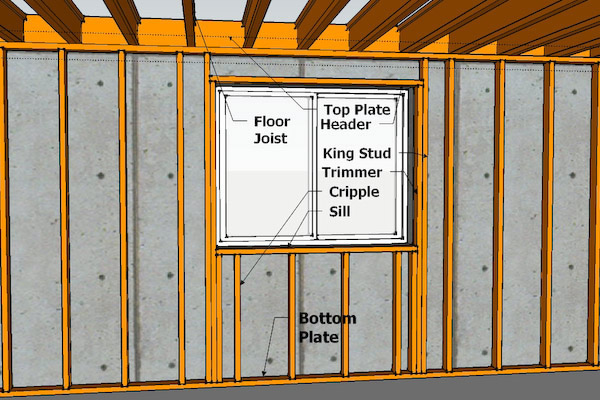
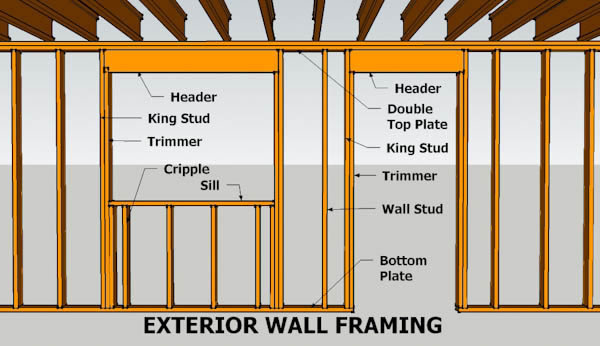
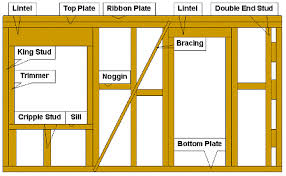
Top Plate in Framing
What is the purpose of top plate in framing?
A single top plate can decrease lumber use and boost energy efficiency, but less lumber also decreases the bearing capacity of the top of the wall. … The tolerance requirements ensure adequate bearing capacity by directing the loads from the framing above the top plate directly into the studs below.
A Top Plate is the continuous timber beam on top of the walls that supports the roof structure by carrying the vertical forces from the rafters to the wall studs.
Ribbon Plate goes above top plate.
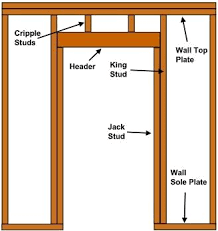
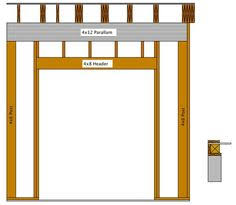
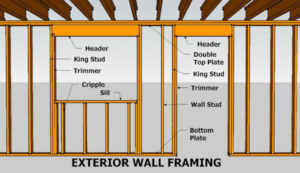
FRAMING AT DOOR 
-
Nightmare Projects to Avoid – (Anecdote #1: Pedestrian Bridge)

Avoid danger in building and construction. “A prudent person foresees danger and takes precautions. The simpleton goes blindly on and suffers the consequences.” –Ancient Proverb
We might do an entire series on these types of projects. Here is one such example:
We’ve seen some unique designs from architects who were either:
- smoking crack cocaine, or were
- fresh grads straight out of uni, or
- who were many years experienced in the trade of being incompetent. Here is another night mare story which will either make you chuckle or shake your head and weep:
A Bridge That Cannot Be Fabricated: Avoid it!
A fabricator walks in wanting to fabricate a bridge. It’s a government project. So the tax payer is paying for all of this. The tax payer’s expert – who ever that may be – has no clue what they’re doing so they approve the designs and planning for a pedestrian bridge – which should be a really simple and straight forward project – to the total cost of $5 m to the tax payer. But of course, the architect and his bureaucrat don’t want to make a simple, ordinary bridge — oh no, that will not do. They want to make a name for themselves. So they design a bridge that simply cannot be fabricated. I wish I could show you the drawings, and explain in detail why it cannot work, but the bottom line is that, using the current technology we have, and that which is available in the best workshops in the land – I cannot see how this thing can be made. Maybe some day when we get some alien technology from Klingon, making this bridge will be a piece of cake. But till that time, mere human beings might struggle.
Think of taking a beam, twisting it at both ends (like you would do to a piece of string), and then trying to rotate it into the shape of a double helix. Do this for 6 beams and try and connect them together – like the spokes of a wheel being connected to a hub, some 10 m away. It’s not going to work! I call up my fabricator and tell him my concerns, warning him, in fact, of the dangers of this project, with a simple question: “How are you doing to fabricate this thing?”
His response: he insisted that it could be done. I insisted it could not – that he should try doing it before jumping into a dangerous and foolhardy project which he would be blamed for, and which he probably was not going to get paid for.
In any case it was clear to me that this was a building and construction project that was going to be very badly managed, and incur huge costs to the tax payer. The bridge that would be built, would be different to that which was originally designed. This means potentially huge rectification costs, from all parties concerned. You could easily treble the cost of the bridge, and double the deadline, and you still wouldn’t be half way there. In the end, the tax payer would be taken for a ride.
I said my piece, and in the end, I declined to be involved in the project.
Perhaps in time, maybe over the next 15 years, I can update you on the status of the project and the costs incurred to the tax payer.
Morale of the Story:
- Listen to good advice, especially when it’s given for free.
- Stay away from dangerous projects, and you won’t fall into a pit.
- Don’t let a government bureaucrat anywhere near your projects – they’re always spending someone else’s money and not their own, so fundamentally: they don’t care.
-
Precast Command: Attaching Data to Grid Lines
Video Demo of the command:
Precast Command: Add Marks To Grid Lines from Tek1 on Vimeo.
The following demonstrates how to attach data to a particular line. In this case we are attached grid marks (from a Mtexts) to AutoCAD lines. We are attaching them to the line’s extension dictionary under the XRecord named “Grid”. We can then view this by using a Line Overrule which displays those Xrecords at the start and end points of those lines. The name of this particular command is: AddGridMarksToGridLines. The reason we are doing this is so that we can programmatically access the grid lines, and also have the grid mark readily attached to that particular line.
The command to toggle the overrule on and off is: “TOGGLEOVERRULE”.
-
LineDirectionJigger (AutoCAD .net API Jig code)
Many times, over my career in using AutoCAD, I’ve had this requirement: given a particular input vector, I’ve wanted to a jig a line perpendicular to it, within my code.
Accordingly, I have written a little class which I call the LineDirectionJigger: basically it restricts users to select one direction or another. For the sake of completeness I”m posting everything, but you will want to focus on the calling class (i.e. the getViewDirection() method) and the server, which is of course the LineDirectionJigger class.
You can see a demo of this jig starting at about 1:26 in this video here.
And here is the code: