Tag: precast

  • DOWEL BAR WITH DETAILS

    Dowel bars:

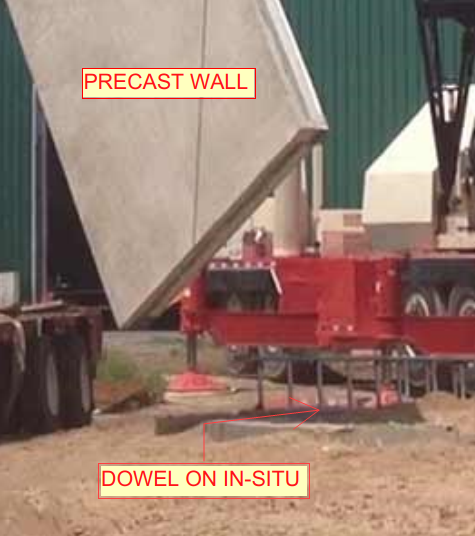
    • Dowels are short straight steel bars and also cogged bars, used to provide mechanical or structural connection between two precast elements or in-situ to precast elements.
      (Refer Fig.01)
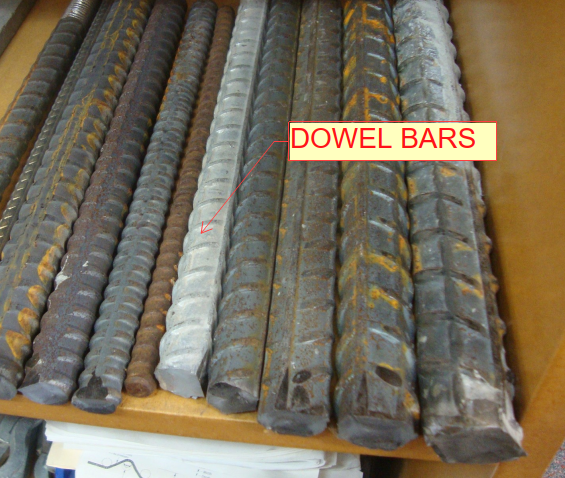
    (Fig.01) Dowel bars

    Purpose of Dowel bars:

    • Dowel bars used to maintain the horizontal and vertical alignments of slab and precast panel. (Ref Fig.02)
    • Dowel bar connection used to transfer the loads between two concrete elements or two precast elements or precast to in-situ elements. (Refer Fig.03&04)
    • Dowel bar is used to extend the structure easily with small drilling to insert the steel for the extension of the structure.

    General details for Dowels:

    • Dowel bar is a steel rods with spiral outer design. (Refer Fig.01)
    • Used in all the locations where Grout tubes are required.
    • Selection of Dowel based on Engineer requirement.
    • Dowel can either be black finish or galvanized finish.
    • Black finish for load bearing dowels and galvanized finish for NLB (non-load bearing) dowel. (It may be varied).
    • Alternatively, bars connected into NMB splice sleeves can be used. Also, starter bars can be casted into panel.
    • Plastic tube will be placed over upper half of dowel. And 20mm compressible cap will be placed over the top of the dowel bar for NLB (non-load bearing) portions whereas grouting material will cover the entire dowels for LB (Load bearing) conditions.
    • Dowels must be positioned within Grout Tubes with minimum amount of clearance on precast walls or slabs.

    Advantages:

    • It is reducing the corner cracking.
    • It will reduce joint faulting.
    • Dowel bar is also used to reduce the deflection and stress.
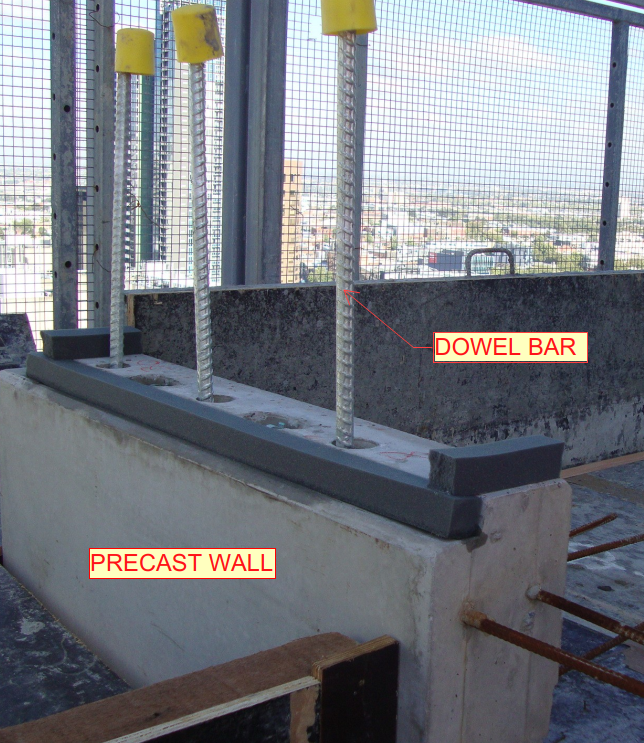
    (Fig.02) Precast wall connection

    (Fig.03) – Precast to in-situ connection
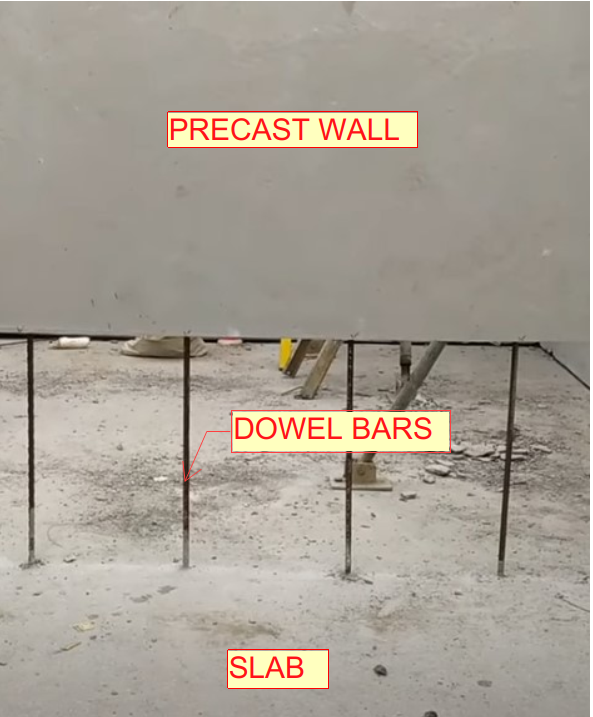
    (Fig.04) – Precast to slab connection
  • STRUCTURAL CORE PLAN AND ELEVATION DRAWINGS STUDY

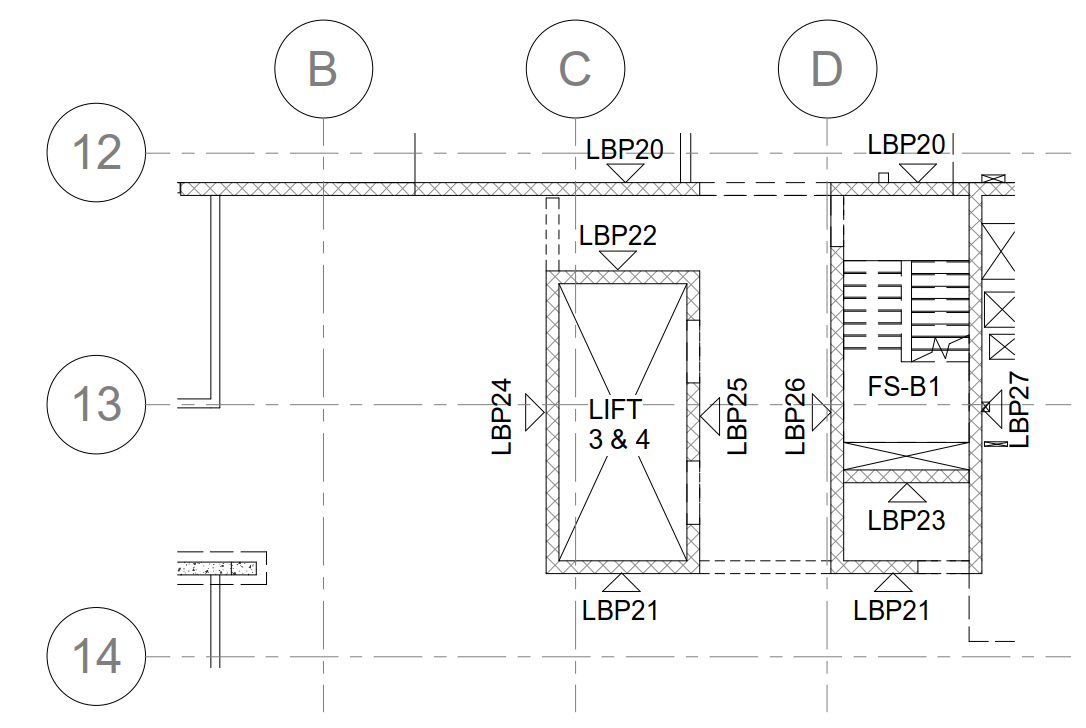
    1. Core plan shows the core wall, shear wall and overall slab boundary. (Only if it is provided by separate structural engineer specifically working for cores & shear walls).
    2. Also, it’s shown the elevation number and viewing direction. (Only if it is provided by separate structural engineer specifically working for cores & shear walls) – Refer Fig 01.
    3. Precast legends will be provided at title sheet.
    4. If too many building means, they highlighted the site key plan with current building.
    5. For single building area of working, they provided the key plan with elevation numbers and views. (Only if it is provided by separate structural engineer specifically working for cores & shear walls).
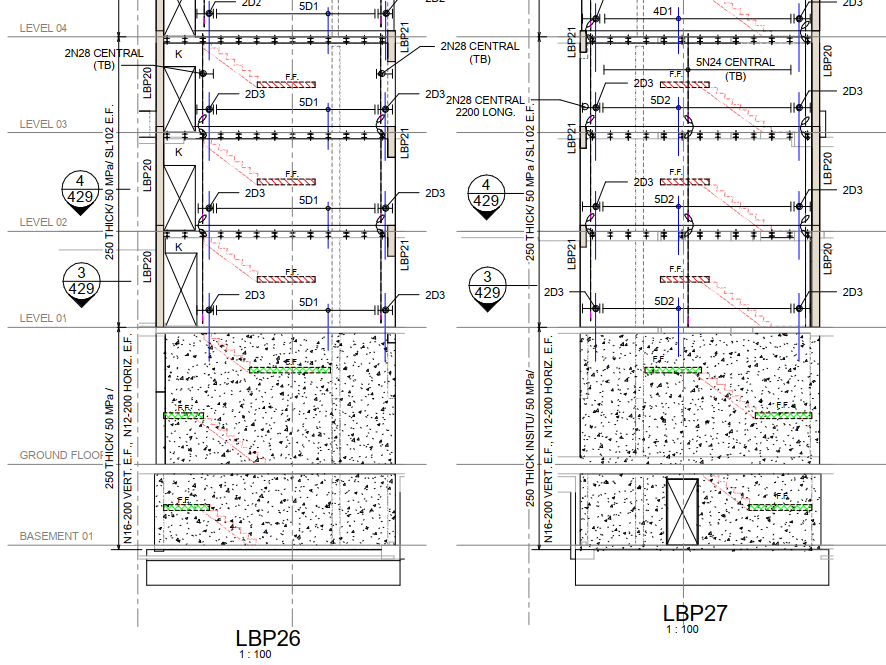
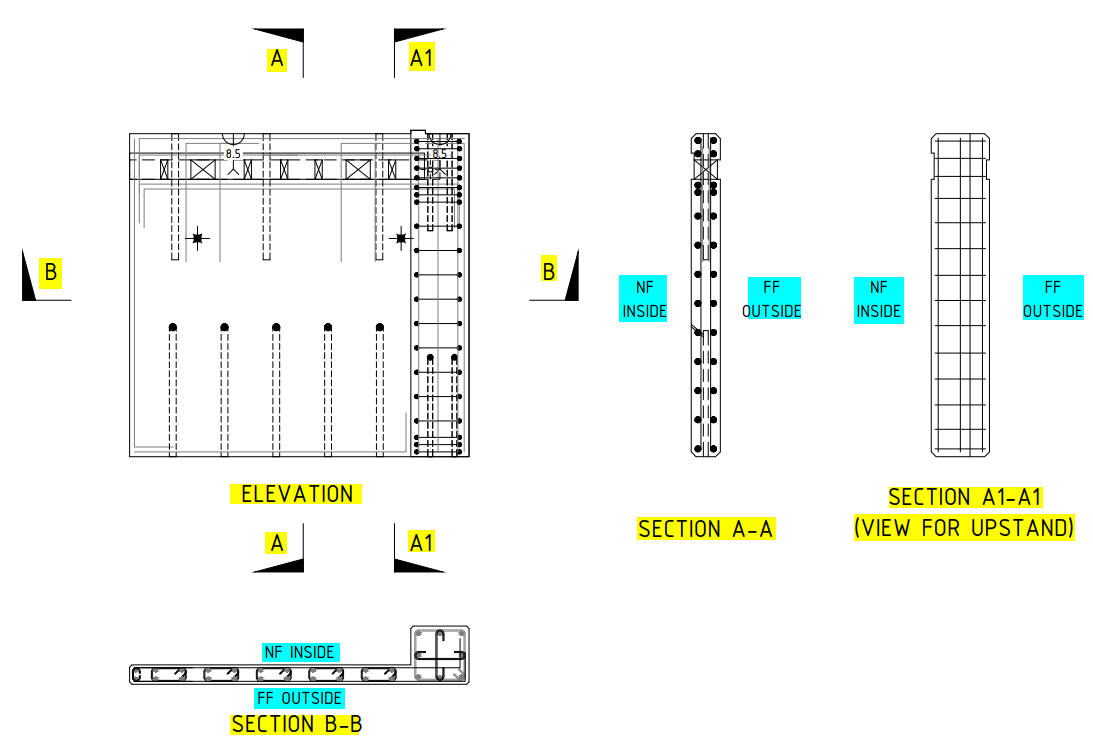
    6. In Core/Shear walls elevation, concerned engineer will provide below details – Refer Fig 02
      • Dowel bar requirement
      • Tension bar requirement
      • Thickness of panel
      • Grade of panel
      • Reinforcement requirement (in some cases it will be given in a separate sheet)
      • CIP requirement
      • Wet-joint details (usually wet joint only specified. Brief details will be given in separate sheet)
      • Header detail schedule type (in some cases header type only given, and will be defined in another sheet)
    7. In core elevation and plan, we prefer to give more importance to elevation than plan, if any issue in it we can raise RFI (Before raising RFI we have to completely analyses the discrepancy, and make a call inward and finalize the deviation. If it is not finalized then only, we can raise RFI (Request for information).

    (Fig.01) SAMPLE CORE KEY PLAN

    (Fig.02) SAMPLE CORE ELEVATION
  • ARCH STAIR PLAN DETAILS AND DRAWING STUDY

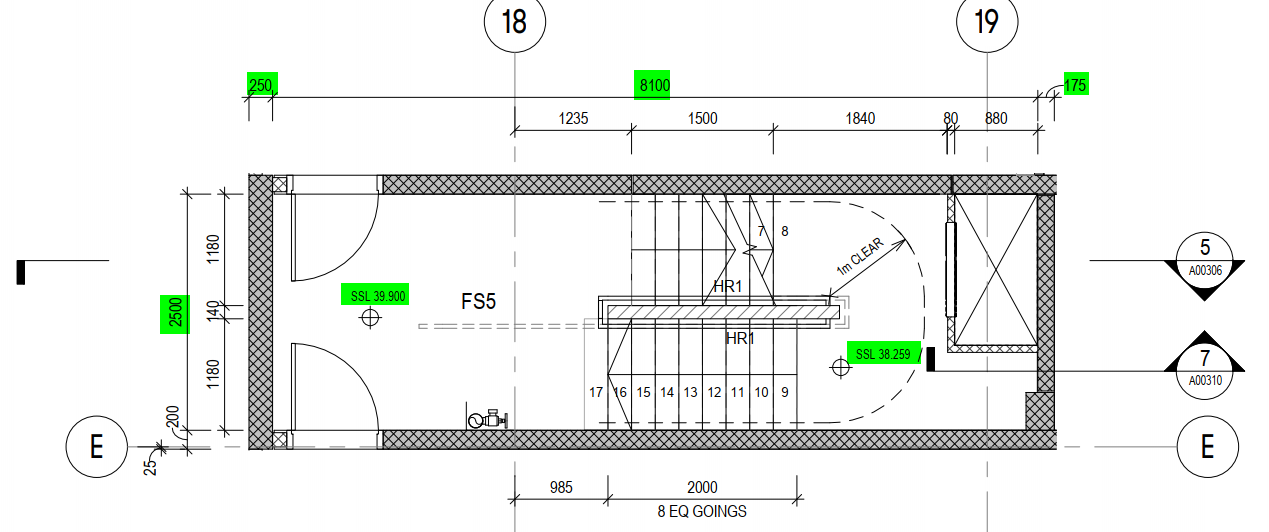
    1. Stair or fire stair drawings are used to find the stair landing RL, landing slab set-out (X-axis distance), fire penetrations and stair pressurization riser details.
      (Refer Fig .01 & 02)
    2. This drawing package are provided by architect separately in arch consultant drawings.
    3. The main things for this drawing are to take the value of stair landing RL’s, Door and opening sizes.
    4. If any mismatch with consultant arch drawing, we have to raise RFI (Request for information) and confirm it. (Most of the cases we need to follow as per stair drawing package only. If we need to raise RFI (Request for information), make sure and cross check issuing date & other references from drawings).
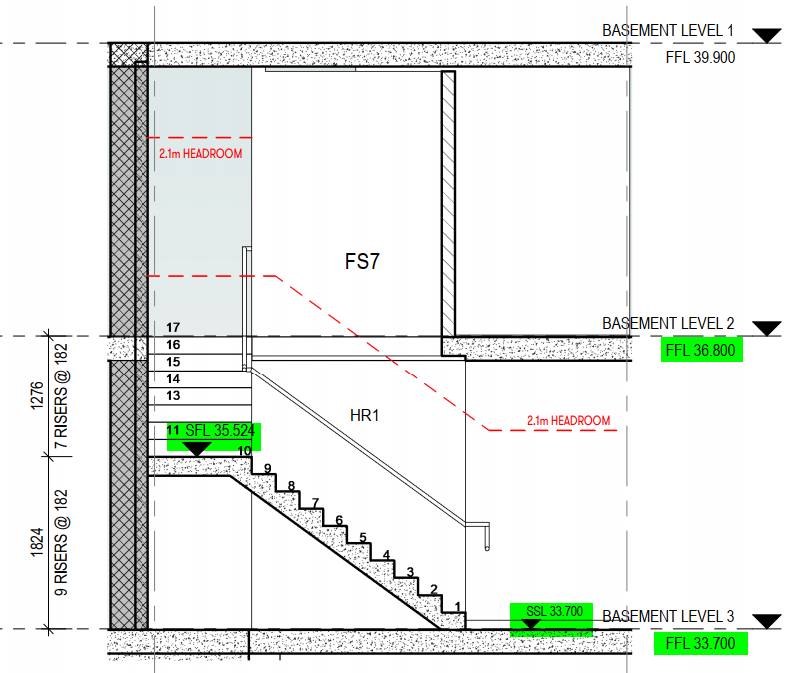
    5. Stair Landing & its mid landing RL’s will be taken from Architect Stair section drawings. If they not provided, then we have to check those RL’s in arch concrete plans.

    ARCHITECTURAL STAIR PLAN (Fig .01)

    ARCHITECTURAL STAIR ELEVATION SECTION (Fig .02)

  • ARCH ELEVATION DETAILS AND DRAWING STUDY

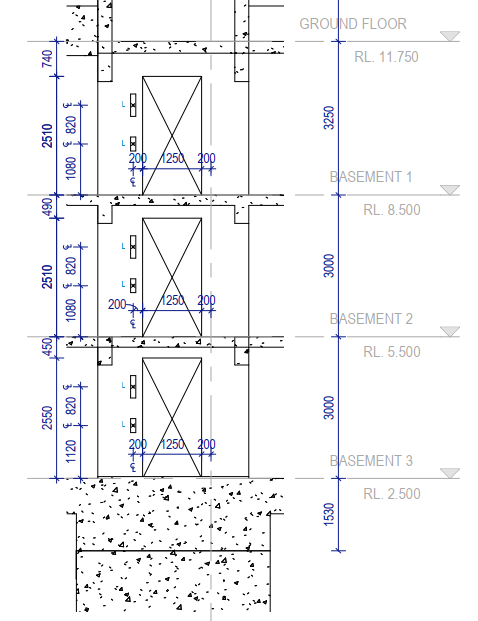
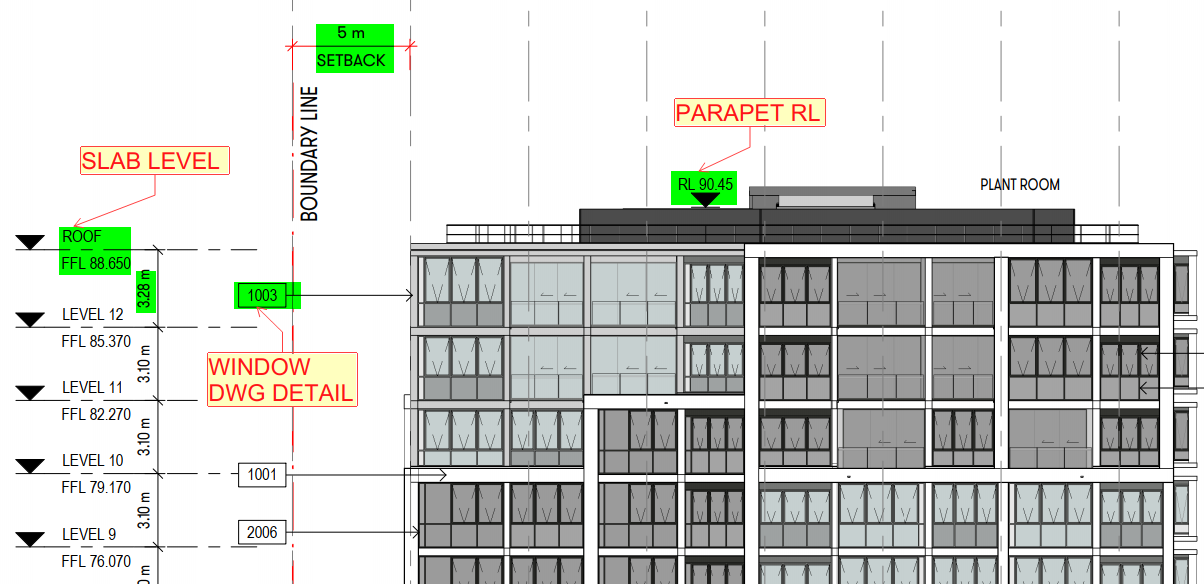
    1. For Architecture elevation, mainly we used for door/window openings height and its location details. (If any other service drawings available means we have to consider that too).
    2. This elevation helps to take the FFL/SSL value of each level.
    3. It’s showing also the RL of parapet and roof level walls.
    4. For patterns, grooves and other elevation design details will be shown on architectural elevation.
    5. The different types of panels finish also shown on elevation where it’s required.
    6. They given all the side of elevation and section views for overall building profile appearance.
    7. It also shows the slab profile appearance and it’s RL’s. (Like floor slab, ramp, stair landing, and etc.,)
    8. Some cases, the arch core elevations also provided separately for stair and lift. It’s shown the details like door and window set-out, fire penetration set-out, landing slab RL and etc.

    Sample Arch core elevation (Fig.01)

    Sample Arch elevation (Fig.02)

  • THE USAGE OF NEAR FACE(NF) AND FAR FACE(FF) INDICATION ON SHOP DRAWINGS

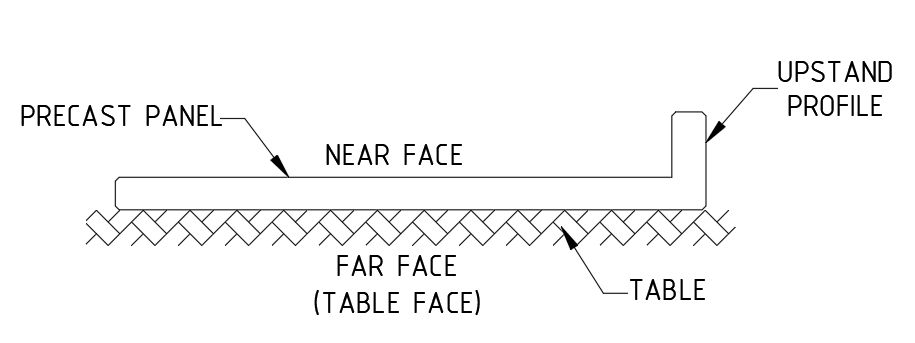
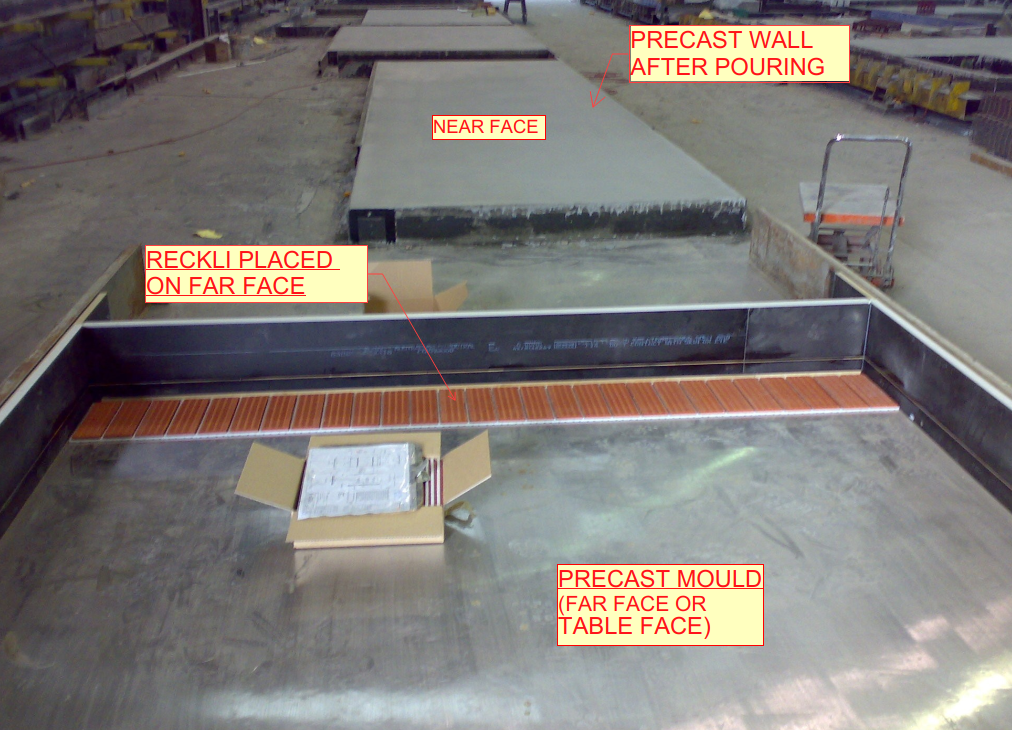
    Near face (NF): Near face is a front view of the precast wall.

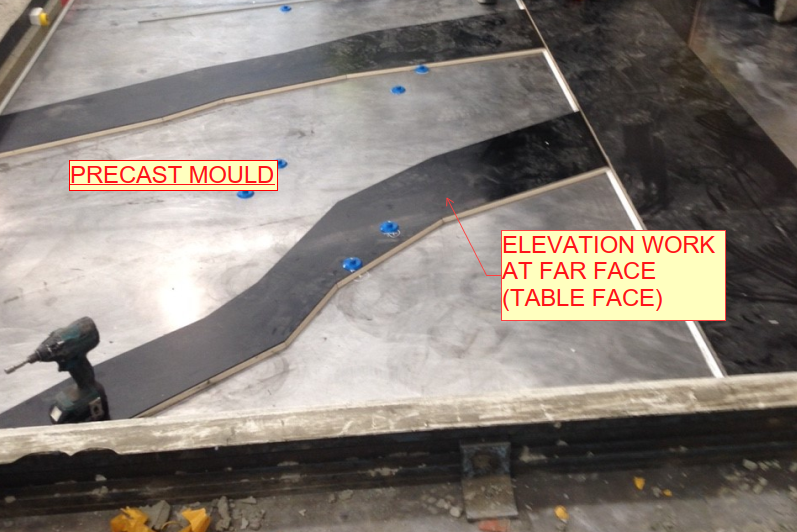
    Far Face (FF): Far face is an outside view or trowel face or table face of the precast wall.

    • Near face and Far face indication playing a major role on shop drawings to identify the component placing for factory people while manufacturing panel. (Refer Fig.02)
    • At initial stage we draw the panel footprint on marking plan and fix the panel view based on where the panel comes like inside or outside of the building.
    • In marking plan, we viewing the panels both inside and outside of the building because to achieve architect and structural aspects or requirements and to avoid some manufacturing difficulties.
    • The below mentioned details are used to fix the views for precast panels from marking plan.1. To View from inside of the building:
    • Good table finish will be on Far face.
    • Grooves, patterns, different profile design comes at outside of the building, so it will easy to assign profiles on far face of the panel and it will be on table face on factory. (Refer Fig.03 & 05)
    • For upstand or corbel to be comes at near face of the precast panels to avoid manufacturing difficulties.
    • If any bars connecting to in-situ at near face, we also view the panel from inside.2. To View from outside of the building:
    • For basement level panels no need trowel finish or good table finish on far face of the panel (Outside of the building). In this case we looking the panels from outside of the panel.
    • If panel have upstand or corbel profiles at outside of the buildings, we need to view the panel from outside to avoid manufacturing difficulties on factory. (Refer Fig.01)
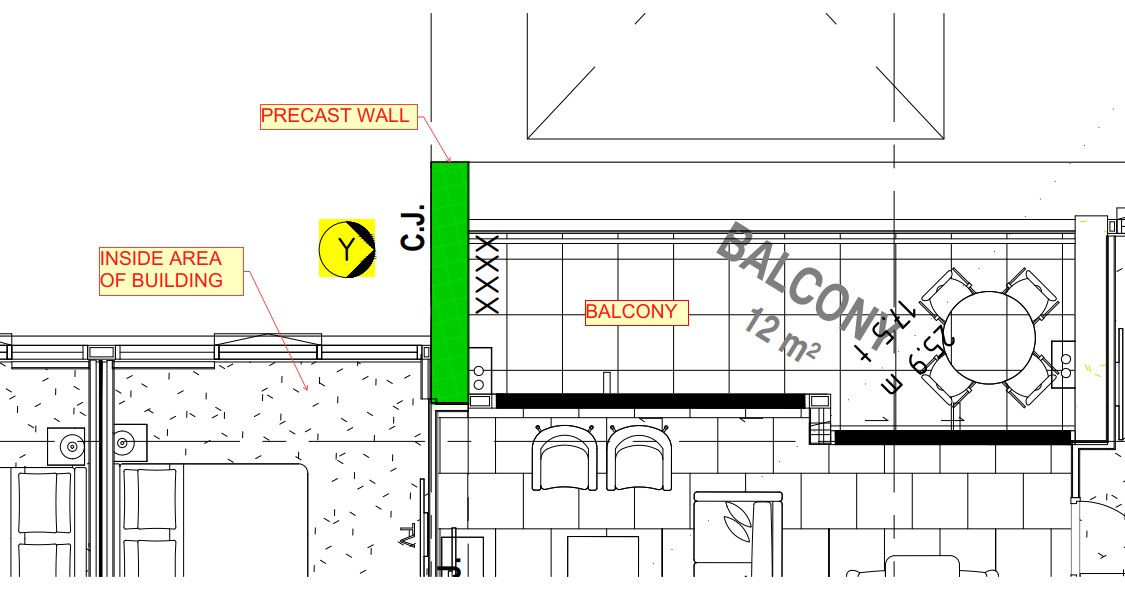
    • In few cases, building inside is fully balcony and outside side is partially inside of the building. So, this kind of scenario we viewing the panel from outside of the building due to panel finish. (Refer Fig.04)

    General:

    • For multi-storied buildings, we follow the same elevation number for same set-out from lower level to above levels.
    • The starting level of panels we will fix viewing direction as per current level architectural and structural aspects.
    • Some cases the lower-level panels come at inside of the building and above level panels comes at outside of the building. In this case we viewing the panels same as per lower levels but we flipped the above level panels for manufacturing purpose.

    Advantages:

    • Drawing study is easy for factory people.
    • It will reduce the time delay of manufacturing the panels.
    • It will also avoid the manufacturing difficulties and Errors.

    Fig.01

    Fig.02

    Fig.03

    Fig.04

    Fig.05

  • RIGGING DIAGRAM AND IT’S USES

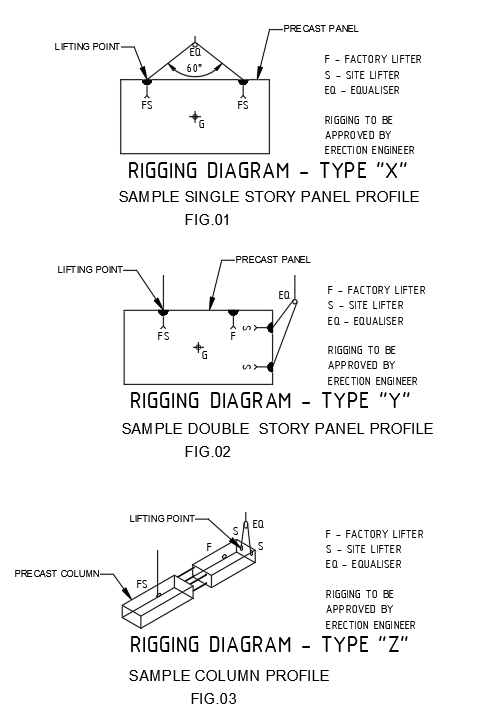
    • The rigging detailed diagrams are shown on shop drawings. (Ref Fig.01,02 & 03)
    • The rigging diagrams are designed based on the precast panel profiles.
    • It is indicating the lifting point position of precast panels for both factory and site.
    • Erection engineer will be approved the rigging diagram details.
    • The site people are preplanning to lifting the precast panels for erection.
    • It is indicating the demolding lifting points. So, the factory people will aware while lifting the panels on factory.
    • It is designed to distribute loads equally between all anchors in precast components such as walls, beams or flat slabs and etc.
    • It is also used for loading and unloading the panel while transportation.
    • The lifting accessories may be in the form of cables, hooks and etc.
    • Many accidents and failures will be avoided with the help of rigging diagram.
    • The time delay of the lifting to be reduced.

    (SAMPLE RIGGING DIAGRAMS FOR REFERENCE)

  • STRONGBACK AND TYPES

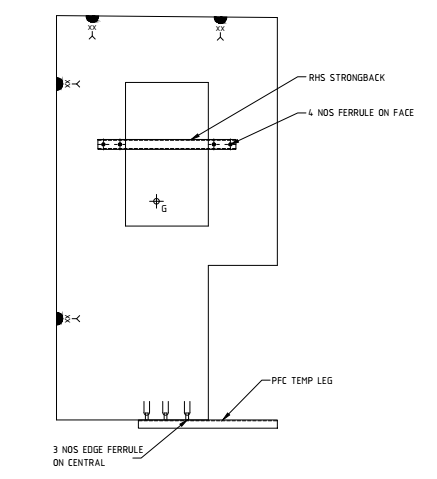
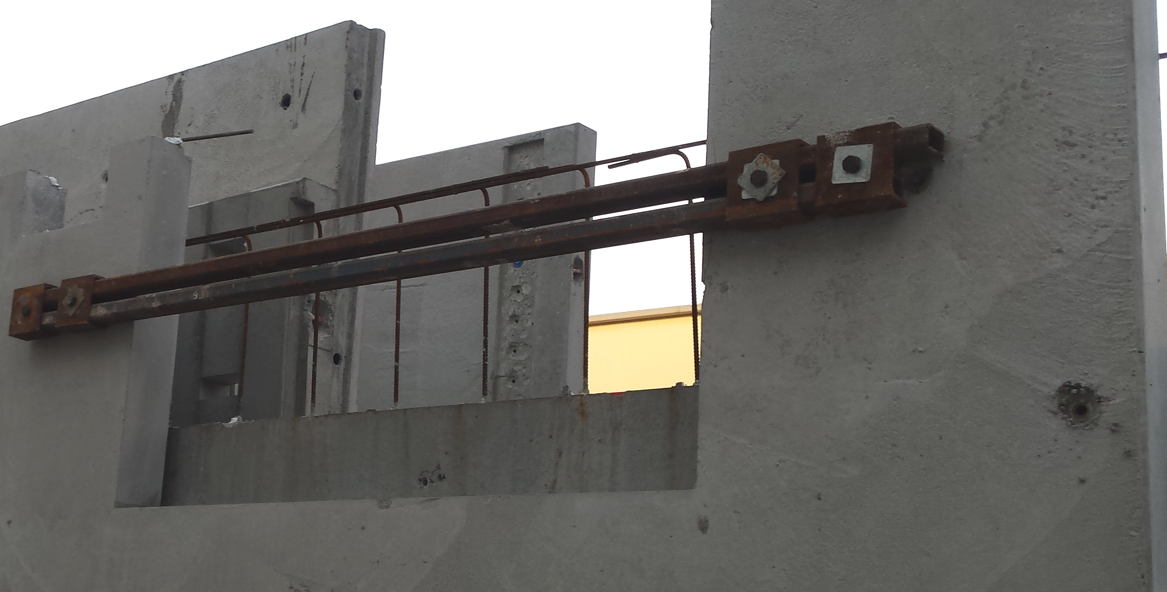
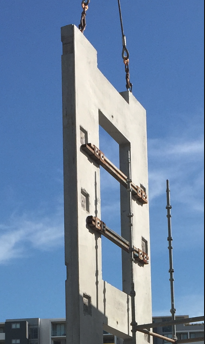
    Normally we are using the strongback in window, Door opening, uneven profile and panel handling purpose. It’s used to avoid the panel breakup, crack and damage during the panel lifting from table, Transportation (Loading & Unloading) and Panel erection on site. We are using three types strongback based on the required strength.

    1. PFC Strong back.
    First is the PFC member which can be bolted to the face or welded to plates on edge.

    2. RHS (Right hand side) Strongback.

    Second is the New and preferred RHS which is bolted to the panel face.

    3. Elbow Strongback.
    Third is the Elbow strongback which is bolted to the panel face and hangs over one edge.

    PFC and RHS Strongback used in SHOP DRAWING.

    Strongback Photos reference for PRECAST PANEL.

  • VIBRATING TABLE FOR PRECAST FABRICATION

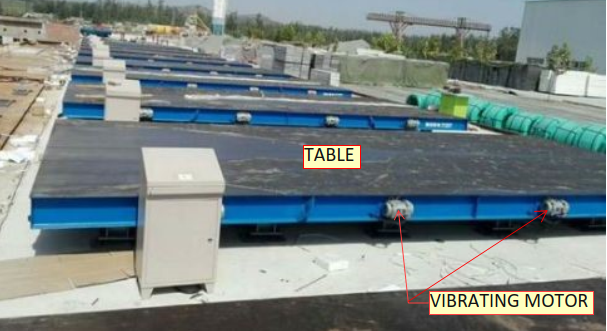
    • Vibrating table using for compacting and consolidating the stiff and harsh mixes in precast structures on factory or yards.
    • While using this vibrator the concrete will be spreads equally at all corners of the precast structure in mold.
    • It will help to improve the strength and quality of precast concrete structure.
    • The void or bubble formation will be avoided.
    • So, the cracks formation also to be reduced.
    • It will reduce the man power.
    • The fabrication time is less.

    Fig.01 (Vibrating table)

  • VARIOUS SPANDREL PROFILES

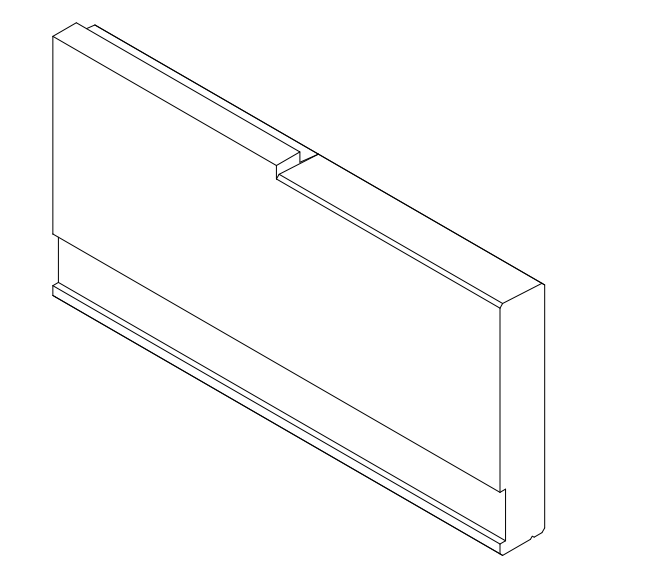
    • Spandrel profiles are designed based on architectural aspects on Elevation purpose.
    • When doing this kind of profiles, it’s challenging and more interesting to achieve.
    • And also, it will help to improve our drawing knowledge and skill.
    • We handled and come across different types of precast spandrel profiles as per below,
    1. Spandrel with straight profile
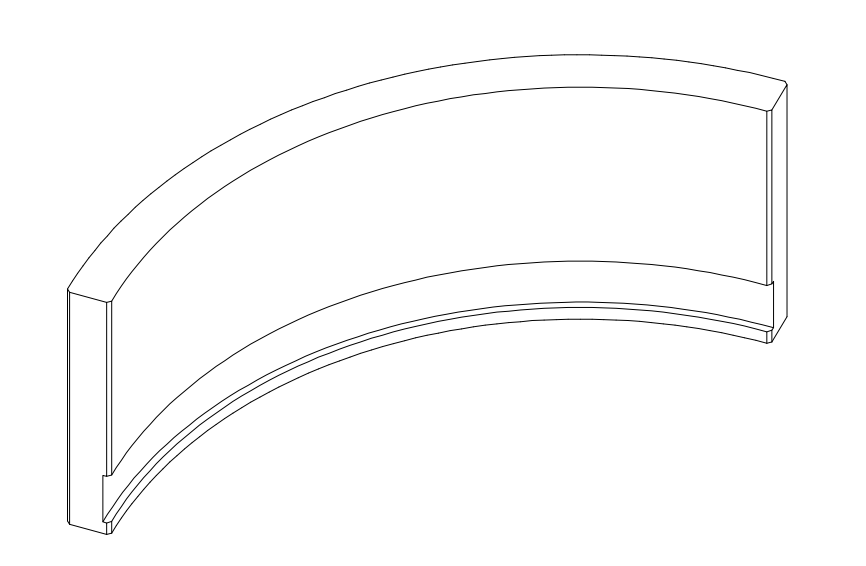
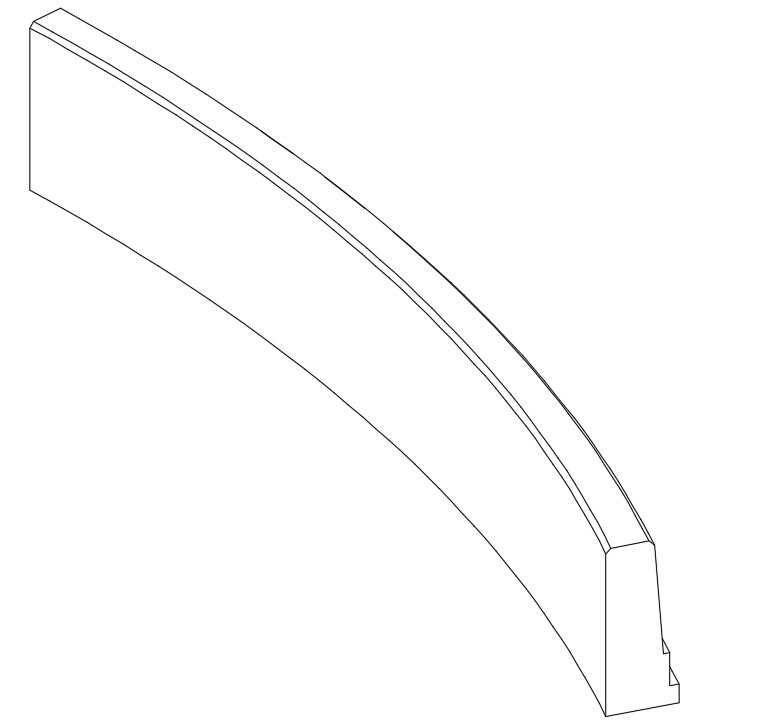
    2. Spandrel with curve profile
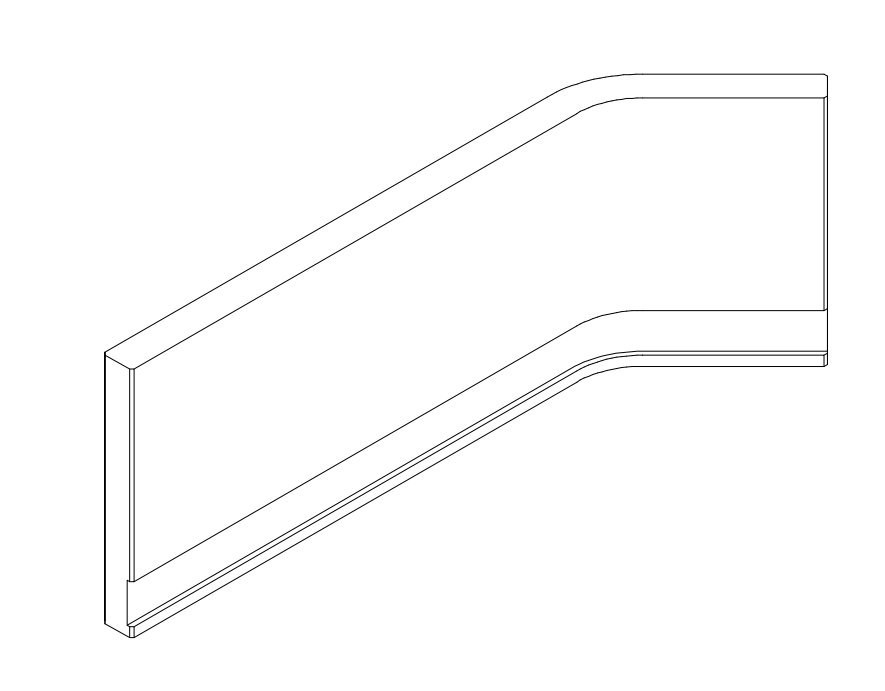
    3. Spandrel with curve & triangle profile
    4. Spandrel with L shaped profile
    5. Spandrel with U shaped profile
    6. Spandrel with V shaped profile
    7. Beam type spandrel1. Spandrel with straight profile (Ref. Fig.01)

    Fig.01

    2. Spandrel with curve profile (Ref. Fig.02)

    Fig.02

    3. Spandrel with curve & triangle profile (Ref. Fig.03)


    Fig.03

    4. Spandrel with L shaped profile (Ref. Fig.04)

    Fig.04

    5. Spandrel with U shaped profile (Ref. Fig.05)

    Fig.05

    6. Spandrel with V shaped profile (Ref. Fig.06)

    Fig.06

    7. Beam type spandrel (Ref. Fig.07)

    Fig.07