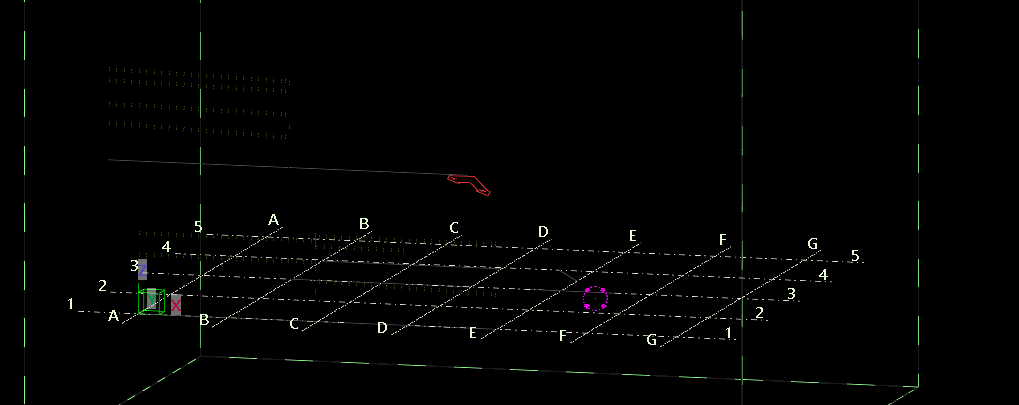
Review the above image. You will note that the work plane is set well above the global coordinate system.
Our job will be to reset the work plane, to match the global coordinate system.
How can we do this?
Full code is also on Github:
 [Test]
 public void failsToChangeWorkPlane()
 {
     // approach 1.
     // set working plane to something crazy.
     Model model = new Model();
     WorkPlaneHandler workPlaneHandler = model.GetWorkPlaneHandler();
     CoordinateSystem world = new CoordinateSystem(new Point(0, 0, 0), new Vector(1, 0, 0), new Vector(0, 1, 0));
     TransformationPlane transformationPlane = new TransformationPlane(new Point(0,0,0), new Vector(1,0,0), new Vector(0,1,0));
     workPlaneHandler.SetCurrentTransformationPlane(transformationPlane); // transformation plane uses coordinateSystem
     ViewHandler.RedrawWorkplane();
 }


 [Test]
 public void failsToChangeWorkPlane2()
 {
     // approach 1.
     // set working plane to something crazy.
     Model model = new Model();
     WorkPlaneHandler workPlaneHandler = model.GetWorkPlaneHandler();

     CoordinateSystem world = new CoordinateSystem(new Point(0, 0, 0), new Vector(1, 0, 0), new Vector(0, 1, 0));
     Matrix matrix =  MatrixFactory.ToCoordinateSystem(world); // doesn't work either.

     Point newOrigin = new Point(0, 0, 0).Transform(matrix);
     Vector newX = new Vector(1, 0, 0).Transform(matrix);
     Vector newY = new Vector(0, 1, 0).Transform(matrix);

     TransformationPlane transformationPlane = new TransformationPlane(newOrigin, newX, newY);
     workPlaneHandler.SetCurrentTransformationPlane(transformationPlane); // transformation plane uses coordinateSystem
     ViewHandler.RedrawWorkplane(); // fails as well
 }
Can you guess what will happen here?
It will not work. The working plane does not change. Isn’t it curious. What a lovely API.
Essentially you are not changing the work plane.
I have spent probably an hour trying to find out where this critical thing is failing.
It’s a good thing that the documentation is so clear! (It’s not).
Here is the code that is winning:
            Model model = new Model();
            WorkPlaneHandler workPlaneHandler = model.GetWorkPlaneHandler();
            CoordinateSystem world = new CoordinateSystem(new Point(0, 0, 0), new Vector(1, 0, 0), new Vector(0, 1, 0));
            workPlaneHandler.SetCurrentTransformationPlaneViaWCSInputs(world); // this works.
            ViewHandler.RedrawWorkplane();
Go to: https://github.com/benkoshy/Tekla.ExtensionMethods for all the methods.
Checkout Tek1’s blog posts for more content on the Tekla Open API. https://www.tek1.com.au/category/tekla-api/
If you need to hire us to do your Tekla API work, please send us your proposal to [email protected]
Leave a Reply