Category: Tekla API

A series of blog posts exploring the Tekla API.  Code examples, explanations and (where relevant) videos will be provided.

  • Tekla Open API – Setting the Workplane to an Arbitrary Coordinate System

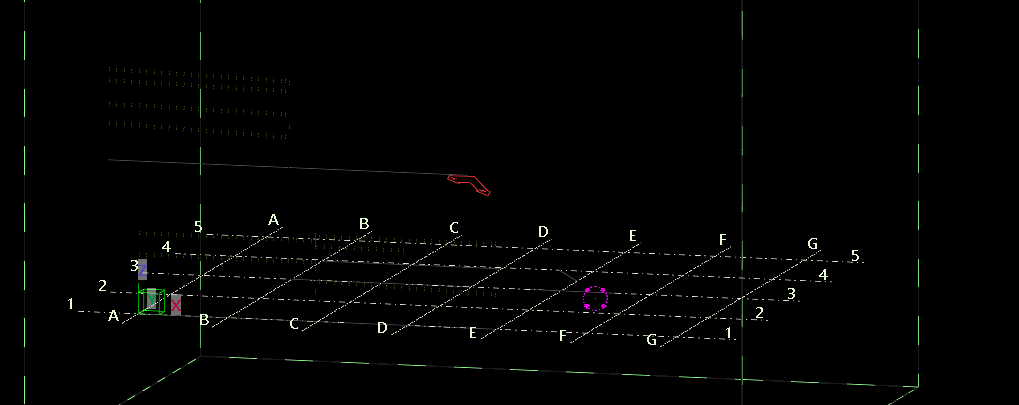
    Arbitrary Work Plane is set.

    Review the above image. You will note that the work plane is set well above the global coordinate system.

    Our job will be to reset the work plane, to match the global coordinate system.

    How can we do this?

    Full code is also on Github:

     [Test]
    public void failsToChangeWorkPlane()
    {
    // approach 1.
    // set working plane to something crazy.
    Model model = new Model();
    WorkPlaneHandler workPlaneHandler = model.GetWorkPlaneHandler();
    CoordinateSystem world = new CoordinateSystem(new Point(0, 0, 0), new Vector(1, 0, 0), new Vector(0, 1, 0));
    TransformationPlane transformationPlane = new TransformationPlane(new Point(0,0,0), new Vector(1,0,0), new Vector(0,1,0));
    workPlaneHandler.SetCurrentTransformationPlane(transformationPlane); // transformation plane uses coordinateSystem
    ViewHandler.RedrawWorkplane();
    }


    [Test]
    public void failsToChangeWorkPlane2()
    {
    // approach 1.
    // set working plane to something crazy.
    Model model = new Model();
    WorkPlaneHandler workPlaneHandler = model.GetWorkPlaneHandler();

    CoordinateSystem world = new CoordinateSystem(new Point(0, 0, 0), new Vector(1, 0, 0), new Vector(0, 1, 0));
    Matrix matrix = MatrixFactory.ToCoordinateSystem(world); // doesn't work either.

    Point newOrigin = new Point(0, 0, 0).Transform(matrix);
    Vector newX = new Vector(1, 0, 0).Transform(matrix);
    Vector newY = new Vector(0, 1, 0).Transform(matrix);

    TransformationPlane transformationPlane = new TransformationPlane(newOrigin, newX, newY);
    workPlaneHandler.SetCurrentTransformationPlane(transformationPlane); // transformation plane uses coordinateSystem
    ViewHandler.RedrawWorkplane(); // fails as well
    }

    Can you guess what will happen here?

    It will not work. The working plane does not change. Isn’t it curious. What a lovely API.

    Essentially you are not changing the work plane.

    I have spent probably an hour trying to find out where this critical thing is failing.

    It’s a good thing that the documentation is so clear! (It’s not).

    Here is the code that is winning:

                Model model = new Model();
    WorkPlaneHandler workPlaneHandler = model.GetWorkPlaneHandler();
    CoordinateSystem world = new CoordinateSystem(new Point(0, 0, 0), new Vector(1, 0, 0), new Vector(0, 1, 0));
    workPlaneHandler.SetCurrentTransformationPlaneViaWCSInputs(world); // this works.
    ViewHandler.RedrawWorkplane();

    Go to: https://github.com/benkoshy/Tekla.ExtensionMethods for all the methods.

    Checkout Tek1’s blog posts for more content on the Tekla Open API. https://www.tek1.com.au/category/tekla-api/

    If you need to hire us to do your Tekla API work, please send us your proposal to [email protected]

  • Tekla Open API – Getting the Attribute File of a Custom Component

    Tekla Open API – Getting the Attribute File of a Custom Component

    I have genericised the following snippet – but you may just as easily simplify it to get the file that you want. The attributes folder contains all sorts of files – so it is best you refine / simplify as much as possible. The following snippet should help you get started:

    Reference Links:

    https://gist.github.com/benkoshy/5c9915b9d044c255253d765824024c3d

    Checkout Tek1’s blog posts for more content on the Tekla Open API. https://www.tek1.com.au/category/tekla-api/

    If you need to hire us to do your Tekla API work, please send us your proposal to [email protected]
  • How to identify the WCS (World Coordinate System) vs the UCS (User Coordinate System) in Tekla?

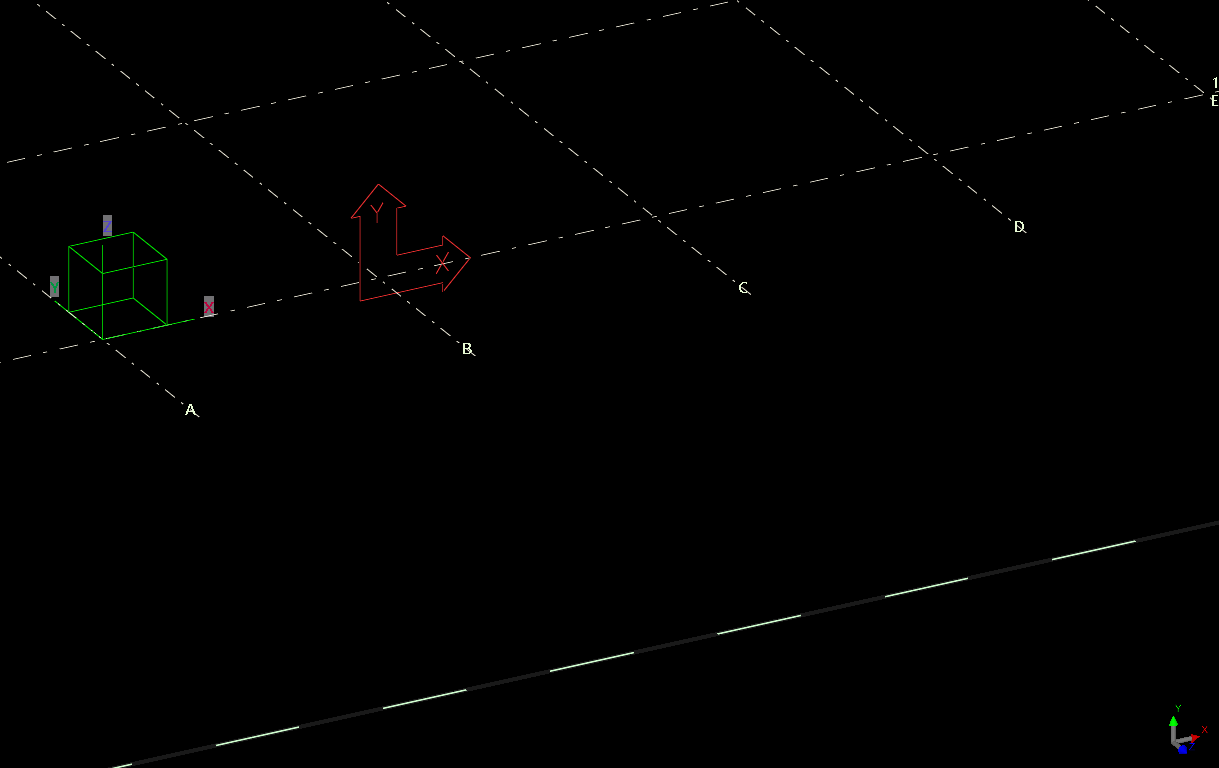
    Pop-quiz: how do you identify the local coordinate system vs the world coordinate system?

    The answer is below:

    Green box denotes the WCS. The UCS is denoted in two places. The UCS is the “work plane”.

  • Create a Precast Wall Panel – Using Tekla’s Open API

    Create a Precast Wall Panel – Using Tekla’s Open API

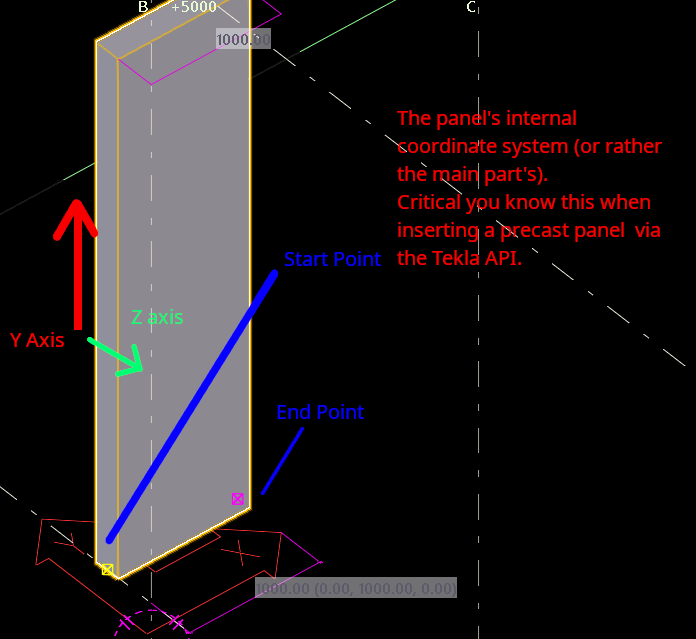
    If you are inserting panels via the Tekla API, you need to be aware or have an understanding of the panel’s local coordinate system.

    The x-axis denotes the vector from the start to end point.

    This may be in stark contrast to a beam’s local coordinate system (or at least according to your intuition).

    The Y axis represents the height of the beam. Or in the case, the height of the panel. Also note where the coordinate system’s origin is – in the case, it starts halfway up the panel’s height.

    This is what you’ll get.

    Try the following code sample:

    Reference Links:

    https://gist.github.com/benkoshy/3ca6f46564d348685097f1196767f86a

    Checkout Tek1’s blog posts for more content on the Tekla Open API. https://www.tek1.com.au/category/tekla-api/

    If you need to hire us to do your Tekla API work, please send us your proposal to [email protected]
  • How Tekla Defines a Beam’s Coordinate System

    How Tekla Defines a Beam’s Coordinate System

    An explanation of how a Tekla's Beam Coordinate System works.

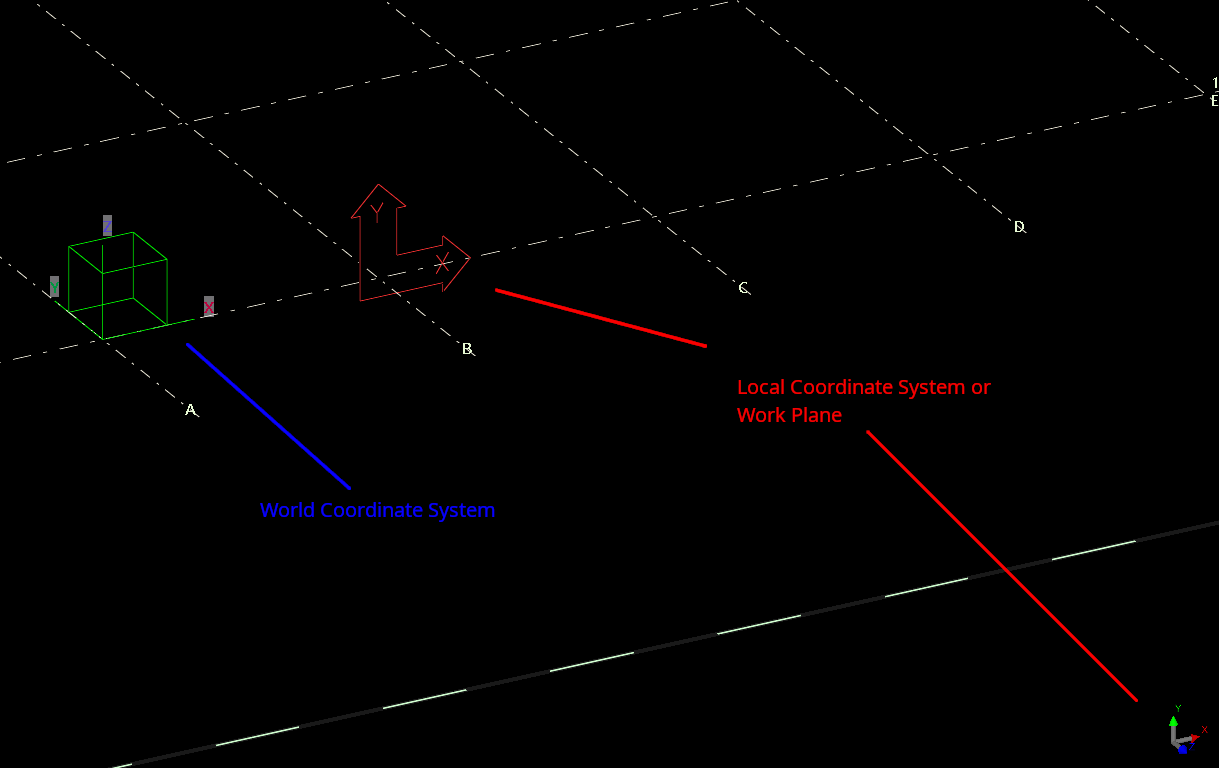
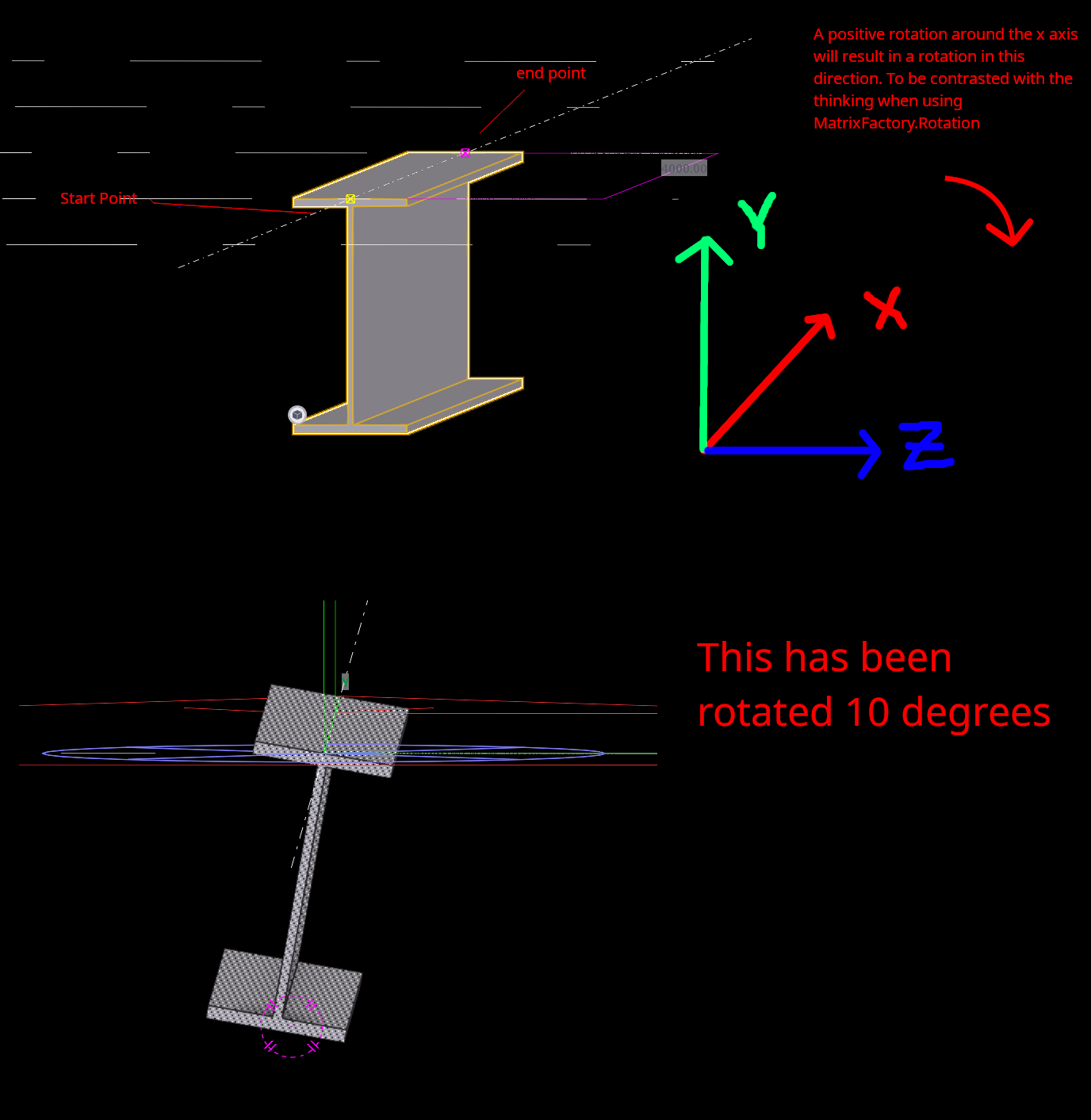
    The documentation is perfectly opaque. As expected. What is the X and Y and Z axis in relation to a beam?

    Easy. Check the picture.

    Furthermore, now you also know what “Rotation” means in relation to a beam. Tekla does this because it is difficult for humans to define a beam using a change of basic matrix.

    For more information on the code behind it, check out this post, or check out the extension methods I have published and open sourced

    X vector of a beam is always the start and end point of the beam.

    Checkout Tek1’s blog posts for more content on the Tekla Open API. https://www.tek1.com.au/category/tekla-api/

    If you need to hire us to do your Tekla API work, please send us your proposal to [email protected]
  • Tekla API Move Object – Mutates Points Without Telling me!

    Tekla API Move Object – Mutates Points Without Telling me!

    Yet another Tekla API gotcha.

    If you wanna waste many hours wondering why your code doesn’t work – try the Tekla API!

    Here is a note for the benefit of the public – where they mutate objects – which SHOULD NOT be mutated. Perhaps they have their own reasons, but the general boy-scount principle(s) should apply:

    • The principle of LEAST surprise, and
    • Leave things AS YOU FOUND THEM.

    They voilate both, IMO:

    Working with the Tekla API is just unecessarily difficult!

    Checkout Tek1’s blog posts for more content on the Tekla Open API.

    If you need to hire us to do your Tekla API work, please send us your proposal to [email protected]
  • FromCoordinateSystem and ToCoordinateSystem Explained (Tekla Open API)

    FromCoordinateSystem and ToCoordinateSystem Explained (Tekla Open API)

    The documentation of the Tekla API – IMO is inadequate. That is why we need supplemental explanations and code samples.

    Here is another example that hopefully benefits the community.

    I have written a bunch of extension methods (Tekla.ExtensionMethods) that would hopefully simplify a lot of the headaches associated with using the API. This is already published as an Open Source project under an MIT license and is available on Nuget. As of 2026-06-25 it is released under an alpha release – meaning that the API might change drastically.

    Checkout Tek1’s blog posts for more content on the Tekla Open API.

    If you need to hire us to do your Tekla API work, please send us your proposal to [email protected]

  • How to load up Tekla DLLs and a Hello World Application (Tekla Open API Course)

    How to load up Tekla DLLs and a Hello World Application (Tekla Open API Course)

    This post and tutorial shows you how to set up your Tekla Dependencies (i.e. DLLs) on an Tekla Open API project:

    Source code:

    Directly Embedded code:

    Model model =  new Model();
    
    if (model.GetConnectionStatus())
    {
        Beam beam = new Beam();
        beam.StartPoint = new Point(0, 0, 0);
        beam.EndPoint = new Point(1000, 0, 0);
        beam.Profile.ProfileString = "UB150*14"; // make sure this is available in your environment.
        beam.Finish = "PAINT";
    
        beam.Insert();
    
    
        model.CommitChanges();
    }
    

    Nuget Packages:

    And if you prefer vimeo (i.e. if you hate youtube ads) checkout this link:

    https://vimeo.com/manage/videos/1196894990
  • Tekla Open API Course (Full Outline)

    Tekla - "open" api
    The API is really closed, though it says it is open

    This is going to be a concise, high value and pithy course on the Tekla Open API.

    You may find other courses out there that boast about: 50+ hours. That might work well for them and their students, but almost everything you need to know can be boiled down to a few simple concepts. Especially helpful if you are an engineer and wanting to automate a few simple tasks. For more specialised requirements that involves making API calls, or developing web apps, you want to a workflow that is engineered by a professional – whether by Tek1 or other parties.

    The following documents the course.

    Video Course:

    Youtube Playlist of the Course (inclusive of all Tekla API related Material)